Meeting notes
Meeting Recap Email: Structure, Subject Lines and 6 Templates
Updated · 10 min read
A meeting recap email is a short summary sent to attendees and anyone who missed the meeting, listing the decisions made, action items with owners and due dates, open questions and the next meeting. Lead with a two-sentence TL;DR, keep it scannable, and send it the same day. Below you will find the structure, subject line formulas, six templates for different meeting types and a checklist to run before you hit send.
Recap email vs. follow-up email
The two overlap, but they do different jobs. A follow-up email usually goes to one person or an external contact — a client, a candidate, a prospect — and pushes toward a next step. A recap email is internal and written for the record: it goes to the whole group, plus stakeholders who could not attend, and its job is to make sure everyone has the same understanding of what happened.
A recap is also not the same as meeting minutes. Minutes are a formal record of who said and voted what; a recap is the five-minute version that people actually read.
The structure of a meeting recap email
TL;DR (one or two sentences)
The single most important outcome. “We are shipping the redesign first; Analytics v2 moves to Q4.” If someone reads only this line, they should not be surprised later.
Decisions
A bulleted list of what was agreed, written as final statements, not discussion. “Beta opens to 500 waitlist users in August,” not “We talked about the beta size.”
Action items with owners and dates
Format each as Owner — task — due date. Start the task with a verb. If an item had no owner in the meeting, write “Owner: TBD” and say who will assign it. See how to write action items.
Open questions
What was raised but not settled, and who is finding the answer. This section prevents “I thought we decided that” arguments a week later.
Next meeting and links
Date and time of the next check-in, plus a link to the full notes, the recording or the doc you reviewed. Detail lives behind the link; the email stays short.
Subject line formulas
A subject line that carries the outcome gets opened — and often answers the question without being opened.
| Formula | Example | Best for |
|---|---|---|
| Recap: [Meeting] — [Date] | Recap: Weekly Product Sync — Nov 11 | Recurring meetings people search for later |
| Recap + decisions: [Topic] | Recap + decisions: Q3 roadmap | Meetings where something was settled |
| [Outcome] — recap of [Meeting] | Redesign ships first — recap of roadmap review | Stakeholders who only skim subjects |
| Action items from [Meeting] ([N] for you) | Action items from kickoff (2 for you) | Small groups with clear owners |
| Missed [Meeting]? Here’s the 2-minute version | Missed the all-hands? Here’s the 2-minute version | People who were not there |
| [Incident ID] postmortem recap: [cause] | INC-482 postmortem recap: expired TLS cert | Incident and review meetings |
Six meeting recap email templates
Copy the one closest to your meeting, then delete any section that would be empty. An empty “Open questions: none” is fine; an empty template field left in brackets is not.
Subject: Recap: [Team] weekly sync — [Date]

Hi all,

TL;DR: [One sentence: the main change or decision this week.]

Decisions
- [Decision]
- [Decision]

Action items
- [Owner] — [Task] — [Due date]
- [Owner] — [Task] — [Due date]

Carried over from last week
- [Owner] — [Task] — [New date] ([reason])

Open questions
- [Question] — [Who is finding out] by [date]

Next sync: [Day, time]. Notes: [link]
Subject: Kickoff recap: [Project] — goals, owners, timeline

Hi everyone,

Thanks for joining the [Project] kickoff. Here is what we agreed.

TL;DR: We are building [what] for [who] to [goal], launching [date].

Scope
- In: [item], [item]
- Out (for now): [item]

Roles
- Project lead: [Name]
- [Area]: [Name]
- Approver for [decisions]: [Name]

Milestones
- [Milestone] — [Date]
- [Milestone] — [Date]

Action items (this week)
- [Owner] — [Task] — [Due date]

Open questions
- [Question] — [Owner]

Next check-in: [Date]. Project doc: [link]
Subject: Decision: [Topic] — recap from [Team A] + [Team B]

Hi all,

TL;DR: We decided [decision]. [Team] owns the rollout.

What we decided and why
- Decision: [What]
- Why: [One or two reasons]
- Options we did not pick: [Option] ([reason])

What changes for each team
- [Team A]: [Impact]
- [Team B]: [Impact]

Action items
- [Owner] — [Task] — [Due date]
- [Owner] — [Task] — [Due date]

If you disagree with this decision or see a risk we missed, reply by [date]. After that we treat it as final.

[Your name]
Subject: Missed the all-hands? Here's the 2-minute version

Hi team,

For anyone who could not make today's all-hands, here is what you need to know.

The headlines
1. [Company / team news in one line]
2. [Metric or result, with the number]
3. [Change that affects people, with the date]

What you need to do
- [Action, if any, with deadline] — or "Nothing right now."

Q&A highlights
- Q: [Question asked] — A: [Short answer]
- Q: [Question asked] — A: [Short answer]

Recording: [link] (the [topic] part starts at [mm:ss])
Questions? Reply here or ask in [channel].
Subject: Workshop recap: [Topic] — top ideas and next steps

Hi all,

Thanks for the energy today. We generated [N] ideas; here is where we landed.

Shortlisted ideas
1. [Idea] — [Why it made the cut]
2. [Idea] — [Why]
3. [Idea] — [Why]

Parked for later
- [Idea], [Idea]

Next steps
- [Owner] — [Turn idea 1 into a one-page proposal] — [Date]
- [Owner] — [Test idea 2 with 5 customers] — [Date]

All ideas and board photos: [link]
We will review the proposals on [date].
Subject: [Incident ID] postmortem recap: [one-line cause]

Hi all,

Summary: On [date], [service] was [degraded/down] for [duration], affecting [who / how many]. Root cause: [cause].

Timeline (short)
- [Time] — [Detected how]
- [Time] — [Mitigated how]
- [Time] — [Resolved]

What went well
- [Item]

What we will change
- [Owner] — [Fix / safeguard] — [Due date]
- [Owner] — [Fix / safeguard] — [Due date]

Open questions
- [Question] — [Owner]

Full postmortem doc: [link]. This review is blameless; please reply with corrections to the timeline.
Good vs. bad recap: the same meeting, two emails
The same 45-minute roadmap review, recapped two ways.
Subject: Notes

Hi all, thanks for a great meeting! We talked about a lot today including the redesign, analytics, the beta and hiring. There were some good points about priorities and we'll need to follow up on several things. Jordan mentioned onboarding. Let's keep the momentum going!
Subject: Recap + decisions: Q3 roadmap — redesign ships first

Hi team,

TL;DR: The mobile redesign is our top Q3 priority. Analytics v2 moves to Q4, freeing two engineers.

Decisions
- Mobile redesign is the #1 Q3 priority.
- Analytics v2 moves to Q4.
- Beta opens to 500 waitlist customers in August.

Action items
- Sara — Finalize redesign specs — Fri, Nov 14
- Jordan — Draft onboarding experiment plan — Tue, Nov 18
- Alex — Update the Q3 roadmap deck — Wed, Nov 12

Open questions
- Do we need a second designer for the beta? — Sara to check by Nov 14

Next: roadmap goes to leadership on Thursday. Notes: [link]
The good version names outcomes in the subject, separates decisions from tasks, gives every task a person and a date, and admits what is still unresolved.
Timing and tone
- Send it within two to four hours. Memories fade fast, and people start acting on their own version of the meeting by the next morning.
- Send it from the person who ran the meeting, or name a recap owner in the agenda so it never falls between chairs.
- Write decisions in plain, final language. “We will” beats “we might want to consider.” If it was not decided, it belongs under open questions.
- Invite corrections with a deadline: “Reply by Thursday if I got anything wrong.” Silence after that is agreement.
- Add people who missed it — they get the most value from a recap, and leaving them off is how teams fall out of sync.
Drafting recaps with AI (and what to check)
If you record the meeting, an AI tool can turn the transcript into a first draft in seconds. That removes the blank page, but the draft is only as good as what was said out loud — and AI can misattribute a task or turn a suggestion into a decision. Treat it as a draft, not a finished email.
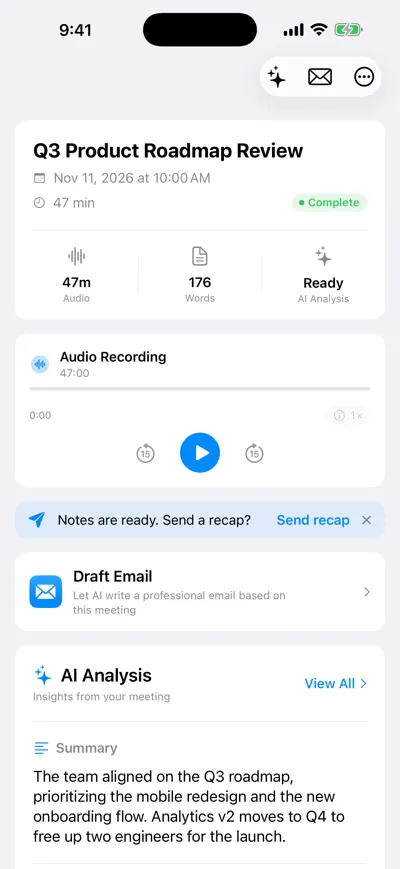
Recap prompt after the meeting
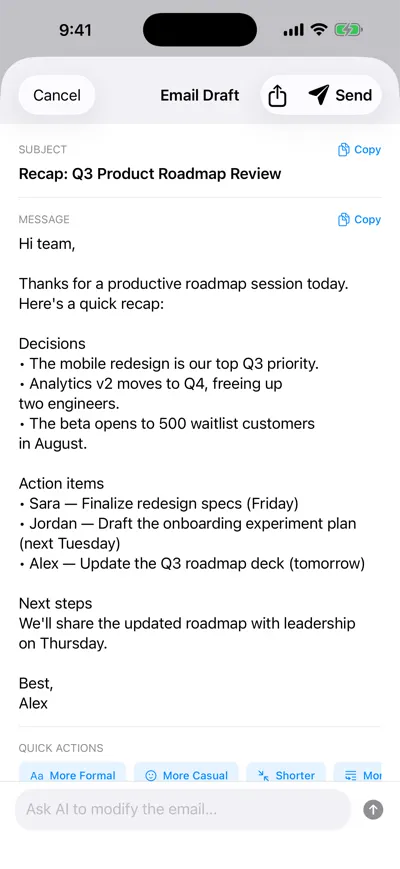
AI-drafted recap email
Check an AI-drafted recap for these
- Decisions are real decisions. Delete anything that was only floated or discussed.
- Owners are correct. Speaker labels can be wrong; confirm each name against your memory or the transcript.
- Dates are absolute. Change “next Tuesday” to “Tue, Nov 18” so it still makes sense when forwarded.
- Nothing confidential slipped in — salaries, health, personnel issues or anything said “off the record.”
- Tone fits the audience. Shorten it for a team channel, make it more formal for leadership.
Before recording any meeting, tell participants and get consent. Recording laws differ by country and US state, and some require everyone’s agreement — this is not legal advice, so check the rules that apply to you. For more on the summary itself, see AI meeting summaries and AI meeting notes.
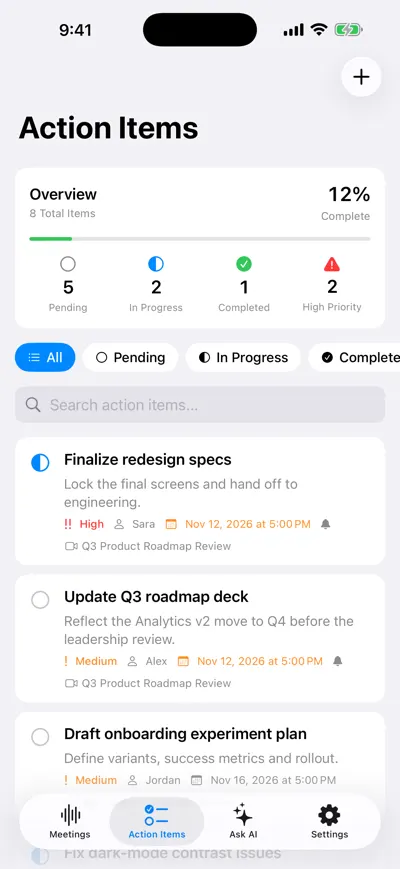
Action items tracked after the recap
Pre-send checklist
- Subject line names the meeting and the main outcome or date.
- TL;DR is two sentences or fewer.
- Decisions and action items are in separate sections.
- Every action item has one owner, a verb, and a calendar date.
- Open questions list who is finding the answer.
- People who missed the meeting are on the recipient list.
- Links to notes, recording or doc work and are shared with the right people.
- Next meeting date and time are included.
- You asked for corrections by a specific date.
- The whole email fits on one or two phone screens.
Frequently asked questions
Let AI take the notes for you
AI Note Taker records and transcribes your meetings, then writes the summary, decisions and action items. Free to start, no install needed.