Use cases
An AI note taker built around the way you work
Lectures, discovery calls, candidate screens, source interviews, client intakes, showings, workshops and parent conferences all end the same way: someone has to turn an hour of talk into a few lines that matter. Pick your role to see the workflow, worked examples, honest limits and the templates that fit.
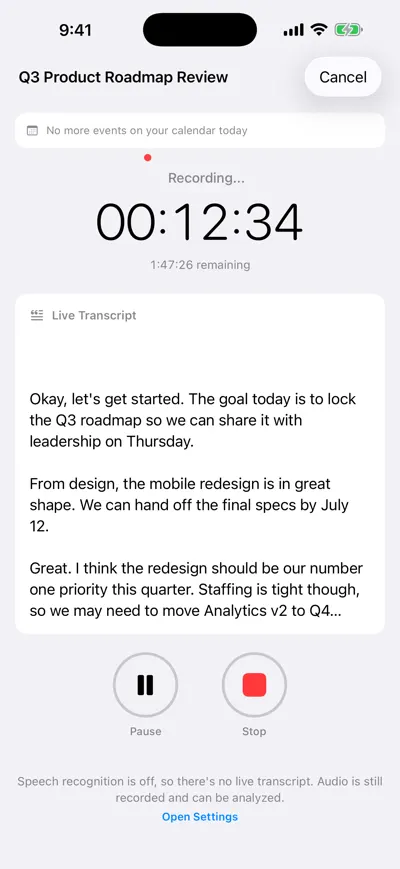
Records on your device
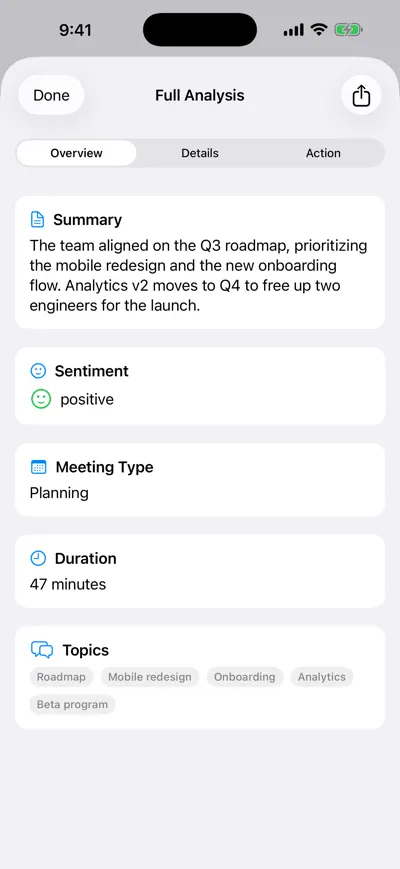
AI summary and topics
Choose your role
For students
The AI note taker for students who would rather listen than type
Lectures, seminars, study groups and research interviews turned into searchable notes you can quiz yourself on.
See the workflowFor sales teams
AI note taker for sales teams: every call ends with a follow-up ready to send
Discovery calls, demos and on-site visits turned into next steps, owners and a recap email drafted before you reach the car.
See the workflowFor recruiters
AI note taker for recruiters: fairer interview notes, faster debriefs
Phone screens, hiring-manager intakes and debriefs with notes tied to what the candidate actually said.
See the workflowFor journalists
AI note taker for journalists: transcribe interviews, verify every quote
Interviews, press conferences and council meetings transcribed with timestamps so every quote can be checked against the tape.
See the workflowFor lawyers
AI note taker for lawyers: intake and prep notes, used with care
Client intake, case-team meetings and your own dictated file notes — with the confidentiality and consent questions answered first.
See the workflowFor consultants
AI note taker for consultants: from stakeholder interviews to findings
Stakeholder interviews, workshops and steering committees synthesized into findings you can trace back to who said what.
See the workflowThe same three steps, whatever your job
Record where the conversation happens
Tap record on your iPhone or in a browser tab. Nothing joins the call or the room except your own device, and the iPhone app keeps recording without internet.
Get a transcript you can search
The transcript is split by speaker with timestamps, so you can jump to the moment someone said the number, the date or the quote you need.
Let AI do the write-up
Each analysis gives you a summary, key decisions, action items with owners and due dates, and a recap email draft. Ask follow-up questions about one meeting or, on Pro, all of them.
The free plan includes unlimited recording and transcription plus one AI analysis; Pro unlocks unlimited analyses. Transcription and AI analysis are English-only for now. Looking for step-by-step how-tos instead? Browse the guides.