AI Note Taker for recruiters

AI note taker for recruiters: fairer interview notes, faster debriefs

Stop choosing between eye contact and accurate notes. Record the screen, then fill the scorecard from what the candidate actually said — with timestamps a hiring manager can check.

  • Speaker-labeled transcripts with timestamps for every answer
  • Summary and follow-ups ready before the next screen starts
  • No bot in the interview, so candidates see a normal call
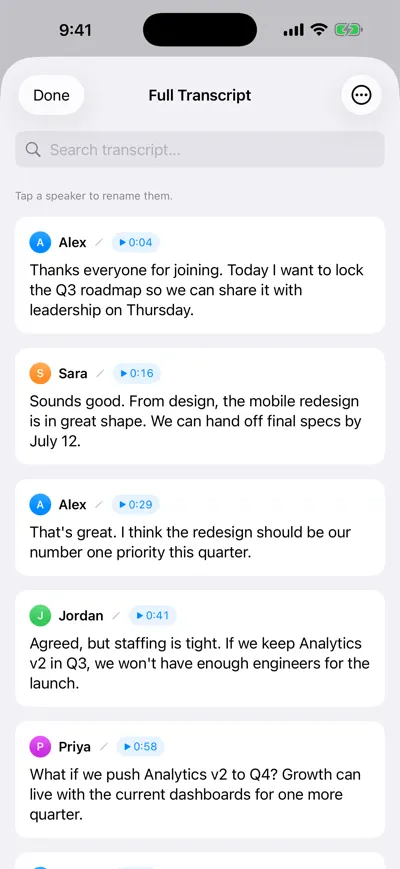
Transcript split by speaker with names on each line, playable timestamps and a search bar at the top

Every answer, by speaker

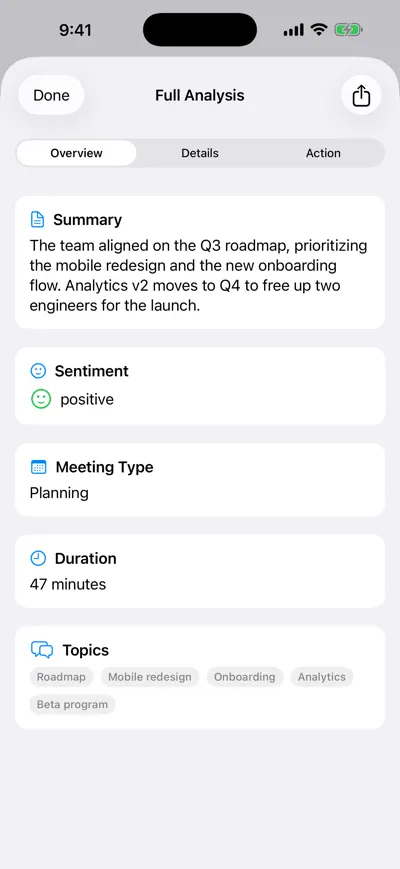
AI analysis screen with a short summary, sentiment, meeting type, duration and topic tags generated from the transcript

Summary and topics

Interview notes decide who moves forward, yet most are written from memory an hour later, after two more calls. An AI note taker for recruiters fixes the evidence problem: the transcript records what the candidate said, and your scorecard can point to it. AI Note Taker records phone and video screens on your device and in-person interviews in the room, so you can listen properly and still hand the hiring manager accurate notes.

A day with AI Note Taker as a recruiter

An in-house recruiter filling a senior backend role and two support roles.

  1. 9:00 · Intake call

    Pin down what the hiring manager really wants

    Record the intake with the engineering manager. Ask afterwards: “What are the must-haves versus nice-to-haves, in their words?” You now have a brief you can quote back when requirements drift in week three.

  2. 10:30 · Three phone screens

    Same questions, comparable notes

    Open each screen with a short consent line, run the same five questions, and record. Each screen ends with a summary and a transcript you can scan for the answer to question 3.

  3. 13:00 · Scorecards

    Score from evidence

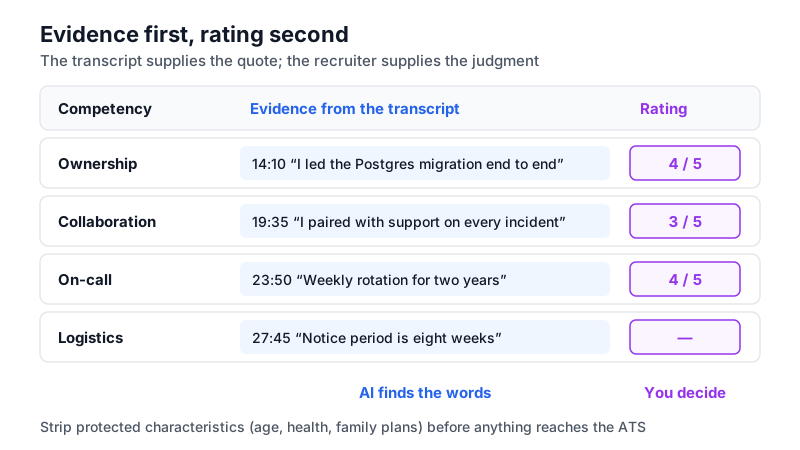
    For each competency, find the answer in the transcript and paste a one-line quote with its timestamp into your ATS scorecard. The rating is still yours.

  4. 15:00 · Debrief

    Settle disagreements with the transcript

    When two interviewers remember an answer differently, search the transcript instead of arguing. Record the debrief itself so the decision and its reasons are documented.

  5. 17:00 · Candidate updates

    Follow up the same day

    Use the action items from each call (“send benefits overview”, “confirm notice period”) as a checklist, with reminders, for candidate emails.

Recruiting conversations it covers

The value is different at each stage of the funnel. So are the risks.

Phone and video screens

Record the screen and get a summary, topics and a searchable transcript. Use the same question set for every candidate so the notes are comparable.

Example

Screen for “Senior Backend Engineer”: summary notes 6 years in Go, led a Postgres-to-Spanner migration (14:10), notice period 8 weeks (27:45), salary expectation stated (29:30).

The app records through the microphone. For phone screens use speaker and a second device, or record in the Phone app and import; on video calls, use speakers rather than headphones.
Hiring-manager intake meetings

Intakes set the job’s real criteria. A recording keeps you from paraphrasing them into something the manager never said.

Example

Must-haves from the intake: “production on-call experience”, “has mentored at least one engineer”. Nice-to-have: “Kubernetes”. Decision: no take-home test for senior hires.

Panel interviews and debriefs

Record the debrief so the hire/no-hire decision, the reasons and any open concerns become a short written record with action items.

Example

Debrief action items: “Priya: reference check on leadership claim (Fri)”, “Sam: confirm budget for senior band (Thu)”. Decision recorded: advance to offer pending references.

Keep the human decision human. Do not ask an AI summary “should we hire this person?” — use it to find evidence, not to rank candidates.

Exit and stay interviews

People-team conversations benefit from an accurate record of themes without someone visibly typing through an emotional conversation.

Example

Ask AI across six exit interviews on Pro: “What did people say about promotion timelines?” and see which interviews each point came from.

Exit interviews often include sensitive personal details. Agree up front what is recorded and who will see it, and delete recordings you do not need.

Time saved per recruiter per week

Reasoned estimates for one recruiter running 15 screens, 2 intakes and 3 debriefs a week.

TaskWithout an AI note takerWith AI Note TakerSaved per week
Writing screen notes for the ATS10 min × 15 = 2.5 hQuote and rate from transcript, 5 min × 15 = 1.25 h~1.25 h
Clarifying an answer you missedFollow-up email or call, ~15 min × 4 = 1 hSearch the transcript, 2 min × 4 = 8 min~50 min
Intake brief write-up25 min × 2 = 50 minEdit summary, 10 min × 2 = 20 min~30 min
Debrief notes and decision record15 min × 3 = 45 minCheck action items, 5 min × 3 = 15 min~30 min

How we estimated this

  • Screens of 25–30 minutes; four a week where you would otherwise have had to re-ask a candidate something.
  • Scorecard time does not drop to zero: you still read the answer and choose a rating, which is the point.
  • Twenty recordings a week need Pro for AI analyses; transcripts alone are unlimited on the free plan.
Diagram of an interview scorecard where each competency rating links to a timestamped quote from the candidate transcript, with the rating left to the recruiter
Evidence first, rating second: the transcript supplies the quote, the recruiter supplies the judgment.

Consent, fairness and data you should not keep

Recording candidates raises the bar on how you handle what you hear.

  • Tell candidates and get consent. In all-party consent states such as California (Penal Code § 632) and Washington (RCW 9.73.030), recording without everyone’s agreement can be unlawful. A line in the interview invitation plus a spoken check at the start covers both expectation and consent.
  • Edit out protected characteristics. If a candidate mentions age, pregnancy, religion, health or family plans, the AI summary may repeat it. Remove it from anything that goes into your ATS; it should play no part in the decision under US equal-employment law.
  • AI notes are not an automated hiring tool — keep it that way. Rules such as New York City’s Local Law 144 regulate automated tools that substantially assist hiring decisions. Using a transcript to find what was said is different from letting software score candidates.
  • Candidates outside the US. Under GDPR, candidates in the EU and UK must be told what you record, why, and how long you keep it. Delete recordings once the hiring decision and any appeal window have passed.
  • English only for transcription and analysis right now.

Frequently asked questions

Try AI Note Taker on your next meeting

Recording and transcription are unlimited on the free plan, and your first AI analysis is included. No bot joins anything: it records on your iPhone or in your browser.