AI Note Taker for lawyers

AI note taker for lawyers: intake and prep notes, used with care

Lawyers bill for judgment, not for typing. Use AI Note Taker for the conversations where a recording helps you — intake, internal strategy, your own dictated memos — and know exactly where it does not belong.

  • Dictate file notes and memos straight after a hearing
  • Action items with owners and deadlines for the case team
  • Meetings private to your account; delete any time
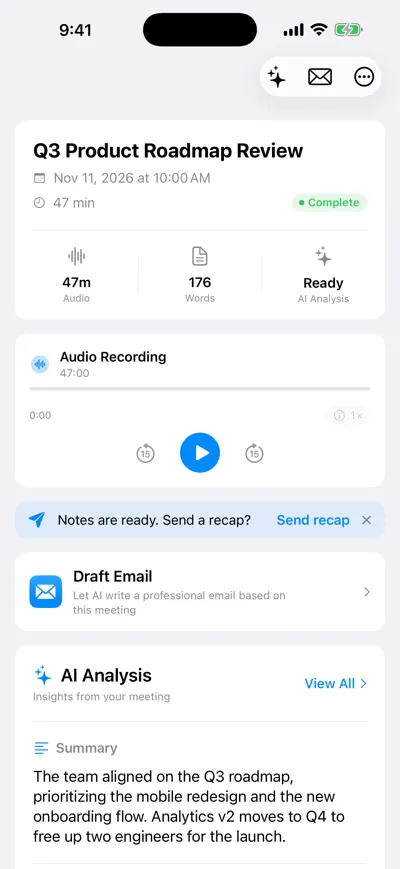
Recording page with an audio player showing the recording length, a Draft Email option and the AI analysis summary below

Recording, summary, recap

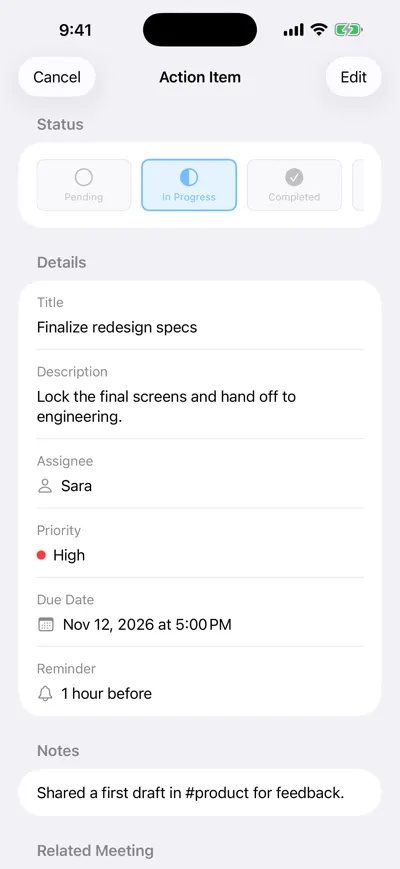
Action item detail showing status In Progress, a title and description, assignee, high priority, due date, a one-hour reminder and notes

Deadlines with owners

An AI note taker for lawyers is useful in fewer places than vendors suggest, and very useful in those. It can turn a first client meeting into a structured intake memo, keep a case team’s action items straight, and capture your impressions right after a deposition while they are fresh. It cannot replace a court reporter, and it should never record a conversation your duty of confidentiality, the court or the other side would not allow. This page covers both.

A day with AI Note Taker in a small litigation practice

An employment lawyer with a new-client consultation, a deposition and a case-team meeting.

  1. 9:00 · Client intake

    Ask, explain, then record

    Explain that you would like to record so the intake memo is accurate, where the recording is stored, and that it will be deleted once the memo is in the file. Record only with the client’s agreement.

  2. 10:15 · Intake memo

    Turn the summary into a memo

    Use the summary and transcript to draft the facts chronology, potential claims and limitation dates, then check each date against the documents. Save the memo in your case-management system, not the app.

  3. 13:00 · Deposition

    Do not record it — the court reporter does

    Take the deposition as normal. Recording methods are governed by the notice and the rules, so your phone stays off.

  4. 16:30 · After the deposition

    Dictate your impressions

    In the car or your office, record a five-minute solo debrief: admissions, inconsistencies, documents to request, follow-up questions. The action items become your to-do list.

  5. 17:30 · Case-team meeting

    Assign the work, with dates

    Record the internal strategy meeting. Action items come out with owners and due dates: “Associate: draft motion to compel by the 20th.”

Legal work it fits, and how

Each use below comes with the professional-responsibility question you should answer first.

Client intake and consultations

A recording lets you listen to the client rather than write. Afterwards, ask the recording for a chronology, the people involved and every date mentioned, and turn that into your intake memo.

Example

“List every date the client mentioned, with what happened” returns a timeline from 14 March (complaint to HR) to 2 June (termination letter), each linked to the passage in the meeting.

Get the client’s informed agreement first, and think about whether a verbatim recording of a privileged conversation should exist beyond the time it takes to write the memo.
Your own dictated file notes

The lowest-risk, highest-value use: you alone, recording your notes after a hearing, call or deposition. No consent issues, and the summary and action items do the formatting.

Example

A four-minute post-deposition dictation becomes: three admissions with approximate times, two inconsistencies with Exhibit 12, and action items to request the 2023 performance reviews.

Case-team and internal meetings

Strategy meetings generate assignments and deadlines. The Action Items tab keeps owners, priority, due dates and reminders.

Example

Team meeting output: “Paralegal: assemble privilege log (Fri)”, “Associate: research on comparator evidence (Wed)”, decision: “Do not oppose extension request.”

Internal recordings may be discoverable or, at minimum, need protection as work product. Decide as a firm which meetings are recorded and how long recordings are kept.

Depositions and court proceedings

Not a fit for recording. The official record comes from the court reporter or the method stated in the deposition notice, and courtrooms have their own rules on devices.

Example

Use the app before (outline your examination by dictating) and after (debrief), not during.

Under Federal Rule of Civil Procedure 30(b)(3), the method of recording is stated in the deposition notice, and another party must give prior notice to use an additional method.

Time saved per matter-week

Reasoned estimates for a lawyer handling two intakes, two dictated debriefs and one case-team meeting in a week.

TaskWithout an AI note takerWith AI Note TakerSaved per week
Intake memo from a 60-min consultation45 min × 2 = 1.5 hEdit summary and verify dates, 25 min × 2 = 50 min~40 min
Post-hearing or deposition file noteTyped, 20 min × 2 = 40 minDictate and tidy, 10 min × 2 = 20 min~20 min
Case-team meeting action list15 min5 min to check owners and dates~10 min
Finding what a client said weeks agoRereading notes, ~20 minAsk the intake recording, ~5 min~15 min

How we estimated this

  • Savings are deliberately conservative: legal work needs every AI-extracted date, name and amount checked against source documents.
  • Time-saved figures are estimates, not billing guidance. Follow your jurisdiction’s rules on billing for time saved by technology.
  • Five analyses a week need Pro; the free plan includes one.
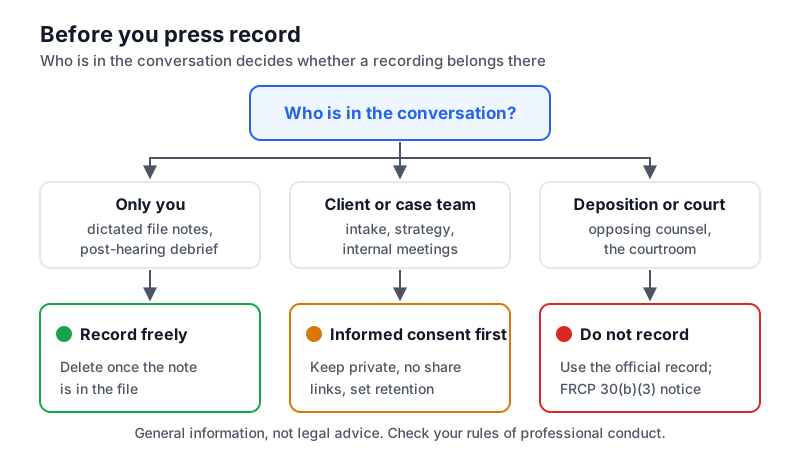
Decision tree for lawyers: your own dictation is fine to record; client meetings need informed consent and a retention decision; depositions and court use the official record instead
Before you press record: who is in the conversation decides whether a recording belongs there.

Confidentiality, privilege and consent

AI Note Taker is a general-purpose meeting tool. It does not claim any legal-industry certification, so the professional judgment is yours.

  • Duty of confidentiality. ABA Model Rule 1.6(c) requires reasonable efforts to prevent unauthorized disclosure of client information, and ABA Formal Opinion 512 (2024) applies that to generative AI tools: understand how the tool handles data and, in some cases, get the client’s informed consent before using it.
  • Know where the data goes. Recordings are stored on Google Cloud (Firebase); audio and transcripts are processed by Google’s Gemini models through Firebase and Vertex AI. Meetings are private to your account unless you create a share link. Read the privacy policy and the FAQ before putting client matters in any cloud tool.
  • Never share privileged recordings by link. Anyone with a share link can view what you shared. Sharing outside the privileged circle risks waiver.
  • Recording consent. Federal law permits one-party consent (18 U.S.C. § 2511(2)(d)), but states including California (Penal Code § 632) require all parties. Get explicit agreement from clients and witnesses.
  • Retention. Decide how long recordings live. You can delete a meeting at any time; deletion is permanent.
  • English only for transcription and analysis right now.

Frequently asked questions

Try AI Note Taker on your next meeting

Recording and transcription are unlimited on the free plan, and your first AI analysis is included. No bot joins anything: it records on your iPhone or in your browser.