Templates
Client Meeting Notes Template for Agencies and Consultants
Updated · 9 min read
A client meeting notes template for agency or consulting work needs three things a normal meeting template doesn’t: a decisions log that records who on the client side approved what, a way to capture change requests without agreeing to them in the room, and a recap the client confirms in writing. This page gives you the notes template, a running decisions log, a change-request form, a filled-in example from a retainer status call, and the recap email that turns your notes into a record both sides can point to.
What client meeting notes must capture
Internal meeting notes can be loose because everyone shares context. Client notes may be read months later by someone who wasn’t there: a new account manager, the client’s finance team checking an invoice, or both sides in a dispute about scope. Capture these fields every time.
| Field | Example | Why it matters later |
|---|---|---|
| Attendees with roles | Maria Lopez, Head of Marketing (approver) | Shows whether the person agreeing had the authority to agree |
| Decisions + who made them | Homepage hero approved by Maria | Settles “who signed off on this?” |
| Feedback on deliverables | Round 2 of 3 on brand guide: 4 changes | Tracks revision rounds included in the contract |
| Change requests | CR-07: add Spanish landing page | Keeps new scope separate from agreed scope |
| Client-side actions | Send product photos by Nov 18 | Explains delays caused by missing inputs |
| Our actions | Revised wireframes by Nov 20 | Shows what you promised and when |
| Dates and deadlines | Launch moved to Feb 3 (agreed) | Prevents silent date drift |
Client meeting notes template
Use this for status calls, review meetings and workshops. Fill the header before the call. If you need an agenda for the meeting itself, the meeting agenda template guide includes a 45-minute client meeting agenda that maps onto these sections.
[CLIENT] × [YOUR COMPANY] — [Meeting type] — [Date]
Project / retainer: [Name, phase]   Meeting #: [ ]
Client attendees: [Name, role — approver? Y/N]
Our attendees: [Name, role]   Notes by: [Name]

1. DELIVERABLES REVIEWED
   - [Deliverable, version] → [Approved / Approved with changes / Rejected]
     Feedback: [specific changes, quoted where possible]
     Revision round: [x] of [y included]

2. DECISIONS
   - [Decision] — decided by [client name] — [D-ID]

3. CHANGE REQUESTS (logged, not agreed)
   - [CR-ID]: [request, in the client's words] — requested by [Name]
     Our reply: impact estimate by [date]

4. CLIENT ACTIONS
   - [Action] — [Client owner] — [Due]

5. OUR ACTIONS
   - [Action] — [Our owner] — [Due]

6. RISKS / DEPENDENCIES
   - [e.g. "Launch date depends on legal sign-off by Dec 1"]

7. NEXT MEETING: [Date, time]   Agenda items carried over: [ ]

Corrections: reply by [date] or we'll treat these notes as confirmed.
Decisions log for the whole engagement
Meeting notes are scattered across weeks; a decisions log pulls every decision into one table. Give each decision an ID (D-01, D-02…) and reference it in later notes and invoices. When a client asks why something was built a certain way, you answer with a line and a date instead of digging through email.
DECISIONS LOG — [Client], [Project]
Shared with: [client contacts]   Maintained by: [Name]

| ID   | Date       | Decision                         | Decided by (client) | Source             | Supersedes |
|------|------------|----------------------------------|---------------------|--------------------|------------|
| D-01 | YYYY-MM-DD | [What was decided]               | [Name, role]        | [Meeting / email]  | —          |
| D-02 |            |                                  |                     |                    |            |
| D-03 |            |                                  |                     |                    |            |

Rules
- A decision is logged only when a named client approver agreed.
- Reversed decisions are not deleted: add a new row and fill "Supersedes".
- Link the meeting notes or email in "Source".
Capturing change requests in the meeting
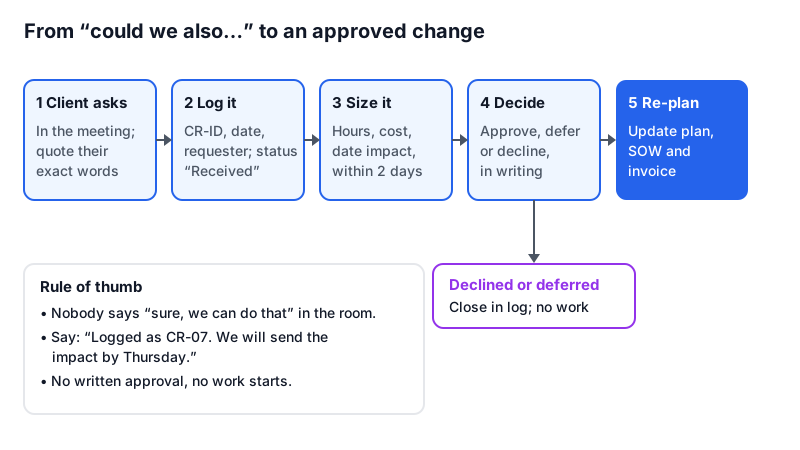
“Could we also…” is how most scope creep starts, and it usually happens live, with the client in the room and everyone wanting to be helpful. The fix is a stock phrase and a form. In the meeting, say: “Good idea. I’ll log that as a change request and send you the impact on time and cost by Thursday.” Then fill the form below and send it.
CHANGE REQUEST — [CR-ID]
Client: [ ]   Project: [ ]   Date raised: [ ]
Requested by: [Name, role]   Raised in: [meeting / email, date]

REQUEST (client's words)
"[Quote]"

WHY THEY WANT IT
[Business reason, as stated]

IMPACT
- Effort: [hours / days] by [role]
- Cost: [amount or "within retainer: uses X of Y hours"]
- Timeline: [milestone] moves from [date] to [date], or "no change"
- Affects: [deliverables, decisions D-xx]
- If declined: [what happens instead]

OPTIONS
A. Do it now: [cost, date impact]
B. Do it after launch / next phase: [cost, date]
C. Don't do it

CLIENT DECISION: [Approved A / B / Declined / Deferred]
Approved by: [Name, role]   Date: [ ]   Reference: [email / signature]
Status: [Received → Sized → Awaiting decision → Approved / Declined → Scheduled]
Not every request needs a formal process. Agree a threshold in the contract or at kickoff: for example, anything under two hours within the retainer is done and noted, anything bigger goes through the form. Write the threshold into the notes template header so both sides see it each time.
Filled-in example: monthly retainer status call
A marketing agency and a mid-size software client, 45-minute monthly call. The notes are under one page but would hold up if the invoice were questioned.
BRIGHTLINE × HALDEN STUDIO — Monthly status — Nov 12, 2026
Retainer: Content + paid social, month 5 of 12   Meeting #: 5
Client: Maria Lopez, Head of Marketing (approver: Y)
        Tom Reed, Product Marketing (approver: N)
Ours: Jess Okafor, account lead; Sam Patel, strategist   Notes: Sam

1. DELIVERABLES REVIEWED
   - December content calendar v2 → Approved with changes
     Feedback: swap the Dec 23 post for the year-in-review video;
     "no more than one product post per week" (Maria)
     Revision round: 2 of 2 included
   - Q4 paid social report → Approved

2. DECISIONS
   - Pause LinkedIn ads Dec 20 – Jan 5 — Maria — D-14
   - Move budget saved ($1,800) to January retargeting — Maria — D-15

3. CHANGE REQUESTS
   - CR-07: "Can you also do a Spanish version of the webinar landing
     page?" — Tom. Jess: logged; impact estimate by Nov 14.

4. CLIENT ACTIONS
   - Send webinar speaker bios and photos — Tom — Nov 18
   - Confirm year-in-review video length (60s or 90s) — Maria — Nov 15

5. OUR ACTIONS
   - Update December calendar to v3 — Sam — Nov 13
   - CR-07 impact estimate — Jess — Nov 14
   - January retargeting plan — Sam — Dec 5

6. RISKS
   - Webinar page launch (Dec 2) slips if bios arrive after Nov 18.

7. NEXT MEETING: Dec 10, 10:00

Hours used this month: 38 of 45.
Corrections: reply by Nov 14 or we'll treat these notes as confirmed.
Send the recap the same day
The notes only become a shared record once the client has seen them. Send the recap within a few hours, put decisions and deadlines at the top, and ask for corrections by a date. More on structure and subject lines in the meeting recap email guide.
Subject: [Client] × [Us] — [Meeting] recap, [date]: 2 decisions, 1 change request

Hi [Name],

Thanks for today. Quick recap so we're aligned:

Decisions
- [Decision] (D-xx)
- [Decision] (D-xx)

Change request
- CR-xx: [request]. We'll send the time and cost impact by [date].
  Nothing changes on our side until you approve it.

Needed from you
- [Action] by [date]

From us
- [Action] by [date]

Full notes: [link]. If anything above is wrong or missing, reply
by [date]; otherwise we'll go ahead on this basis.

[Name]
Taking notes while you run the client meeting
Split the roles if you can
The account lead runs the conversation; a second person takes notes. On a small team where you are alone, record the meeting (with the client’s consent) and write the notes afterwards.
Quote feedback exactly
“Make it pop” is useless in a revision brief; “the headline should mention the 30-day trial” is not. When the client gives feedback, write their words, then read your summary back before moving on.
Name the approver every time
Write who agreed, not “client approved”. If the person in the room can’t approve, note that and add a client action for the person who can.
Read back decisions and requests at the end
Spend the last three minutes on “So we’ve decided X and Y, and logged CR-07. Did I miss anything?” It catches misunderstandings while everyone is still on the call.
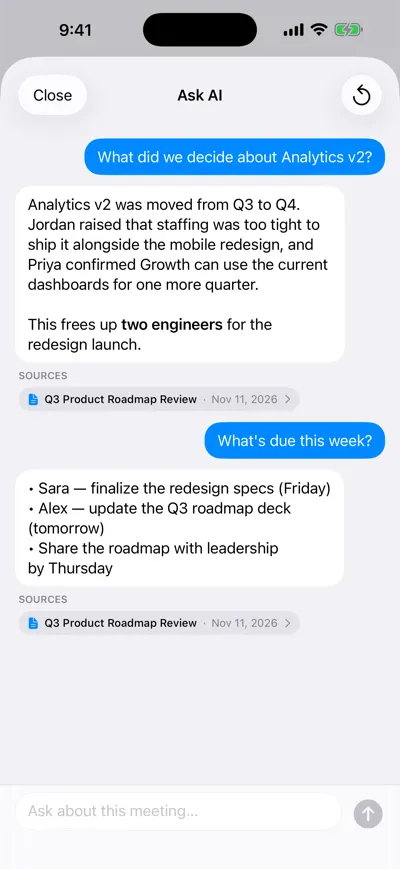
Check what the client said
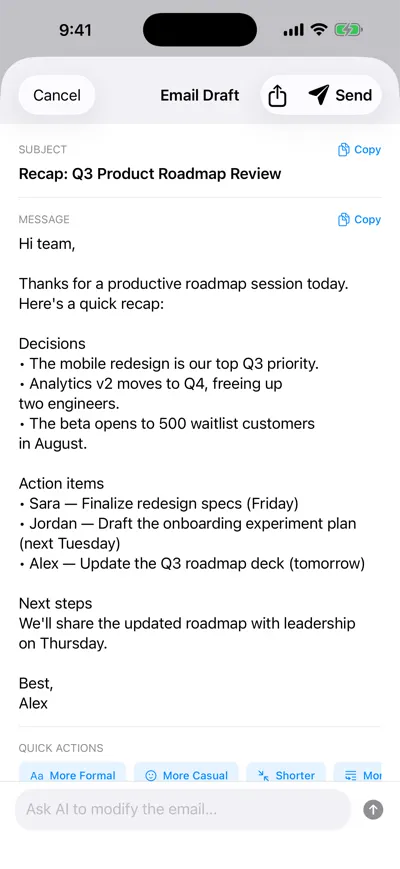
Draft the same-day recap
Recording laws differ by country and US state; some require every participant’s consent. Ask at the start of the call, and see is it legal to record a meeting for the details.
Frequently asked questions
Let AI take the notes for you
AI Note Taker records and transcribes your meetings, then writes the summary, decisions and action items. Free to start, no install needed.