Templates
Meeting Agenda Template: 7 Free Examples That Keep Meetings Short
Updated · 9 min read
A good meeting agenda template lists the outcome of the meeting, each topic phrased as a question, an owner and a timebox for every item, and any pre-reads, and it goes out at least 24 hours ahead. Below you’ll find how to write one in six steps, a good vs. bad example, and seven copyable agendas with timeboxes that actually add up.
How to write a meeting agenda in 6 steps
Define the outcome
Write one sentence that starts with “By the end of this meeting we will…”: for example, “…have picked a launch date and an owner for the press release.” If you can’t write it, you probably need an email, not a meeting.
List topics as questions
“Q3 budget” invites a 20-minute tour. “Do we move $15k from events to paid search for Q3?” invites an answer. Questions also make it obvious when an item is finished.
Assign an owner and a timebox to each item
The owner prepares the item and drives the discussion. The timebox (5, 10, 15 minutes) tells everyone how deep to go. Add the timeboxes up and leave 5–10% of the slot as buffer.
Put decisions first
Energy and attendance are highest in the first 15 minutes. Run the items that need a decision first and the informational items last, where they can be cut if time runs out.
Add pre-reads
Link the doc, dashboard or one-pager each item depends on, and say how long it takes to read (“5 min”). Reading in advance replaces the first ten minutes of “let me catch everyone up”.
Send it 24 hours ahead
Put the agenda in the calendar invite, not in a separate message that gets lost. A day’s notice lets people prepare, suggest changes, or decline if they aren’t needed.
Good vs. bad meeting agenda example
Here is the same 30-minute marketing meeting written two ways. The first is what most calendar invites look like. The second takes three extra minutes to write and usually saves fifteen in the room.
Marketing sync
- Q3 budget
- Website
- Events
- AOB
Marketing sync — Tue, 10:00–10:30
Outcome: agree on Q3 budget split and the website launch date.
Pre-read: Q3 budget sheet (5 min) — linked

1. DECIDE (12 min) — Priya
   Do we move $15k from events to paid search in Q3?
2. DECIDE (8 min) — Marco
   Website relaunch: May 6 or May 20?
3. DISCUSS (6 min) — Lena
   Which two trade shows do we keep for the fall?
4. INFORM (2 min) — Priya
   New agency contract signed; starts June 1.
5. Wrap-up (2 min) — Priya
   Read back decisions and action items.
The good version tells people what to prepare, what will be decided, who leads each item, and when they can expect to leave. “AOB” (any other business) is gone: new topics go on the next agenda, not into the last five minutes.
Agenda item types: inform, discuss, decide
Label every item with its type. It sets expectations (“we’re deciding this today”) and makes timeboxing easier, because each type needs a different amount of time.
| Type | Goal | Typical timebox | Better done async? |
|---|---|---|---|
| Inform | Share news or a status update | 1–3 min | Usually. Put it in a pre-read and take questions only |
| Discuss | Gather input, surface risks, explore options | 5–15 min | Sometimes. A comment thread works for low-stakes topics |
| Decide | Choose between options and name an owner | 10–20 min | Rarely. Live discussion helps with trade-offs and buy-in |
A healthy agenda is mostly discuss and decide items. If more than half of yours are inform items, turn them into a written update and shorten the meeting.
7 meeting agenda templates you can copy
Each template below fits a common calendar slot, and its timeboxes add up to the full length. Replace the bracketed text, delete what you don’t need, and paste it into the invite.
1. General team meeting agenda (30 min)
[Team] meeting — [Date], 30 min
Outcome: [one sentence]
Pre-read: [link]

1. Last meeting’s action items: done / blocked? (3 min) — [Facilitator]
2. DECIDE: [question] (10 min) — [Owner]
3. DISCUSS: [question] (10 min) — [Owner]
4. INFORM: [announcements] (4 min) — [Owner]
5. Wrap-up: read back decisions and action items (3 min) — [Facilitator]
2. Weekly status meeting agenda (30 min)
Weekly status — [Date], 30 min
Outcome: everyone knows what’s blocked and who is unblocking it.
Pre-read: written updates in [doc], posted by [day, time]

1. Key metrics vs. target (5 min) — [Owner]
2. Blockers round: one blocker per person, no status recaps (12 min) — All
3. DECIDE: [priority conflict or trade-off] (8 min) — [Owner]
4. Risks for next week (3 min) — [Owner]
5. Action items read-back (2 min) — [Facilitator]
3. Project kickoff meeting agenda (60 min)
[Project] kickoff — [Date], 60 min
Outcome: shared agreement on goals, scope, roles and the first milestone.
Pre-read: project brief (10 min) — [link]

1. Introductions and why this project matters (8 min) — [Sponsor]
2. Goals and success metrics: how will we know it worked? (10 min) — [PM]
3. Scope: what is in, what is explicitly out? (10 min) — [PM]
4. Roles: who owns, who approves, who is kept informed? (10 min) — [PM]
5. Timeline and first milestone (10 min) — [PM]
6. Top risks and open questions (7 min) — All
7. Next steps, owners and next check-in date (5 min) — [PM]
4. Decision meeting agenda (45 min)
Decision: [the question] — [Date], 45 min
Decision maker: [Name]   Input from: [Names]
Pre-read: options memo with pros, cons and costs (10 min) — [link]

1. Restate the question and the deadline (3 min) — [Decision maker]
2. Clarifying questions on the memo (7 min) — All
3. Options and trade-offs: strongest case for each (15 min) — [Option owners]
4. Decide, or name what’s missing and when we’ll decide (10 min) — [Decision maker]
5. Who needs to know, and action items (5 min) — [Decision maker]
6. Buffer (5 min)
5. Brainstorm or workshop agenda (60 min)
Brainstorm: [How might we…?] — [Date], 60 min
Outcome: a shortlist of 3 ideas, each with an owner to test it.

1. Frame the problem, constraints and what “good” looks like (5 min) — [Facilitator]
2. Silent idea generation, one idea per sticky note (10 min) — All
3. Share ideas, no critiquing yet (15 min) — All
4. Group similar ideas into themes (10 min) — [Facilitator]
5. Dot vote: 3 votes each (5 min) — All
6. Discuss top 3: what would we test first? (10 min) — All
7. Owners and next steps (5 min) — [Facilitator]
6. Client meeting agenda (45 min)
[Client] × [Your company] — [Date], 45 min
Outcome: client approves [deliverable] and we agree on next milestone.
Pre-read: progress report (5 min) — [link]

1. Introductions and confirm agenda (3 min) — [Account lead]
2. Progress since [last meeting date] (8 min) — [Project lead]
3. Client questions and feedback (15 min) — [Client]
4. DECIDE: approve [deliverable] or list required changes (10 min) — [Client]
5. Next steps, owners and dates on both sides (6 min) — [Account lead]
6. Buffer (3 min)
7. Quarterly planning and retrospective agenda (90 min)
[Team] Q[X] retro and Q[Y] planning — [Date], 90 min
Outcome: 3 agreed priorities for next quarter, each with an owner.
Pre-read: last quarter’s goals and results (10 min) — [link]

1. Last quarter’s goals: hit, missed, why? (15 min) — [Lead]
2. Retro: what worked, what didn’t, what to change (20 min) — All
3. Break (5 min)
4. Candidate priorities for next quarter (20 min) — [Owners]
5. DECIDE: top 3 priorities and what we drop (15 min) — [Lead]
6. Owners, milestones and first check-in (10 min) — [Lead]
7. Read back decisions and action items (5 min) — [Facilitator]
For recurring one-on-ones and daily standups, see the one-on-one meeting template and the standup meeting notes guide.
Pre-meeting checklist
Before you send the invite
- The outcome fits in one sentence.
- Every item is a question and labeled inform, discuss or decide.
- Every item has one owner and a timebox.
- Timeboxes add up to less than the meeting length.
- Decision items come first.
- Pre-reads are linked, with an estimated reading time.
- Only people who own an item or are needed for a decision are invited.
- Last meeting’s open action items are listed for a quick check.
- The agenda is in the calendar invite, sent at least 24 hours ahead.
- Someone is assigned to take notes (or the meeting will be recorded).
Closing the loop: agenda, notes, action items
An agenda only pays off if the meeting’s output follows the same structure. Use your agenda as the skeleton for your notes: under each item, write the decision (or “no decision, because…”) and any action items with an owner and due date. Our guide on how to take meeting notes covers the note-taking side, and the meeting minutes template is the formal version for boards and committees.
- During the meeting: keep the agenda on screen and move on when a timebox runs out. Park new topics for the next agenda.
- Last two minutes: read back each decision and action item so owners confirm them out loud.
- Within a few hours: send a meeting recap email organized by agenda item, with decisions and owners at the top.
- Before the next meeting: copy open action items into item 1 of the next agenda.
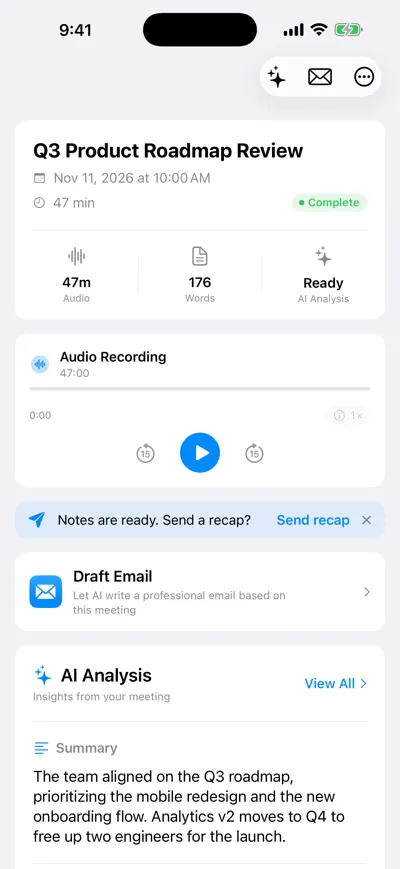
Summary of a recorded roadmap meeting
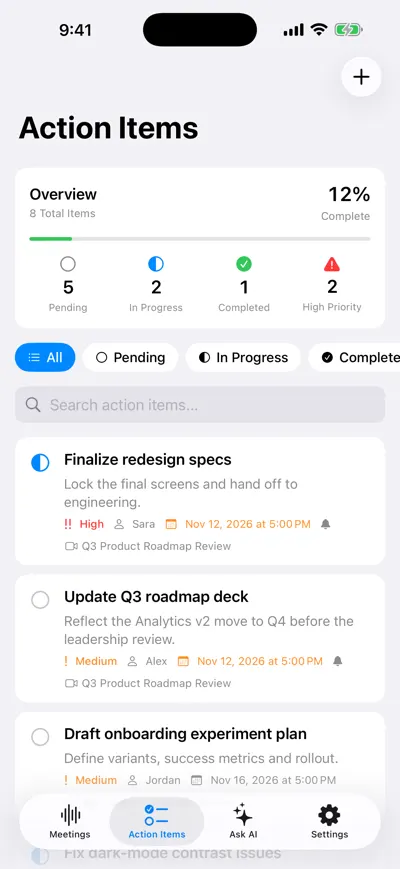
Action items carried into the next agenda
Frequently asked questions
Let AI take the notes for you
AI Note Taker records and transcribes your meetings, then writes the summary, decisions and action items. Free to start, no install needed.