Templates
Standup Meeting Notes: Templates, Agenda and Examples
Updated · 10 min read
Good standup meeting notes capture only three things: blockers, decisions, and follow-ups that need a separate conversation. Everyone’s full “yesterday / today” update does not need to be written down — it is out of date by lunch. Below: a 15-minute standup agenda, four copyable templates, a filled-in example, and fixes for common standup problems.
What a daily standup is for (and what it isn’t)
The daily standup (called the daily scrum in Scrum) is a short, same-time-every-day check-in where a team lines up its work for the next 24 hours. It has one job: get blocked work moving again and make sure nobody is about to collide with, or wait on, someone else.
It is not a status report to a manager. When people talk to the lead instead of each other, updates get longer and more defensive, and real problems go unmentioned. A useful test: if the manager skipped it, would it still be worth having?
That is also why standup notes are different from regular meeting notes. You aren’t writing a record of who said what. You’re keeping a short list of things that need to happen after the standup.
Standup formats compared: three questions vs. better alternatives
The classic format asks each person: “What did I do yesterday? What will I do today? Is anything blocking me?” It’s easy to start with but drifts into individual status updates. These alternatives keep the focus on the work:
| Format | How it works | Best for | Watch out for |
|---|---|---|---|
| Three questions | Each person answers yesterday / today / blockers, in turn. | New teams, teams new to standups. | Turns into status theater. Blockers buried at the end of each turn. |
| Walk the board | Go through the sprint or Kanban board right to left (closest to done first). Discuss each card in progress, not each person. | Engineering teams with a well-kept Jira, Linear or Trello board. | Work that isn’t on the board stays invisible. Keep the board current. |
| Blockers first | Open with “What’s stuck?” Solve or assign each blocker, then do quick updates only if time remains. | Ops, support and platform teams with lots of dependencies. | Quiet people may not raise blockers unprompted, so ask each person directly. |
| Goal-based | Restate the sprint or weekly goal, then each person says what they’re doing today to move it and any risk to it. | Product teams working toward a clear outcome or launch date. | Needs a real, written goal. Vague goals produce vague updates. |
A 15-minute standup meeting agenda
Minute 0–1: Goal and focus
The facilitator restates the sprint or weekly goal in one sentence and names anything urgent (an incident, a deadline tomorrow).
Minutes 1–4: Blockers
Anyone stuck says so first. For each blocker, agree who will help and when. Don’t solve it now unless it takes under 60 seconds.
Minutes 4–12: Walk the board (or quick updates)
Go card by card, or person by person if you must, about 30–45 seconds each. Only mention what others need to know: hand-offs, risks, changes in plan.
Minutes 12–14: Parking lot
Read back the topics that came up and need a longer talk. Each gets an owner and the people who should stay behind or meet later.
Minute 14–15: Confirm notes
The note-taker reads the blockers and follow-ups aloud. Done. The parking-lot people stay, everyone else leaves.
Keep your standup to 15 minutes
- Same time, same place (or link) every day, and start on time even if people are missing.
- Use a visible timer. Fifteen minutes is the limit, not the target.
- Talk to the team, not the manager. Rotate the facilitator weekly.
- Say only what others need to know. Details go in the ticket.
- Any discussion longer than one minute goes to the parking lot.
- Cap the group at about 10 people. Split larger teams into smaller standups.
- End with the note-taker reading back blockers and follow-ups.
What to write down in standup notes
The note-taker (rotate it, along with the facilitator) writes down only what someone will need to act on or look up later:
- Blockers: what’s stuck, who is blocked, who will unblock it, and by when.
- Decisions: anything the team agreed that changes the plan (“We ship without the CSV export and add it next sprint”).
- Follow-ups / parking lot: topics that need their own conversation, with an owner and who should be in it.
- Changes in availability: someone out tomorrow, on call, or pulled onto an incident.
What to leave out: each person’s list of tasks, ticket-by-ticket progress (the board already has it), and anything that sounds like a performance review. If a follow-up turns into real work, write it as a proper action item with one owner and a due date.
Daily standup templates you can copy
1. Daily standup notes (in-person or video)
STANDUP — [Team] — [Date]
Facilitator: [Name]   Notes: [Name]
Sprint / weekly goal: [One sentence]
Absent: [Names]

BLOCKERS
- [What is stuck] — blocked: [Name] — unblocker: [Name] — by: [Time/date]

DECISIONS
- [What was agreed]

PARKING LOT (after standup / separate meeting)
- [Topic] — owner: [Name] — with: [Names] — when: [Today after standup / date]

AVAILABILITY
- [Name]: [Out / on call / half day] — [Date]
2. Async standup (Slack or Microsoft Teams post)
:sunrise: Standup — [Date]
:dart: Goal I'm moving today: [Ticket / outcome]
:white_check_mark: Done since last update: [1–2 items, link tickets]
:construction: Blocked by: [Nothing / what + who you need]
:handshake: Need from someone: [@name — what — by when]
:palm_tree: Availability: [Normal / out from 3pm / on call]
Ask everyone to post by a fixed time in their own morning (say 10:00 local), in one thread per day. A rotating owner scans it and replies to every blocker.
3. Weekly blocker log
BLOCKER LOG — [Team] — Week of [Date]

| Raised | Blocker                 | Blocked | Owner to unblock | Status    | Days open |
|--------|-------------------------|---------|------------------|-----------|-----------|
| Mon    | [Description]           | [Name]  | [Name]           | Open      | [n]       |
| Tue    |                         |         |                  | Resolved  |           |

Repeat blockers this week (same cause 2+ times):
- [Cause] — [Proposed fix for retro]
Bring the blocker log to your retro: a blocker that shows up three weeks in a row (“waiting on staging deploys”) is a process problem, not a bad week.
4. Parking-lot follow-up
Parking lot from today's standup — [Date]

1. [Topic]
   Owner: [Name]   With: [Names]
   When: [Right after standup / Thu 2pm]
   Outcome needed: [Decision / estimate / plan]

2. [Topic]
   Owner: [Name]   With: [Names]
   When: [ ]
   Outcome needed: [ ]

Reply here with the outcome so the rest of the team sees it.
Example: filled-in standup notes
Notes from a 12-minute standup on a seven-person payments team. Seven people spoke, but only what others need to act on was written down.
STANDUP — Payments — Tue, Nov 10
Facilitator: Priya   Notes: Marcus
Sprint goal: Launch Apple Pay checkout to 10% of users by Fri Nov 13
Absent: Leo (out sick)

BLOCKERS
- Apple Pay merchant certificate expired in staging — blocked: Hana —
  unblocker: Daniel (has the Apple Developer admin role) — by: 1pm today
- Fraud rules API returning 503 under load test — blocked: Omar —
  unblocker: Platform on-call (Sofia) — Omar to open ticket by 10am

DECISIONS
- Feature flag rollout goes 1% Wed → 10% Fri (not 5% → 10%)
- Refund flow for Apple Pay ships next sprint; support gets a macro for now

PARKING LOT
- Retry logic for declined cards — owner: Omar — with: Hana, Priya —
  right after standup (10 min)
- Do we need a new dashboard for Apple Pay conversion? — owner: Priya —
  with: Jess (analytics) — Thu 2pm

AVAILABILITY
- Daniel: on call from Wed
- Hana: leaves at 3pm today
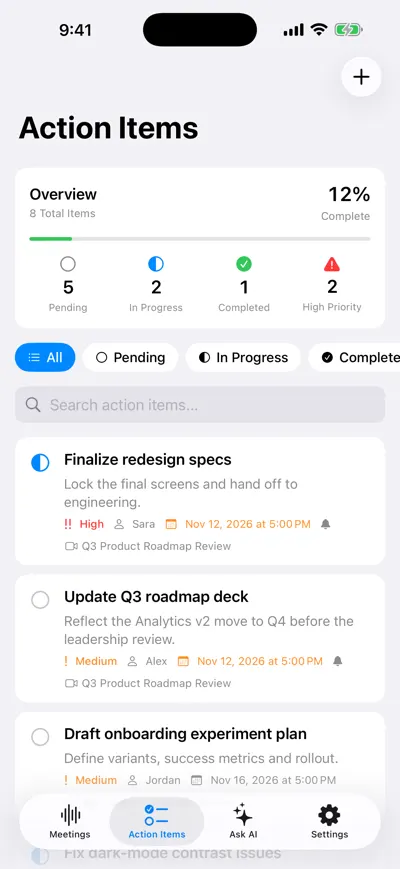
Follow-ups with owners and due dates
Remote, hybrid and async standups
Remote (video) standups: share the board on screen so you discuss the work, not faces, and use a set speaking order so there’s no “who’s next?” pause. Keep the notes in a pinned doc or channel thread.
Hybrid standups: people in the room should each join the call from their own laptop (audio muted) so remote people hear everything. Ask remote people about blockers first, as they’re the most likely to stay quiet.
Async standups: when the team spans more than about four time zones, someone always joins at 7am or 9pm. Switch to the async post format above and keep one short live sync a week for planning. The risk is blockers that nobody answers, so name someone to reply to every blocker within a few hours.
Standup anti-patterns and how to fix them
| Symptom | Likely cause | Fix |
|---|---|---|
| Standup regularly runs 30+ minutes | Problem-solving during updates | Strict parking lot and a visible timer. Discussion over one minute moves to after standup. |
| Everyone looks at the manager while talking | It has become a status report | Rotate the facilitator. The manager speaks last or only on blockers. |
| “No blockers” every day, yet work stalls | People don’t feel safe saying they’re stuck | Ask “What’s slowing you down?” instead. Thank people for raising blockers. |
| Updates are lists of tickets nobody follows | Person-by-person format | Walk the board, and only call out hand-offs and risks. |
| Same blocker comes up for days | No owner or deadline for unblocking | Every blocker gets an unblocker and a time, tracked in the weekly blocker log. |
Should you record your standup?
Usually not. A standup is 15 minutes of mostly short-lived information, and short notes cover it. Recording is worth it in a few specific cases:
- Distributed teams: someone in another time zone can catch up in a few minutes from a summary instead of a recording.
- Frequent absences: on-call rotations, part-timers or people at customer sites miss standups often.
- Patterns over time: seeing what kept blocking the team across a sprint without a hand-kept log.
- No note-taker: on a small team where everyone is talking, nobody is free to write.
It’s overkill when the team is co-located, attendance is steady and the board is well kept. Recording can also make people guarded about raising problems. Ask the team first, say when it’s on, and check your local rules: some places require everyone’s consent to record (this is not legal advice).
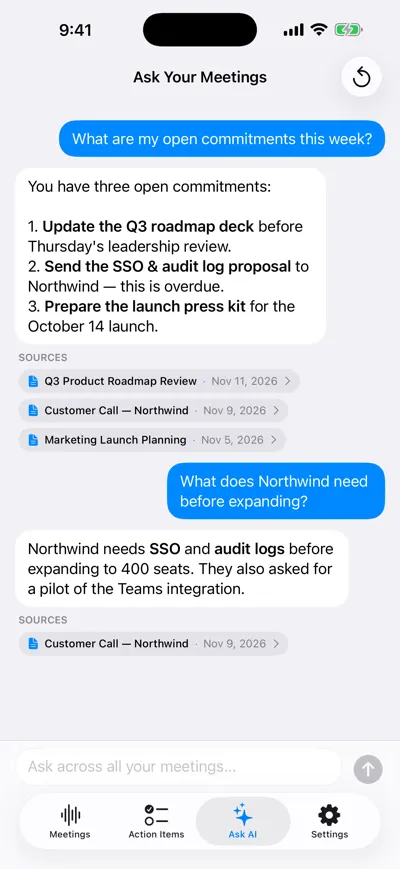
Ask across all meetings
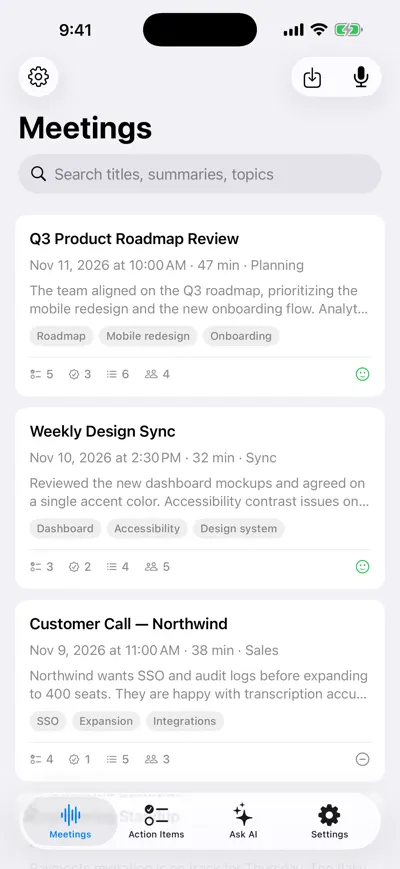
Each meeting summarized
More on this: AI meeting notes, asking questions about a transcript and the meeting agenda template for your weekly sync.
Frequently asked questions
Let AI take the notes for you
AI Note Taker records and transcribes your meetings, then writes the summary, decisions and action items. Free to start, no install needed.