Productivity
Chat With a Meeting Transcript: 40 Questions to Ask AI
Updated · 10 min read
To chat with a meeting transcript, give an AI the transcript text and ask it questions in plain language — “What did we decide about pricing?”, “What did Priya commit to?” — and it answers from what was actually said. The answers are only as good as your questions and the transcript, so this guide covers how it works, 40 questions that get useful answers, and how to check that the AI is not making things up.
How chatting with a transcript works
Under the hood it is simple. The tool puts the transcript (and sometimes a summary and list of action items) in front of a large language model along with your question, and tells it to answer using only that material. For a single meeting, the whole transcript usually fits. For “all my meetings”, the tool first searches for the most relevant parts, then hands those to the model — so wording matters more there.
If you do not have a transcript yet, start there — see how to transcribe a meeting recording. A transcript with speaker names is far more useful than one without, because most good questions are about who said or agreed to what.
Why source citations matter
Language models can “hallucinate”: produce a confident, plausible answer that the transcript does not support. In meeting notes this usually looks like a decision that was only discussed, a due date nobody said, or a task assigned to the wrong person. The fix is to make every answer traceable. A good tool shows which meeting (and ideally which part of the transcript) an answer came from; when you use a general chatbot, you get the same effect by asking it to quote the exact lines and timestamps. If a claim matters — a commitment to a customer, a number, a deadline — click through or search the transcript and read it yourself before you act on it.
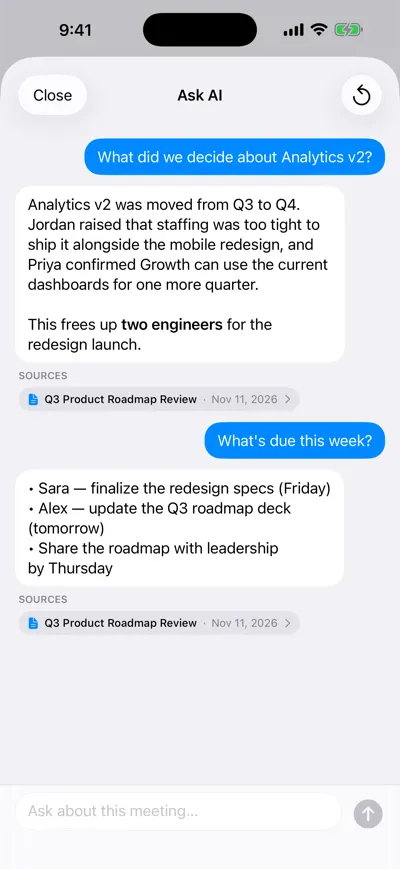
Answers link to the meeting they came from
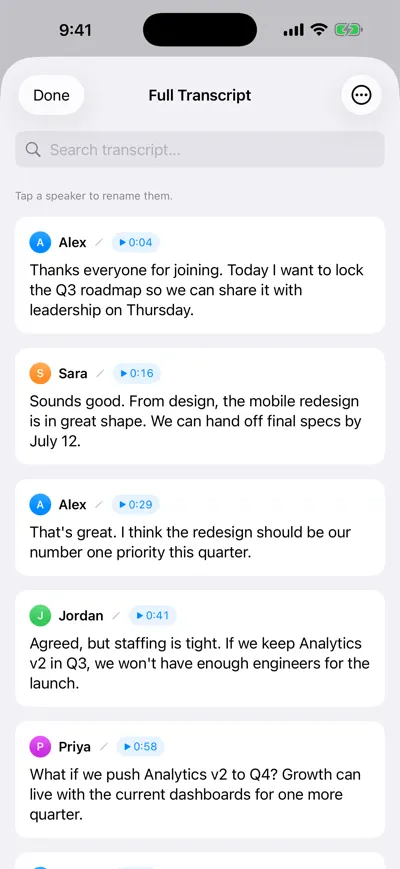
Check the claim in the speaker-labeled transcript
40 questions to ask about a meeting transcript
Copy these as they are, then swap in your own names, topics and dates. They are grouped by what you are trying to get done.
Catch up on a meeting you missed
- Summarize this meeting in five bullet points, most important first.
- What do I need to know if I only have two minutes?
- Was anything said about me, my team or my projects? Quote it.
- What questions were raised but left unanswered?
- Was there any disagreement? Who held which position?
- What changed compared with the plan going into this meeting?
Find decisions (and non-decisions)
- List every decision made, with who made it and the exact quote.
- What was discussed but not decided? What is blocking each one?
- What did we decide about [pricing / the launch date / hiring]?
- Were any earlier decisions reversed or reopened?
- What assumptions is the main decision based on?
Extract action items and commitments
- List every action item as a table: task, owner, due date, quote. Write “not stated” where no owner or date was given.
- What did [Jordan] commit to, and by when?
- What are my action items? My name is [name].
- Which tasks were mentioned but nobody took ownership of?
- What did we promise the customer or other teams?
Once you have the list, turn it into tasks people will actually finish — how to write meeting action items covers the owner-plus-date format.
Prepare for the next meeting
- Draft an agenda for the follow-up meeting based on the open questions.
- What should I check on before we meet again?
- What did we say we would revisit next time?
- Draft a short recap email to attendees with decisions and action items.
Sales and customer calls
- What problems or pain points did the customer describe, in their words?
- What objections or concerns came up, and how did we respond?
- Who is involved in the buying decision, and what is their timeline and budget?
- Which competitors were mentioned, and what was said about them?
- What does the customer need from us before the next step?
1:1s and interviews
- What feedback did each of us give, and was any of it acted on?
- What concerns or frustrations came up, even briefly?
- What career goals or growth areas were discussed?
- For this interview: list the candidate’s concrete examples for [skill], with quotes.
- Which of my interview questions did the candidate not fully answer?
If you want a structure to fill in afterwards, pair these with the sales call notes template or the one-on-one meeting template.
Across many meetings
- When did we last discuss [topic], and what was said?
- How has our position on [topic] changed over the last month?
- Which action items from the last two weeks are still open?
- What did [Northwind] ask for across all our calls?
- What topics come up most often in our weekly team meetings?
- Who committed to what this week, across all meetings?
- Which issues have come up in three or more meetings without being resolved?
- Summarize everything we know about [project] so far, with the meeting each point came from.
- What did we decide last week?
- Prepare a brief for my meeting with [Dana] tomorrow: what did we discuss last time and what is still open?
Tips for better answers
| Instead of | Ask | Why it works |
|---|---|---|
| What happened? | What were the three decisions about the Q3 roadmap? | A specific topic and a count give the AI a clear target. |
| What are the action items? | List action items with owner, due date and the quote they came from. | Asking for the quote forces the answer back to the source. |
| What did the client want? | What did Dana from Northwind say she needs before expanding? | Names reduce confusion when several people spoke. |
| Did we agree on pricing? | What was said about pricing, and was anything actually agreed? | It separates discussion from decision instead of inviting a yes. |
| What did we discuss recently? | What did we discuss about hiring in meetings since November 1? | Dates narrow a search across many meetings. |
- Ask for what was not said. “What was not decided?” and “Which tasks have no owner?” surface gaps a summary hides.
- Ask for quotes and timestamps whenever you will act on the answer or share it.
- Give it permission to say “not mentioned”. Adding “If the transcript does not say, answer ‘not mentioned’” cuts down on guessing.
- Ask follow-ups. The chat remembers the conversation, so “Who disagreed?” or “Quote that” works after a first answer.
- Tell it who you are. “I am Sara, the designer” makes “what do I need to do?” answerable.
- Fix speaker names first. If the transcript says “Speaker 2”, rename speakers before asking who said what.
What the AI cannot know
- Only what was said. Decisions made in a hallway, on Slack or on a whiteboard that nobody read aloud are not in the transcript.
- Transcription errors carry through. A misheard number (“fifteen” vs. “fifty”) or product name becomes a wrong answer. Check numbers against the audio.
- Speaker labels can be wrong. If two people sound alike or talk over each other, a line can be attributed to the wrong person — and “who committed to what” inherits the mistake.
- Tone and intent are guesses. “Was the client happy?” gets an interpretation, not a fact. Ask for the quotes behind it.
- Search across many meetings can miss things. If an answer seems incomplete, name the meeting or date range, or ask again with different words.
How to do it with any AI chatbot (free)
Get a text transcript
Export it from Zoom, Teams or Google Meet, or transcribe a recording. Keep speaker names and timestamps if you have them.
Clean it up quickly
Replace “Speaker 1” style labels with real names and add the meeting title, date and attendees at the top.
Paste the prompt below, then the transcript
The prompt sets the rules: answer only from the transcript, quote sources, and say when something is not mentioned.
Ask your questions one at a time
Use the question library above. Follow up on anything vague with “Quote the line that supports that.”
Verify before you share
Search the transcript for the quoted lines, especially names, numbers and dates.
You are helping me understand a meeting. Answer only from the transcript below.

Rules:
- Base every answer on the transcript. Do not add outside knowledge or assumptions.
- After each claim, quote the supporting line in quotation marks with the speaker name (and timestamp if available).
- If the transcript does not answer the question, say "Not mentioned in the transcript."
- Keep discussion and decisions separate: only call something a decision if people clearly agreed to it.
- Be concise. Use bullet points.

About the meeting:
- Title: [Meeting name]
- Date: [Date]
- Attendees: [Name (role), Name (role)]
- I am: [Your name and role]

My first question: [Your question]

TRANSCRIPT:
[Paste transcript here]
This works well for one meeting. Across ten meetings you hit length limits and have to paste everything again in each new chat.
How to do it in AI Note Taker
AI Note Taker records on your iPhone or in the browser (no bot joins the call), or transcribes an audio file you import, then gives you a speaker-labeled transcript. Asking questions comes in two forms, both part of Pro:
- Ask AI about one meeting. Open a meeting and ask. Answers use only that meeting’s summary, action items and transcript, and link back to the meeting.
- Ask across all your meetings. The Ask AI tab in the iPhone app, or the Ask page on the web, searches every completed meeting and lists the meetings each answer came from, with their dates.
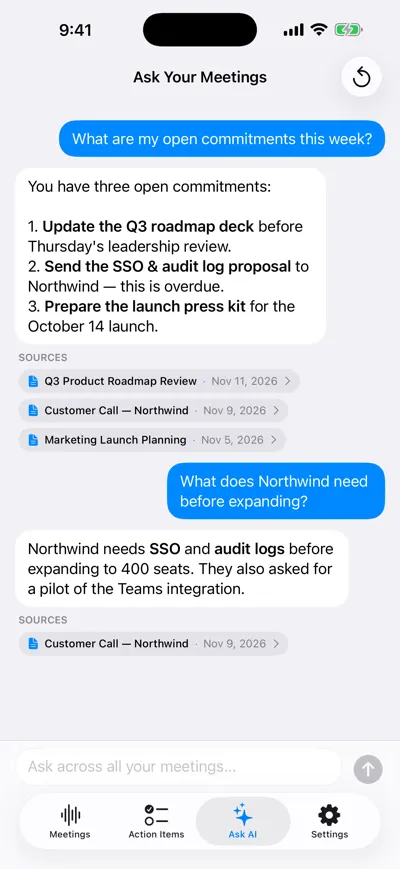
One question, answered across all meetings
A note on privacy
Whatever tool you use, the transcript is sent to an AI service to be answered. Before you paste a transcript into a chatbot, check whether that service may use your conversations for training and whether you can turn that off, and do not paste anything your company, client agreement or local law does not allow you to share. Get consent before recording people — rules vary by country and state, and this is not legal advice. In AI Note Taker, meetings are private to your account unless you create a share link, transcripts are processed by Google’s Gemini models through Firebase and Vertex AI, and you can delete a meeting or your whole account at any time.
Frequently asked questions
Let AI take the notes for you
AI Note Taker records and transcribes your meetings, then writes the summary, decisions and action items. Free to start, no install needed.