Meeting notes
AI Meeting Summary: What a Good One Contains (+ Prompts and Examples)
Updated · 10 min read
An AI meeting summary is a short write-up, generated from the meeting transcript, that tells a reader what was decided, who is doing what by when, and what is still open — without them listening to the recording. The best ones fit on one screen and are checked by a human before anyone else sees them. This guide shows what to include, how to shape it for different readers, a real before/after example, and prompts you can paste into any chatbot.
What a great meeting summary contains
Notes record what happened; a summary tells the reader what changed because the meeting happened. If a reader still has to ask “so what did we decide?”, it failed. Strong summaries have six parts, in roughly this order:
- TL;DR — one or two sentences on the outcome. “We moved the launch to May 6 and cut the referral feature from v1” beats “The team discussed the launch timeline.”
- Decisions — stated as facts, past tense, one per line. Only things that were actually agreed.
- Action items — task, one owner, due date. If no date was set, say “no date set” so the gap is visible. See how to write action items.
- Open questions — what was raised but not resolved, and who will answer it. This is the section AI and humans most often drop.
- Risks and blockers — anything that could derail the plan, with the person who flagged it.
- Key numbers — budgets, dates, headcount, metrics, prices. Numbers are what readers search for later, so pull them out instead of burying them in prose.
What to leave out
- The order things were discussed. Group by topic or outcome, not by minute. Nobody needs “First we talked about X, then Y.”
- Who said what — unless it matters. “Legal (Maya) requires a DPA before signing” is useful attribution; “Tom agreed with Priya” usually is not.
- Small talk and dead ends — unless a rejected option may come back; then one line (“Considered a freemium tier; rejected over support load”) saves a repeat debate.
- Sensitive remarks — personal comments, performance concerns, offhand opinions about customers or colleagues.
- Filler like “productive discussion” or “great alignment”.
Summary formats by audience
Pick the format for the reader before you write — or before you prompt the AI:
| Format | Reader | Length | What to include | What to drop |
|---|---|---|---|---|
| Exec 3-bullet | Leadership, stakeholders who were not there | 3 bullets, under 60 words | Outcome, the one decision that matters to them, any ask or risk needing their input | Task lists, discussion detail, names of junior owners |
| Team recap | Everyone who attended | Half a page | TL;DR, all decisions, full action items with owners and dates, open questions | Background everyone already knows |
| Client-facing | External customer or partner | Short email body | What was agreed, what you will deliver and when, what you need from them | Internal debate, pricing discussion, anything about margins or other clients |
| Async update for absentees | Teammates who missed it | Half a page to one page | Context for each decision (the “why”), what changed for them specifically, where to find the recording | Nothing important — this reader has no other source |
If the summary is going out by email, the structure carries over directly into a meeting recap email. If it needs to be a formal record, use meeting minutes instead — minutes record motions and votes; summaries do not.
Before and after: a messy transcript and the summary it should produce
A realistic slice of a product meeting, with the hedging, half-decisions and corrected numbers that weak summaries get wrong:
[00:12:04] Dana: OK so the launch. Are we still saying April 22?
[00:12:09] Raj: Honestly I don't think QA can be done by then. The payments flow alone is like... a week and a half of testing.
[00:12:15] Dana: Hm. What if we pushed to, like, the 29th?
[00:12:18] Raj: Still tight. May 6 is realistic.
[00:12:21] Lena: Marketing already booked the webinar for the 24th though.
[00:12:25] Dana: Can you move it?
[00:12:26] Lena: Probably. I'd need to check with the partner. I'll ask them today.
[00:12:31] Dana: OK. Let's say May 6, assuming Lena can move the webinar. And referrals — I think we cut that from v1.
[00:12:38] Raj: Yeah agreed, it's not ready.
[00:12:40] Dana: Budget for the beta incentives was 8k, right?
[00:12:43] Lena: Twelve. We bumped it last month.
[00:12:45] Dana: Right, twelve. Um, Raj, can you get me the QA plan?
[00:12:48] Raj: Sure, by Thursday.
[00:12:50] Dana: Also, does anyone know if the Android build has the same payment bug? ... No? OK, park that.
TL;DR: Launch moves from April 22 to May 6 (pending webinar reschedule). Referrals are cut from v1.

Decisions
- Launch date: May 6 — conditional on Lena moving the partner webinar (currently April 24).
- Referral feature removed from v1.

Action items
- Ask the partner to move the April 24 webinar — Lena — today
- Send QA plan for the payments flow — Raj — Thursday
- Confirm final launch date once webinar is resolved — Dana — no date set

Open questions
- Does the Android build have the same payment bug? No owner yet.

Risks
- Payments QA needs about 1.5 weeks; any new bugs push May 6.

Key numbers
- Beta incentive budget: $12,000 (raised from $8,000 last month)
What makes the “after” version good: the date is marked conditional rather than final, the budget uses the corrected figure (a weak summary often reports $8k because it was said first), the Android question is kept as an open item instead of silently dropped, and the owner-less task is flagged with “no date set” rather than invented.
How to review an AI summary before you share it
Keep the transcript open next to the summary and work through this list. It takes about two minutes.
AI meeting summary review checklist
- Names are spelled right and attached to the right person — especially for similar names or speaker labels that were never renamed.
- Numbers, dates and prices match the transcript, and where a figure was corrected mid-meeting, the summary uses the final one.
- Decisions were actually agreed — not just proposed (“what if we…”, “maybe we should…”) or conditional on something still pending.
- Action items each have one owner; missing dates are marked as missing, not guessed.
- Open questions that were parked are still listed.
- Sensitive remarks — personnel issues, comments about customers, confidential numbers — are removed before it goes to a wider audience.
- Missing context is added: an acronym, a project codename or a decision that only makes sense if you know what happened last week.
- The audience is right: no internal pricing debate in a client-facing summary.
Common AI summary mistakes and how to fix them
| Mistake | Why it happens | Fix |
|---|---|---|
| Proposal reported as a decision | “What if we pushed to the 29th?” reads like a plan to a language model | Ask for decisions “only if explicitly agreed”; mark conditional ones as such |
| First number wins | A figure gets corrected later, but the summary picks up the original | Prompt the AI to use the final stated value; spot-check every number |
| Wrong owner | Unlabeled speakers, or “I’ll do it” attributed to the wrong voice | Rename speakers in the transcript before summarizing; check each owner |
| Open questions disappear | Unresolved items feel unimportant to the model | Request an explicit “Open questions” section |
| Vague, generic summary | Low-quality audio or a prompt that only says “summarize” | Ask for a specific structure and length; improve the recording (see AI meeting notes tips) |
| Invented due dates | The model fills gaps to make tasks look complete | Tell it to write “no date set” when none was said |
Prompts to summarize a meeting transcript yourself
If you already have a transcript — from Zoom, Teams, a voice memo, or a transcribed recording — rename the speakers to real names (this alone fixes most wrong-owner errors), then paste one of these prompts followed by the transcript into any AI chatbot. Check your company’s policy before pasting confidential meetings into a public tool.
Summarize the meeting transcript below for the people who attended.

Format:
- TL;DR (max 2 sentences, focused on outcomes)
- Decisions (only things explicitly agreed; mark anything conditional as "conditional on …")
- Action items as "Task — Owner — Due date" (write "no date set" if none was said; never invent dates)
- Open questions (raised but not resolved, with owner if any)
- Risks / blockers
- Key numbers (if a number was corrected, use the final value)

Rules: group by outcome, not by time. No small talk. Max 250 words.

Transcript:
[paste here]
Write a 3-bullet summary of this meeting for a senior executive who was not there.
Bullet 1: the outcome. Bullet 2: the most important decision and its impact.
Bullet 3: any risk or decision that needs their input (or "No action needed").
Max 60 words total. No names except owners of risks. Plain language, no jargon.

Transcript:
[paste here]
Write a short, friendly summary of this call to send to our client, [Client name].
Include: what we agreed, what we will deliver and by when, and what we need from them.
Exclude: internal discussion, pricing debate, anything about other clients, and any
remark that would be awkward if the client read it. Max 150 words. Do not invent dates.

Transcript:
[paste here]
Write an update for teammates who missed this meeting.
For each decision, include one sentence on WHY it was made.
Then list: action items (Task — Owner — Due date), open questions, and anything
that changes their own work. Flag any decision that is still conditional.
Max 350 words. End with: "Full recording available on request."

Transcript:
[paste here]
Getting an AI meeting summary automatically
A meeting app does this as soon as the recording ends. In AI Note Taker, each meeting gets an AI analysis with a short summary, the overall sentiment, the meeting type and the main topics, alongside action items with owners and due dates.
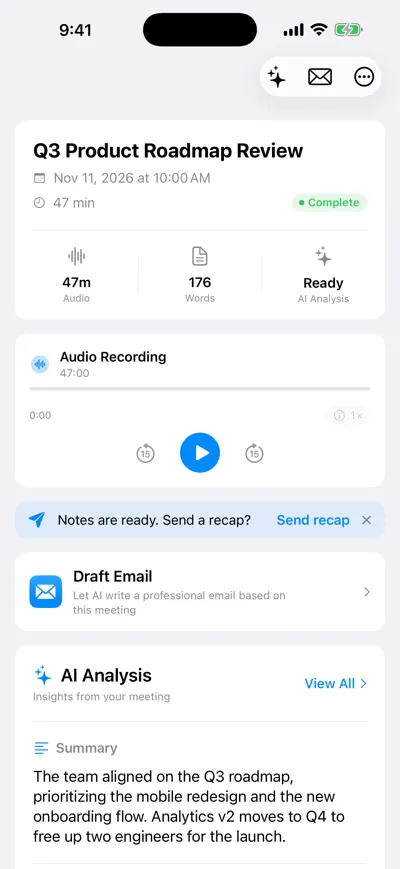
The summary on the meeting page
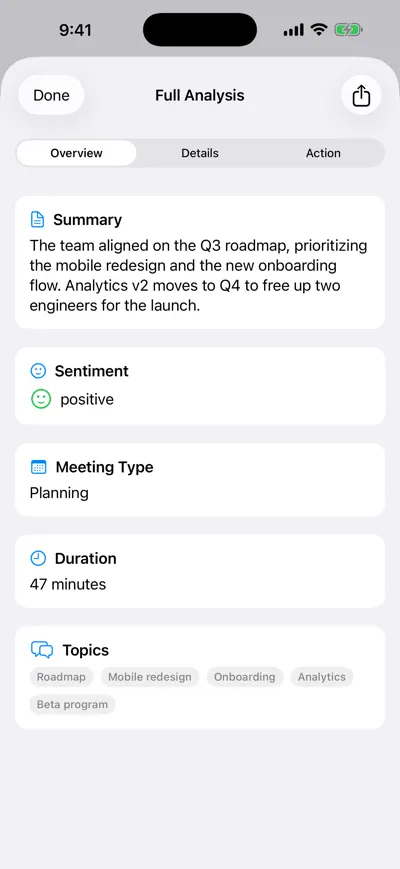
Full analysis: summary, sentiment, topics
Summaries also appear in the searchable meetings list. The app records on your iPhone or in the browser — no bot joins the call — or you can import an existing audio file. The free plan includes unlimited recordings and transcriptions plus one AI analysis; unlimited analyses are on Pro.
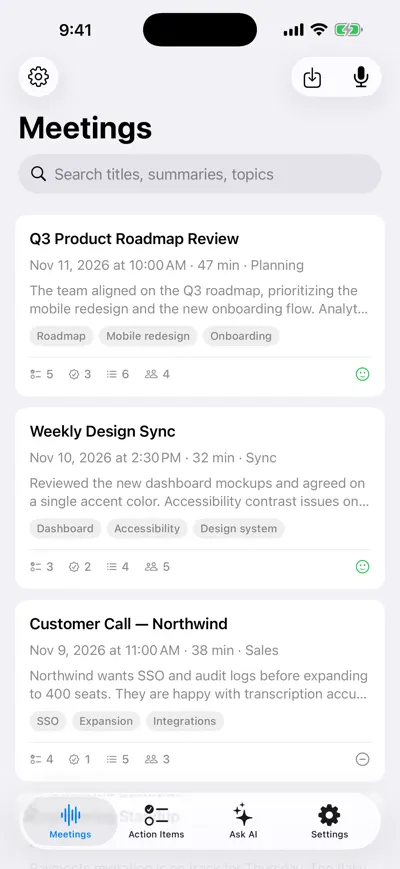
Every meeting’s summary at a glance
Frequently asked questions
Let AI take the notes for you
AI Note Taker records and transcribes your meetings, then writes the summary, decisions and action items. Free to start, no install needed.