AI Note Taker for students

The AI note taker for students who would rather listen than type

Put your iPhone on the desk, follow the argument instead of transcribing it, and get a transcript, summary and topic list after class. Then ask it the questions you would ask a classmate.

  • Unlimited recording and transcription on the free plan
  • Long lectures are fine: at 2 hours the recording saves and Part 2 starts with one tap
  • Works offline in the lecture hall, syncs to the web later
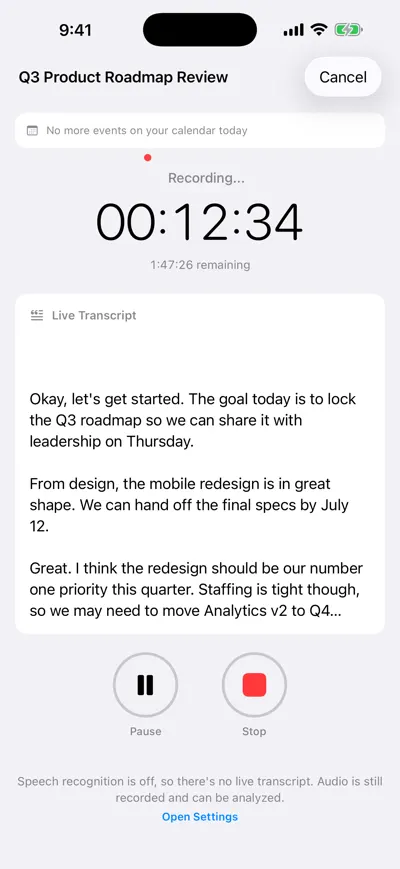
iPhone recording a session with a running timer, live transcript text appearing below it, and Pause and Stop buttons

Record the lecture

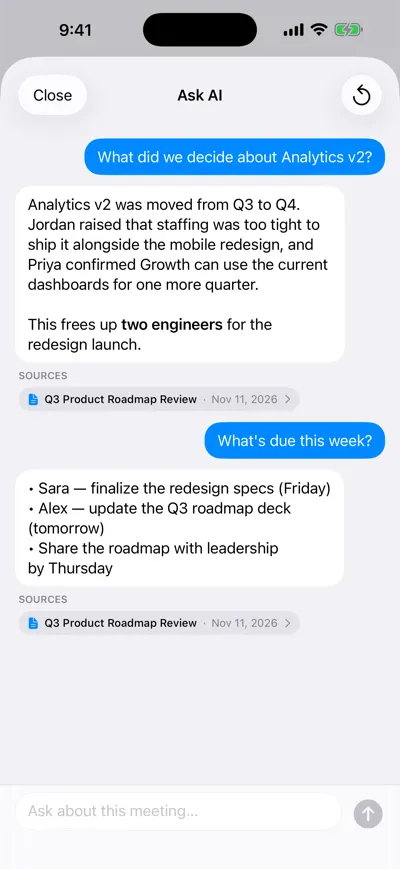
Ask AI chat about one recording: questions answered in plain language, each answer linking back to the source recording and date

Ask it what you missed

Most students take notes to remember, but in a fast lecture typing everything means hearing nothing. An AI note taker for students flips that: the app captures every word, and you write down only what is worth thinking about — the question you want to ask, the example that made it click. AI Note Taker records on your iPhone or in a browser tab, transcribes in English, and turns the hour into a summary and topic list you can search and question later.

A day with AI Note Taker as a student

Here is how a typical Tuesday looks for a second-year economics student with two lectures, a seminar and a study group.

  1. 9:00 · Lecture

    Hit record, then listen

    Title it “ECON 201 — Week 7: Price elasticity” and put the phone face-up near the front. Write three margin notes on paper: the equation on the board, one confusing step, one exam hint (“this will be on the midterm”). The live transcript fills in the rest.

  2. 11:00 · Between classes

    Skim the summary, flag gaps

    Open the recording on the walk to the next class. The summary and topic tags show what was covered; search the transcript for “elasticity” to find the exact minute the lecturer worked the example you missed.

  3. 14:00 · Seminar

    Capture the discussion, not just the slides

    In seminars the useful material is what classmates argue. The speaker-labeled transcript lets you quote a point back accurately in your response paper — with the tutor’s permission to record.

  4. 19:00 · Study group

    Turn the group’s plan into tasks

    Record the group call on speaker. Action items come out with owners and dates (“Maya: draft question 2 by Thursday”), so nobody has to be the secretary.

  5. Exam week

    Ask, don’t reread

    Ask one lecture “What were the three determinants of elasticity, with the examples used?” and get an answer that points back to the recording. On Pro, ask across the whole term at once.

What students use it for

Four jobs come up again and again. Each one works a little differently, and each has a rule worth knowing before you press record.

Lectures and long classes

Record the whole session on your phone; on iPhone a single recording runs up to 2 hours, with a warning five minutes before and a one-tap Part 2 for three-hour labs or evening classes. The transcript is searchable, so “what did she say about the midterm?” takes seconds.

Example

A 75-minute biology lecture becomes a five-sentence summary, topic tags such as “Krebs cycle” and “ATP yield”, and a transcript where searching “NADH” jumps to the three places it was explained.

Many universities restrict recording lectures without the lecturer’s permission or an approved accommodation. Check your course syllabus and school policy first.
Study groups and group projects

Group calls produce decisions nobody writes down. Record the session and the AI pulls out who agreed to what, with due dates you can turn into reminders in the Action Items tab.

Example

“Group 4 — case study planning” ends with four action items: “Jon: find 2019 market data (Wed)”, “Maya: draft Q2 (Thu)”, “Ana: slides template (Thu)”, “All: review draft Sunday 6pm”.

Tell the group you are recording; a quick “ok if I record so we get notes?” at the start is enough for most groups and is required in some places.

Office hours and supervisor meetings

Ten minutes with a professor is often the most valuable time of the week, and the easiest to forget. A recording means you can replay the exact explanation instead of reconstructing it.

Example

A thesis supervision meeting yields a recap listing the three requested changes (“narrow research question to 2010–2020”, “add a limitations section”, “cite Card & Krueger”) and the next meeting date.

Ask first. Most supervisors are happy to be recorded if you explain it is for your own notes.

Research interviews for a thesis or dissertation

Import interview audio or record in person, then search and quote from a timestamped transcript instead of transcribing by hand. Files up to 500 MB import in MP3, M4A, WAV, MP4 and other common formats.

Example

Twelve 40-minute participant interviews become twelve searchable transcripts; you find every mention of “commute” in minutes when coding themes.

Research with human participants usually needs ethics (IRB) approval that specifies how recordings are stored. Recordings in AI Note Taker are processed and stored on Google Cloud — confirm that fits your approved data plan before you use it.

Time saved for a typical student week

These are reasoned estimates for one student with a full course load, not measured results. Your numbers depend on how you study now.

TaskWithout an AI note takerWith AI Note TakerSaved per week
Rewriting lecture notes into study notes20 min per lecture × 8 = 2 h 40 minEdit the summary, 8 min per lecture = 1 h 4 min~1.5 h
Finding a specific explanation againScrubbing recordings or slides, ~15 min × 4 = 1 hTranscript search, ~3 min × 4 = 12 min~45 min
Study-group minutes and task list15 min to write up, if anyone does2 min to check the action items~13 min
Exam review per courseRereading all notes, ~3 hTargeted questions plus reading the answers’ sources, ~2 h~1 h (exam weeks)

How we estimated this

  • Eight lectures of 50–75 minutes a week, four times a week you need to find one specific explanation, and one study-group session.
  • “With” times include checking the AI output against the recording when something looks off — you should still do that.
  • Exam review saving assumes you ask about each lecture individually on the free plan; asking across all lectures at once needs Pro.
  • The free plan includes one AI analysis in total. Transcripts stay unlimited, so on the free plan the summary step is replaced by reading the transcript or pasting it into a chatbot your school allows.
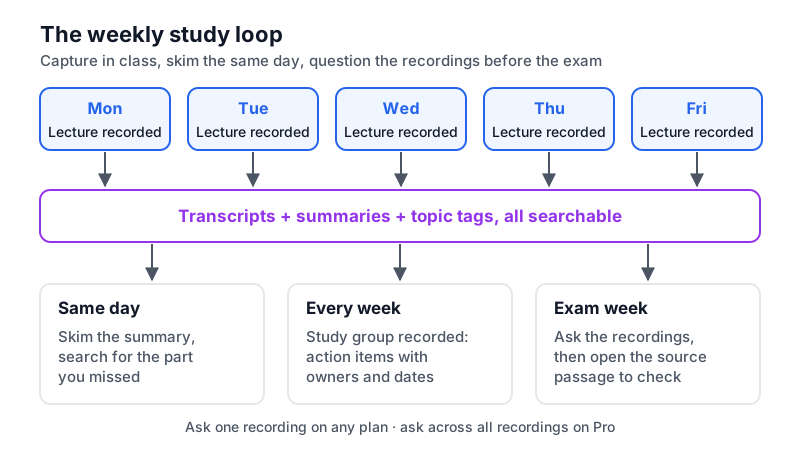
Diagram of a weekly study loop: record lectures Monday to Friday, skim summaries the same day, ask questions in study group, then review by asking the recordings before the exam
The study loop: capture in class, skim the same day, and question the recordings before the exam instead of rereading everything.

Recording rules, accommodations and honest limits

A recording app is only useful if you are allowed to use it. Check these before the first week of term.

  • School and course policy comes first. Lecture recording rules are set by your university, faculty or individual lecturer, often in the syllabus. If you have a disability accommodation that permits recording, that is usually handled through your disability services office.
  • Get consent from people in small groups. Seminars, study groups and office hours are conversations, not broadcasts. Some US states (California, for example, under Penal Code § 632) require everyone’s consent to record a confidential conversation.
  • Academic integrity applies to AI summaries. Using a summary to study is different from submitting it. Follow your course’s AI policy for anything you hand in.
  • English only, for now. Transcription and AI analysis currently support English, so a lecture in another language will not transcribe correctly.
  • One free AI analysis. The free plan gives unlimited recording and transcription plus one AI analysis; Pro is $19.99/month or $99.99/year for unlimited analyses and Ask AI across all recordings.

Frequently asked questions

Try AI Note Taker on your next lecture

Recording and transcription are unlimited on the free plan, and your first AI analysis is included. No bot joins anything: it records on your iPhone or in your browser.