Comparisons
Free AI Note Takers: What “Free” Really Gets You (2026)
Updated · 10 min read
Yes, you can get AI meeting notes for free — but every “free AI note taker” limits something different: minutes per month, length per meeting, how many AI summaries you get, or how long your notes are kept. The best free setup for most people is free, unlimited transcription plus a free chatbot prompt for the summary, and this guide shows exactly what each free plan includes and how to build that workflow.
The four ways a “free” AI note taker is limited
Before comparing tools, decide which limit would actually hurt you.
- Transcription minutes. A monthly pool, such as 300 minutes. Four one-hour meetings a month already blows past it.
- Length per meeting. A cap per recording. If your weekly team call runs 50 minutes and the cap is 30, you lose the last 20 — usually where the decisions happen.
- AI summaries or credits. Transcripts may be unlimited while summaries, AI chat or action items are rationed — sometimes per month, sometimes for the lifetime of the account.
- Retention and storage. Notes or recordings disappear after a set time, or you must delete old meetings to record new ones.
Also check how the tool records. Many free note takers send a bot into your Zoom, Meet or Teams call — convenient, but awkward with clients and useless in person. Tools that record on your device avoid this; see AI note takers without a bot.
Free AI note taker plans compared (as of November 2026)
Every figure below comes from the vendor’s own pricing page or help center, as of November 2026. Plans change often, so confirm before you commit. Where an official page did not state a detail, the cell says so.
| Tool | Transcription on free plan | AI summaries / AI chat | Length or storage limits | How it records | Platforms |
|---|---|---|---|---|---|
| AI Note Taker (ours) | Unlimited recordings and transcriptions | 1 free AI analysis in total (summary, sentiment, topics, action items); unlimited on Pro | 1 imported file on Free (it uses the AI analysis); files up to 500 MB | On your device — no bot joins the call | iPhone app and web app; English only for now |
| Otter.ai Basic | 300 minutes per user per month (shared with imports); 3 lifetime file imports | 20 AI Chat queries per user per month, 3 per conversation | 30 minutes max per conversation | Meeting assistant for Zoom, Teams and Meet, plus in-app recording | Web, iOS, Android, Mac and Windows |
| Fireflies.ai Free | A small number of transcription credits for new users; help center also says auto-join allows unlimited transcriptions | AI summaries included; 20 AI credits per month for AskFred and other AI features | 400 minutes of storage per seat; uploads up to 150 minutes and 100 MB | Bot joins the meeting (also Chrome extension and mobile app) | Web, mobile, desktop; 50+ integrations |
| Fathom Free | Unlimited recordings and transcriptions | Instant AI call summaries included; advanced summaries are paid; AI action items limited | Unlimited storage | Bot, or bot-free capture (beta, Mac) | Not listed on the pricing page |
| Granola Basic | No meeting cap stated on the pricing page | Chat across meetings included (automatic model selection) | 30 days of meeting history | Device audio — no bot | Desktop, iOS, Android, Apple Watch |
| tl;dv Free | Unlimited recordings and transcripts | Full AI notes for your first 10 meetings; after that, only the first 10 minutes of each meeting | Max 3 hours per meeting; recordings kept 3 months | Not stated in the free-plan article | Not stated in the free-plan article |
| iPhone Voice Memos / Notes | Free on-device transcription (iPhone 12 or later, supported languages) | Notes can summarize a recording with Apple Intelligence (iPhone 15 Pro or later) | Limited by your phone’s storage | Your phone’s mic — no bot | iPhone (and other Apple devices) |
| Zoom Basic (free) | Automated live captions; local recording on desktop only | AI summaries and the AI assistant are tied to paid plans | 40-minute limit on meetings | Built into the meeting | Zoom desktop, web, mobile |
Two built-ins are missing from the table on purpose. Google Meet transcripts require a paid Google Workspace edition (such as Business Standard or Workspace Individual), and Google’s help page does not list free personal accounts. Microsoft Teams’ AI “intelligent recap” requires a Teams Premium or Microsoft Copilot license. If your employer already pays for them, use them.
What each free plan is actually good for
- Otter Basic: fine for a few short calls a month, with strong live transcription and mobile apps; the 30-minute cap rules out longer meetings.
- Fireflies Free: good for auto-joining calls and pushing notes into other apps; the 400-minute storage cap means deleting old meetings within weeks.
- Fathom Free: the most generous free plan for video calls — unlimited recordings, storage and basic summaries.
- Granola Basic: no bot, and good if you jot rough notes for AI to enhance; 30-day history means it is not an archive.
- tl;dv Free: unlimited recording and transcripts, but full AI notes run out after 10 meetings — the cap does not reset monthly.
- AI Note Taker Free: unlimited live recording and transcription on iPhone or web, no bot — but only one AI analysis (an imported file uses it too), so use the workflow below for ongoing summaries.
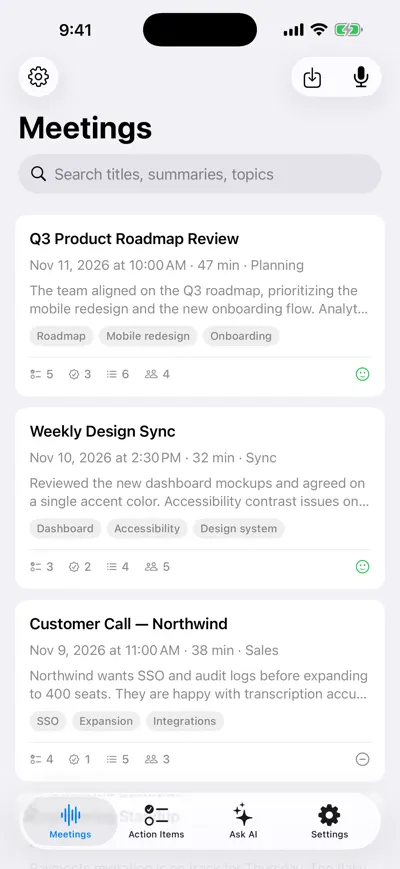
Every recording is kept and searchable
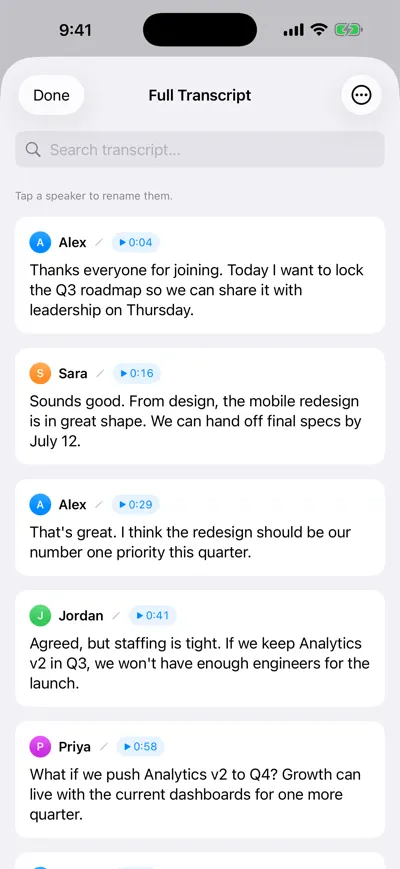
Speaker-labeled transcript with timestamps
How to get great meeting notes for $0
AI summaries are the part vendors ration, because they cost the most to run. Transcription is cheap and often unlimited. So split the job: use any free tool for the transcript, then use a free chatbot (ChatGPT, Claude, Gemini or Copilot free tiers) for the summary. It takes about two minutes per meeting.
Record with a tool that has no length cap
For in-person meetings and phone calls, record on your phone. For video calls, record on the device in the room or use a free recorder that covers your full meeting length. Ask for everyone’s consent first — recording laws vary by location (this is not legal advice).
Get the transcript
Copy it from Voice Memos (More Actions → Copy Transcript), Notes, or your note taker’s export. In AI Note Taker you can download the notes and transcript as Markdown. If you already have an audio file, see how to transcribe a meeting recording.
Clean up speaker names (30 seconds)
If the transcript says “Speaker 1” and “Speaker 2”, replace them with names. The AI cannot assign action items to people it cannot identify.
Paste it into a free chatbot with the prompt below
Add one line of context at the top: meeting name, date, who attended and what it was for. If a long transcript exceeds the free chatbot’s limit, split it in half.
Check the output against the transcript
AI summaries can invent or merge details. Search the transcript for every due date and number before you send anything. Then paste the result into your notes doc or recap email.
You are an expert meeting note taker. Below is a transcript of a meeting.

Context: [Meeting name] on [date]. Attendees: [names and roles]. Purpose: [one sentence].

Write meeting notes with exactly these sections:

1. SUMMARY — 3 to 5 sentences: what the meeting was about and what was agreed.
2. DECISIONS — a bullet for each decision that was actually made. Include who made it if stated. If nothing was decided, write "No decisions recorded."
3. ACTION ITEMS — a table with columns: Task (start with a verb) | Owner | Due date. Only include tasks someone agreed to. If no owner or date was said, write "Unassigned" or "No date" — do not guess.
4. OPEN QUESTIONS — anything raised but not resolved.
5. KEY NUMBERS & DATES — every figure, deadline or date mentioned, with the speaker.

Rules:
- Use only information in the transcript. Do not add facts.
- Quote the speaker's exact words for anything ambiguous.
- Keep it under 400 words.

Transcript:
[paste transcript here]
Example: for a 47-minute roadmap review, expect a summary (“Mobile redesign prioritized; Analytics v2 moves to Q4”) and action items like “Hand off final redesign specs — Sara — July 12.” More on that in meeting action items.
When a free plan is enough
You can probably stay free if…
- You have fewer than 4–5 meetings a month that need notes.
- Your meetings fit the free plan’s length cap (or you use a tool with none).
- You do not mind 2 minutes of copy-paste per meeting.
- You do not need to search across months of past meetings.
- Your employer already pays for Zoom, Google Workspace or Microsoft 365 with transcription included.
When it is worth paying
Pay when the manual workflow costs more than the subscription. At three one-hour meetings a week, the copy-paste-check routine is roughly 30 minutes a month — and the bigger cost is the meetings you never summarize. Paid plans also add what a prompt cannot: searchable history, action items with reminders, and questions across all your meetings at once.
Paid prices for reference, as of November 2026, from each vendor’s pricing page:
| Tool | Plan | Monthly billing | Annual billing |
|---|---|---|---|
| AI Note Taker | Pro (unlimited AI analyses) | $19.99/month | $99.99/year (about $8.33/month) |
| Otter.ai | Pro | $16.99/user/month | $8.33/user/month |
| Fathom | Premium | $20/user/month | $16/user/month |
| Granola | Business | $14/user/month | Not listed separately |
| tl;dv | Pro | €29/seat/month | €18/seat/month (€216/year) |
Pick based on how you meet, not on price alone. If most meetings are video calls and a bot is acceptable, a bot-based tool is the least effort. If you meet in person, take calls on your phone, or do not want a bot in client meetings, choose something that records on your device. Our best AI note taker comparison goes deeper on paid features.
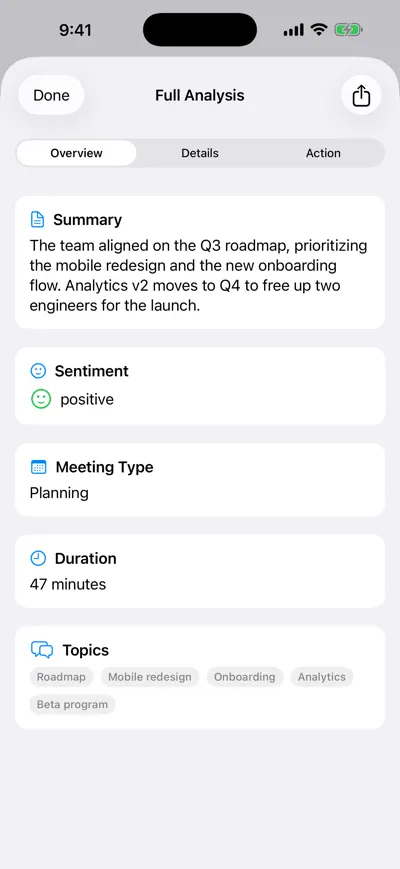
What one AI analysis includes
Frequently asked questions
Let AI take the notes for you
AI Note Taker records and transcribes your meetings, then writes the summary, decisions and action items. Free to start, no install needed.