Comparisons
Best AI Note Taker in 2026: An Honest Buyer’s Guide
Updated · 10 min read
There is no single best AI note taker: the right one depends on where your meetings happen. For video calls on Zoom, Meet or Teams, a bot-based tool like Otter, Fireflies or Fathom is hard to beat; for in-person meetings and phone-first use, pick an app that records on your own device, such as Granola or AI Note Taker. This guide gives you the criteria, a side-by-side table of six tools and a pick for each situation.
How to choose an AI note taker
Feature lists look nearly identical: transcript, summary, action items, search. Work through these eight questions before you compare prices.
Bot or device recording?
A bot joins your Zoom, Meet or Teams call as a participant and records from the call itself. Guests see it, and some find it off-putting. Device recording captures audio from your computer or phone: no extra participant, but you have to be present and start it yourself.
Do you meet in person?
Bots cannot join a conference room, a client lunch or a site visit. If a real share of your meetings happen face to face, you need a mobile app that records the room. See how to transcribe an in-person meeting for setup tips.
Accuracy and speaker labels
Every vendor claims high accuracy on clean audio. Speaker labels (“Speaker 1: …”) matter more than a few percent of word accuracy, because summaries that mix up who said what produce wrong action items.
Summaries and action items
Look at the structure, not the marketing. Good output separates decisions from discussion and lists action items with an owner and due date. A drafted follow-up email is a bonus.
Search and Q&A across meetings
After a month you will have dozens of transcripts. The ability to ask “What did the client say about pricing?” across all of them, with links back to the source, is often the feature people end up using most.
Privacy and data handling
Check where audio is processed and stored, whether your data trains the vendor’s models, who in your workspace can see recordings, and how you delete them.
Price and limits
Free plans differ in what they cap: minutes per month, length per meeting, how many meetings you can keep, or how many AI summaries you get. Pick the limit you will hit last.
Platforms
Make sure the tool runs where you work: Mac, Windows, web, iPhone, Android. A desktop-only tool is a poor fit if most of your meetings start on your phone.
The best AI note takers compared
Prices below come from each vendor’s official pricing page as of November 2026, per user per month. Annual billing is usually cheaper; vendors change plans often, so confirm before you buy.
| Tool | How it records | In-person meetings | Free plan | Paid from | Platforms |
|---|---|---|---|---|---|
| AI Note Taker | On your iPhone or in the browser; no bot | Yes, built for it | Unlimited recording and transcription, 1 AI analysis | $19.99/mo or $99.99/yr | iPhone, web |
| Otter.ai | Bot joins Zoom, Teams, Meet; mobile apps | Via mobile app | 300 min/month, 30 min per conversation | Pro $8.33/mo billed annually ($16.99 monthly) | Web, iOS, Android |
| Fireflies.ai | Bot joins Zoom, Meet, Teams and 10+ others; Chrome extension without a bot | Not a focus | Yes, with limits | Pro $10/seat billed annually ($18 monthly) | Web, iOS, Android |
| Fathom | Bot, or bot-free capture (beta, Mac) | Not a focus | Unlimited recordings and transcription; some AI features limited | Premium $16/mo billed annually ($20 monthly) | Zoom, Meet, Teams; iOS app |
| Granola | Device audio; never joins as a bot | Yes, via iPhone/Android app | Yes, 30-day meeting history | Business $14/user/mo | macOS, Windows, iOS, Android |
| Zoom AI Companion | Built into Zoom | No (Zoom meetings only) | No | Included with most paid Zoom plans | Zoom |
Each tool in brief
AI Note Taker — best for in-person and iPhone-first use
Full disclosure: this is our app, so weigh this section accordingly. AI Note Taker records on your iPhone or in a browser tab, so it works the same in a conference room, on a call on speaker, or in a lecture hall, and it keeps recording without internet. You get a speaker-labeled transcript, an AI analysis with summary, sentiment and topics, action items with due dates and reminders, a drafted recap email, and Ask AI across all your meetings with links to the source meeting. You can also import audio and video files. It does not join Zoom or Teams calls on its own, and today it supports English only.
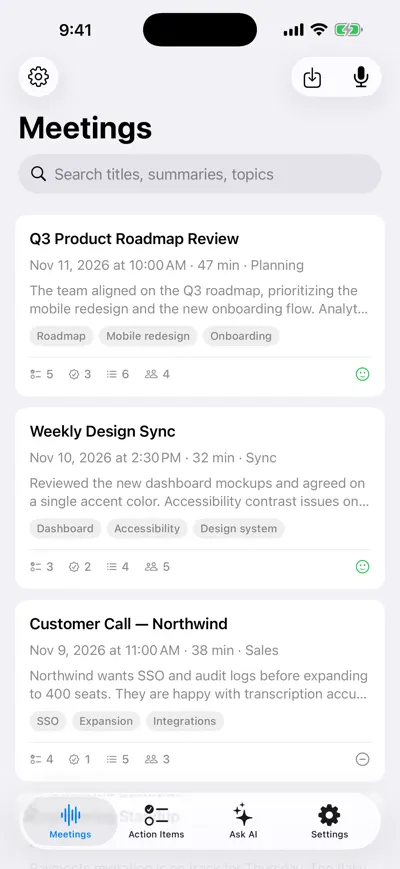
Every meeting with its summary and topics
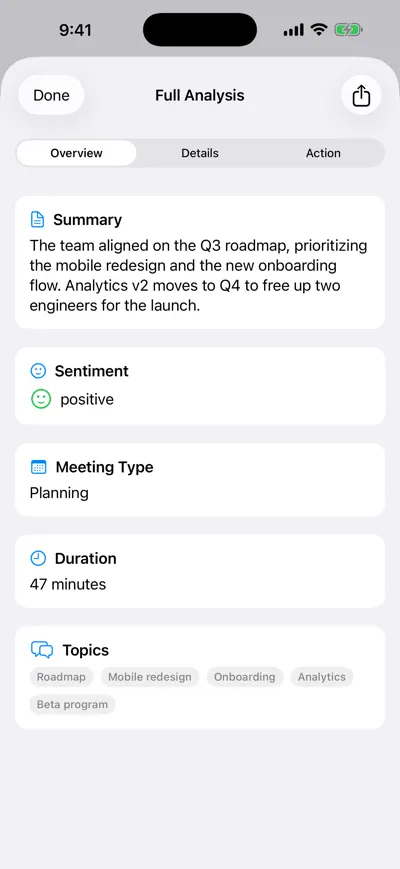
AI analysis of one meeting
AI Note Taker
Pros
- Works in person, on the phone and online — no bot in the room
- Free plan has no cap on recording or transcription minutes
- Ask AI (Pro) across all meetings, with source meetings cited
- Simple flat price: $19.99/month or $99.99/year for unlimited AI analyses
Cons
- No calendar bot: you must start the recording yourself
- Only 1 AI analysis on the free plan
- English only for now; iPhone and web, no Android app
- No built-in Zoom, Teams or CRM integrations
Otter.ai — best all-rounder for frequent video calls
Otter’s bot joins Zoom, Teams and Google Meet to take notes automatically, it offers live captions for Zoom and Meet, and it has iOS and Android apps on every plan. The free Basic plan gives 300 transcription minutes a month but caps each conversation at 30 minutes and keeps only your 25 most recent conversations. Pro raises that to 1,200 minutes and 90 minutes per conversation. For a full comparison, see our Otter.ai alternatives guide.
Otter.ai
Pros
- Mature bot for Zoom, Teams and Meet
- Live captions during Zoom and Meet calls
- Mobile apps on all plans, including free
Cons
- Free plan: 30-minute limit per conversation
- Free history limited to 25 recent conversations
- Monthly billing costs roughly double the annual rate
Fireflies.ai — best for teams that live in integrations
Fireflies records Zoom, Google Meet, Teams and more than ten other platforms, and can also capture calls through a Chrome extension without a bot. It has mobile apps and lets you upload audio and video files. Its Business plan adds conversation intelligence and team analytics, which is why it shows up in many sales and customer-success stacks. More detail in our Fireflies alternatives guide.
Fireflies.ai
Pros
- Supports the widest range of meeting platforms
- Bot-free option through the Chrome extension
- Team analytics and conversation intelligence on Business
Cons
- Storage and AI credits are metered by plan
- Best features sit on the higher tiers
- Built around video calls rather than in-person meetings
Fathom — best free option for video calls
Fathom’s free plan is unusually generous: unlimited recordings and transcriptions with instant AI summaries, plus clips and search across calls. Some features, such as AI action items and Ask Fathom, are marked “limited use” on the free tier. It works with Zoom, Google Meet and Teams, integrates with Salesforce and HubSpot, and offers a bot-free capture mode in beta on Mac.
Fathom
Pros
- Generous free plan for individuals
- Salesforce and HubSpot integrations for sales teams
- Choice of bot or bot-free (beta) capture
Cons
- Team and Business plans need at least 2 users
- Some AI features capped on the free plan
- Focused on video calls
Granola — best bot-free notes on the desktop
Granola never joins your meeting. It transcribes your computer’s audio in the background and turns it into notes, and its iPhone and Android apps handle in-person meetings too. It runs on macOS and Windows. The free Basic plan keeps 30 days of meeting history; Business at $14 per user per month removes that limit and adds integrations such as Notion, HubSpot and Zapier.
Granola
Pros
- No bot in any meeting, on any plan
- Desktop and mobile apps, including in-person use
- Low price for the Business plan
Cons
- Free plan keeps only 30 days of history
- Integrations and API need a paid plan
- You need to be on the call yourself for it to capture anything
Zoom AI Companion — best if you already pay for Zoom
If your company has paid Zoom licenses, AI Companion is included at no additional cost on most paid plans: meeting summaries, recaps and next steps inside Zoom. An admin may need to turn it on. The catch: it only covers Zoom meetings, so Teams calls and in-person conversations live somewhere else.
Zoom AI Companion
Pros
- No extra cost on most paid Zoom plans
- Nothing new to install or approve
- Summaries stay inside a tool IT already trusts
Cons
- Zoom meetings only
- Some advanced features are paid add-ons
- Notes are scattered if you also use other platforms
Which one should you pick?
- Mostly in-person meetings (consultants, field sales, founders, students): pick a phone-first recorder. AI Note Taker or Granola’s mobile app. Bots simply cannot help here.
- Sales team on Zoom with a CRM: Fathom or Fireflies. Both integrate with CRMs and handle recurring external calls well.
- Free or tight budget: Fathom for video calls; Otter if your meetings are under 30 minutes; AI Note Taker if you want unlimited transcription of in-person meetings and only need occasional AI summaries. Our free AI note taker guide goes deeper.
- Privacy-sensitive conversations (HR, legal, healthcare): prefer a tool with no bot, read the vendor’s data-processing terms, and confirm whether your data is used for training. See AI note takers without a bot.
- Your whole company is on Zoom: start with Zoom AI Companion before buying anything.
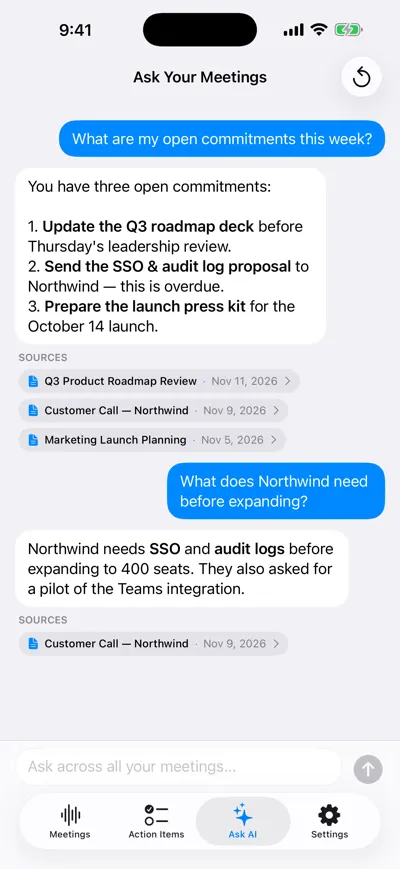
Asking a question across all meetings
Trial checklist
Before you pay for an AI meeting assistant
- It records the meetings you actually have (video, phone, in person)
- Speaker labels are right in a meeting with 3+ people
- Action items have owners and due dates, not just topics
- You can find a specific decision from last week in under a minute
- Exports work (copy, PDF, Markdown or your notes app)
- You have read where audio is processed and how to delete it
- The free plan limit you will hit first is acceptable — or the paid price is
The tool only captures the conversation; you still need a habit around it. See how to take meeting notes and AI meeting notes for a workflow that works with any app.
Frequently asked questions
Let AI take the notes for you
AI Note Taker records and transcribes your meetings, then writes the summary, decisions and action items. Free to start, no install needed.