Comparisons
Otter AI Alternative: 6 Options Compared (and How to Switch)
Updated · 10 min read
The best Otter AI alternative depends on why you are leaving: Granola or AI Note Taker if you want notes without a bot joining your calls, Fathom if you mostly need free Zoom and Meet summaries, Fireflies for team call workflows, and Notta if you transcribe in several languages. Below is why people switch, what to check before you do, and how to move your transcripts out of Otter without losing anything.
Why people look for an Otter alternative
Otter is a capable tool, but a few complaints come up again and again. Check them against your own situation before you switch.
- The free plan runs out fast. As of November 2026, Otter’s Basic plan gives you 300 transcription minutes per month, a 30-minute cap per conversation and 3 file imports for the lifetime of the account. A single hour-long weekly team meeting does not fit in one conversation.
- The bot joins your calls. Otter’s meeting assistant (OtterPilot) joins Zoom, Microsoft Teams and Google Meet to take notes. If it is connected to your calendar with auto-join on, it can show up in meetings where other people did not expect it. Some clients and IT teams ask attendees to keep note-taking bots out.
- The paid plans add up. Otter Pro is $16.99 per user per month billed monthly, or $8.33 per month billed annually, with 1,200 minutes a month and a 90-minute cap per conversation. Business is $30 per user monthly or $19.99 annually (all as of November 2026, from otter.ai/pricing).
- In-person meetings are an afterthought. Otter can record from its mobile app, but its product is built around video calls. If most of your meetings happen in a room, a phone-first recorder may fit better.
What to look for in an Otter replacement
Before you pick a tool, answer these
- Where do your meetings happen? Video calls need a bot, a desktop app or a browser extension. In-person meetings need a good phone recorder.
- Bot or no bot? A bot is convenient (it joins automatically) but visible to everyone. Device recording is invisible to the call platform — which means you are responsible for telling people you are recording.
- Free plan limits: minutes per month, minutes per recording, file imports and how long history is kept.
- Speaker labels: can you rename speakers and jump to the moment someone said something?
- AI output: summary, action items with owners and dates, a recap email, and the ability to ask questions about past meetings.
- Languages: check the exact list if you meet in anything other than English.
- Export: can you get your transcripts and audio out again if you leave?
Whichever tool you choose, recording laws differ by country and US state — some require every participant’s consent. Tell people at the start of the meeting that you are recording. This is general information, not legal advice.
The best Otter AI alternatives in 2026
Prices and limits below come from each company’s official pricing page as of November 2026. Where a vendor did not publish a number, we left it out rather than guess.
1. AI Note Taker — best for in-person meetings on iPhone, with no bot
AI Note Taker records on your iPhone or in your browser, so nothing joins the call and nothing needs to be installed in Zoom. You get a speaker-labeled transcript, an AI analysis (summary, sentiment, topics), action items with due dates and reminders, a drafted recap email, and Ask AI (Pro), which answers questions about one meeting or all of them and cites the part of the transcript it used. You can also import existing audio files, which is what makes switching from Otter easy.
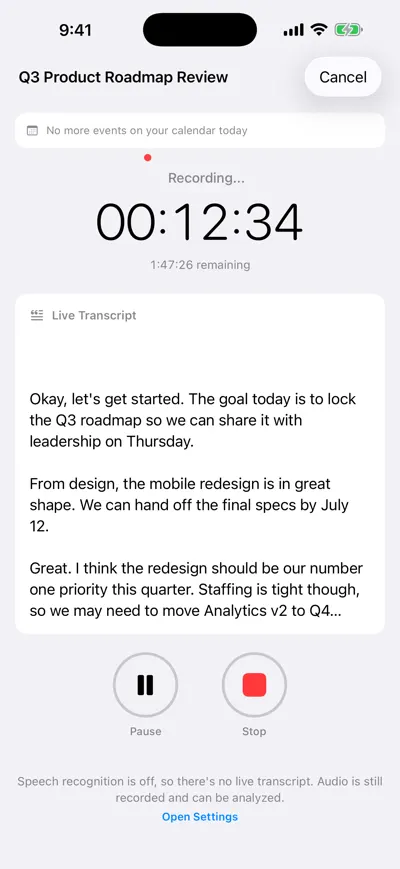
Records on the phone — no bot
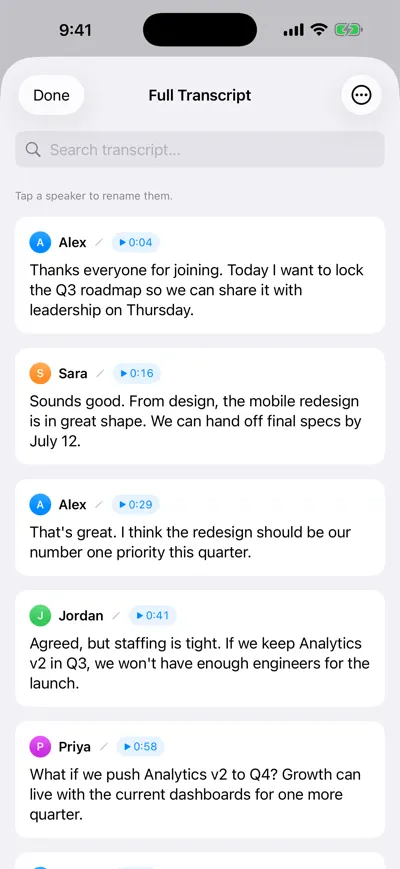
Speaker-labeled transcript
Pros
- Unlimited recordings and transcription on the free plan
- No bot — works for in-person meetings, calls on speaker and lectures
- Imports MP3, M4A, WAV, MP4 and more (up to 500 MB per file)
Cons
- Free plan includes 1 AI analysis; unlimited analyses need Pro ($19.99/month or $99.99/year)
- English only for now
- No Zoom, Teams or Meet integration — it does not join calls for you
2. Fathom — best free option for Zoom, Meet and Teams summaries
Fathom’s free plan advertises unlimited recordings and transcriptions with instant AI call summaries, which is the most generous free tier for video calls in this list. Some features, such as AI action items, are marked “limited use” on the free plan. Paid Premium is $20 per month, or $16 per month billed annually. Fathom records with a bot by default and offers a bot-free mode in beta on Mac.
3. Granola — best bot-free notes for desktop video calls
Granola captures your device’s audio instead of sending a bot, and it is built around your own notes: you jot a few lines and it fills in the rest from the transcript. It has desktop, iOS, Android and Apple Watch apps. The free Basic plan keeps 30 days of meeting history; Business is $14 per user per month for unlimited notes and history.
4. Fireflies — best for teams that live in sales and CRM tools
Fireflies joins meetings with its bot and is strong on team features: integrations, shared workspaces and searchable call libraries. It also offers recording through a Chrome extension without the bot. It has Free, Pro, Business and Enterprise plans; we could not confirm current prices or free-plan limits on its official pricing page, so check there. For a deeper look, see our Fireflies alternative guide.
5. Notta — best for multilingual and bilingual transcription
Notta focuses on transcription across languages and includes bilingual transcription (4 uses a month on the free plan). The free plan is tight: 120 minutes a month and 3 minutes per conversation. Pro is $8.17 per month billed annually ($97.99 a year) with 1,800 minutes a month and up to 5 hours per recording.
6. Apple Voice Memos — best zero-cost option for quick transcripts
If you only need a rough transcript and no AI notes, the Voice Memos app on iPhone and iPad can transcribe recordings on iOS 18 and later. There is no summary, no action items and no meeting library, but it costs nothing and is already on your phone. Our guide to transcribing voice memos on iPhone covers the steps and the limits.
Otter vs. AI Note Taker, feature by feature
| Feature | Otter | AI Note Taker |
|---|---|---|
| How it records | Bot joins Zoom, Teams and Meet; mobile and web apps | On your iPhone or in your browser; no bot |
| Free transcription | 300 min/month, 30 min per conversation | Unlimited |
| Free file imports | 3 for the life of the account | 1 on Free (it uses the free AI analysis); unlimited on Pro, up to 500 MB per file |
| AI summary and action items | Automated summaries with action items | 1 free AI analysis, then Pro |
| Ask questions about meetings | Yes, AI Chat within and across meetings | Yes, one meeting or all, with source citations |
| Speaker labels | Yes | Yes, renameable |
| Languages | English plus others (Spanish and French added in 2024) | English only |
| Export | TXT and MP3 free; PDF, DOCX, SRT on Pro | Markdown, or print to PDF |
| Entry paid plan | $16.99/month or $8.33/month billed annually | $19.99/month or $99.99/year |
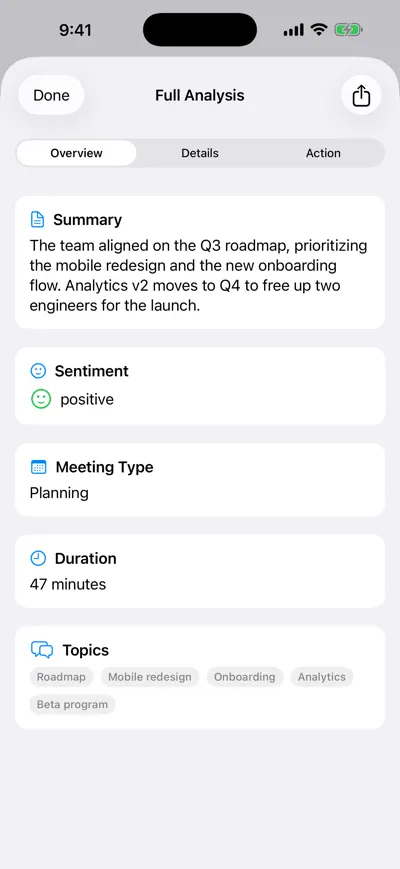
AI analysis after the meeting
When Otter is still the better choice
Be honest about what you would lose. Stay with Otter if:
- You want calls joined automatically. If most of your meetings are on Zoom, Teams or Meet and you never want to press record, a bot is the point, not the problem.
- You meet in Spanish, French or other languages. AI Note Taker is English only today.
- You run notes for a whole team. Otter’s Business plan adds admin features such as activity logs and usage analytics, plus shared speakers.
- You need SRT captions or DOCX exports from the same tool that records.
A common setup is to keep a call tool for video meetings and use a phone recorder for everything that happens in a room. Our AI note taker without a bot guide compares that approach in more detail.
How to switch from Otter without losing your notes
List what you actually need to keep
Open your Otter conversations and sort them into “keep” (client meetings, decisions, interviews) and “ignore”. Often only 10–20% of your history matters.
Export transcripts and audio from Otter
Open each conversation you want to keep and use Otter’s export option. On the free plan you can export the transcript as TXT and the audio as MP3; Pro adds PDF, DOCX and SRT, and Business adds bulk export. Save them in one folder named by date and meeting, for example “2026-10-14 Acme kickoff.mp3”.
Turn off Otter’s auto-join
Before you cancel, switch off OtterPilot auto-join and disconnect your calendar so the bot does not appear in meetings during the changeover.
Import the audio into your new tool
In AI Note Taker, tap Import audio on the meetings list (iPhone) or import from the web app. MP3, M4A, WAV, AAC, MP4 and MOV files up to 500 MB are supported, and each import gets a fresh speaker-labeled transcript and AI analysis. The free plan covers one import; bringing over a whole archive needs Pro. Keep the TXT exports as a backup copy.
Run one real meeting side by side
Before you rely on the new tool, record one meeting with both. Compare the transcript, the speaker labels and the action items. If the new one catches the commitments you care about, you are ready.
Cancel and tell your team
Cancel the Otter subscription, and let regular attendees know they will no longer see the bot.
Which Otter alternative should you choose?
| If you mainly need… | Pick |
|---|---|
| In-person meetings, iPhone, no bot | AI Note Taker |
| Free summaries of Zoom, Meet and Teams calls | Fathom |
| Bot-free notes on desktop video calls | Granola |
| Team call library and CRM integrations | Fireflies |
| Several languages or bilingual meetings | Notta |
| A quick free transcript, no AI notes | Apple Voice Memos |
Still comparing? Our roundup of the best AI note takers covers more tools, and the free AI note taker guide focuses only on what each free plan really includes.
Frequently asked questions
Let AI take the notes for you
AI Note Taker records and transcribes your meetings, then writes the summary, decisions and action items. Free to start, no install needed.