Comparisons
Best Fireflies AI Alternatives in 2026 (With and Without a Bot)
Updated · 10 min read
The best Fireflies AI alternative depends on why you are leaving: pick Granola or AI Note Taker if you want notes without a bot joining your calls, AI Note Taker or Read AI for in-person meetings recorded on your phone, and Fathom if you want a generous free plan for Zoom, Meet and Teams. If you rely on Fireflies’ CRM sync and team analytics, the honest answer may be to stay — or to move to a tool with similar sales features, like Fathom’s Business plan.
Why people look for a Fireflies alternative
Fireflies works by sending its notetaker bot, Fred, into your Zoom, Google Meet or Microsoft Teams calls from your calendar. That is convenient when every meeting is a scheduled video call. It is less convenient in four common situations:
- A bot in the call feels awkward. Clients and candidates notice the notetaker in the participant list, and some IT policies block third-party bots outright.
- Many of your meetings are not video calls. Site visits, 1:1s over coffee, classroom sessions and phone calls do not have a meeting link for a bot to join. Fireflies does have a mobile app for in-person recording, but its core workflow is built around calendar-joined calls.
- The free plan runs out fast. The Free plan’s 400 minutes of storage per team is about seven one-hour meetings before you have to delete or upgrade.
- Per-seat pricing adds up. Every teammate added to a workspace counts as a paid seat, so a five-person team on Business pays $95 a month billed annually, or $145 billed monthly.
Fireflies pricing and features (as of November 2026)
| Plan | Price per seat | Storage | Notable features |
|---|---|---|---|
| Free | $0 | 400 min per team | Transcription, limited AI summaries, 20 AI credits, mobile app, Chrome extension, file upload |
| Pro | $18/month, or $10/month billed annually | 8,000 min per seat | Unlimited AI summaries, video recording, downloads, unlimited integrations |
| Business | $29/month, or $19/month billed annually | Unlimited | Conversation intelligence, team analytics, multi-language mode, user groups |
| Enterprise | $39/month, annual only | Unlimited | SSO, SCIM, audit logs, HIPAA-ready with a BAA, custom data retention |
Fireflies: strengths and weaknesses
Pros
- Deep integrations, including Salesforce, HubSpot, Slack and Zoho Projects, so notes land in the CRM without copy-paste.
- Strong team features: shared channels, team analytics for admins, conversation intelligence and speaker talk-time.
- Transcription in 100+ languages, plus a multi-language mode on Business.
- Several ways to capture: calendar bot, a Chrome extension that records without the bot, iOS and Android apps, and file upload.
- Enterprise controls: SOC 2 Type II, SSO, SCIM and HIPAA-ready with a BAA.
Cons
- The default experience is a visible bot in your calls; the bot name can only be customized with a paid add-on.
- Free plan storage (400 minutes per team) fills up within a couple of weeks of regular use.
- Downloading transcripts, summaries and recordings requires Pro or higher.
- Per-seat pricing gets expensive for teams where only one person really needs the notes.
- AI credits are capped (20 on Free and Pro, 30 on Business), so heavy use of AI features is limited.
The 5 best Fireflies alternatives
Prices below come from each vendor’s pricing page in November 2026, per user per month in US dollars.
1. AI Note Taker — best for in-person and phone-first meetings, no bot
AI Note Taker records on the device in your hand — the iPhone app or the web app — so no bot ever joins a call. Put your phone on the table in a conference room, or run the web app during a video call, and you get a speaker-labeled transcript, an AI summary with sentiment and topics, action items with due dates and reminders, and an AI-drafted recap email. You can also import existing audio and video files (MP3, M4A, WAV, MP4 and more, up to 500 MB) and ask questions across all your meetings, with answers that cite the source.
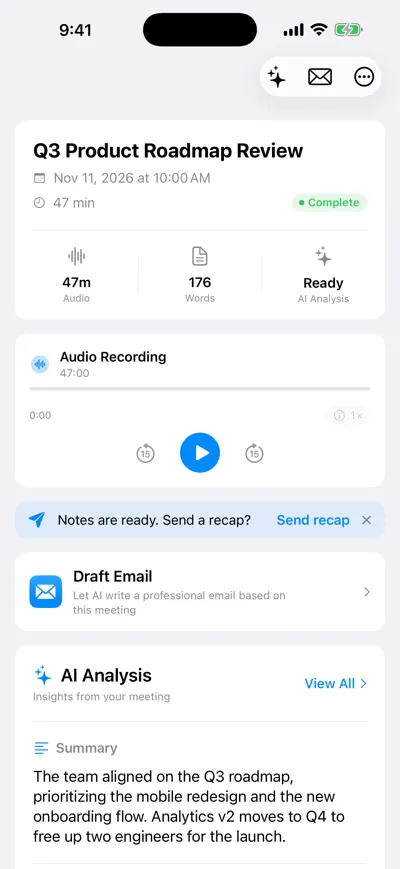
One meeting: recording, recap prompt and summary
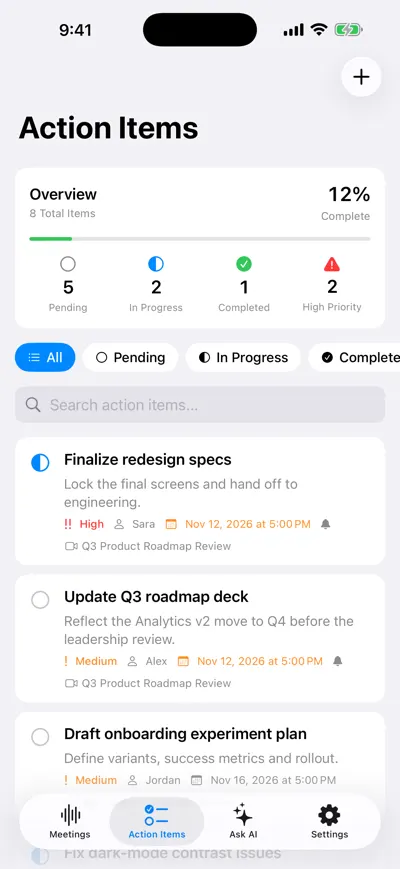
Action items with owners, due dates and reminders
Pricing: Free plan with unlimited recordings and transcriptions plus one AI analysis; Pro is $19.99/month or $99.99/year for unlimited AI analyses (see pricing). Trade-offs: it is built for individuals rather than teams, has no CRM integrations, transcribes English only today, and the mobile app is iPhone-only.
2. Fathom — best free option for Zoom, Meet and Teams
Fathom’s Free plan includes unlimited recordings and transcriptions with instant AI call summaries. It now offers a choice of bot capture or bot-free capture, though bot-free is a beta feature for Mac. Premium is $20/month, or $16 billed annually, and adds AI action items and a custom meeting bot. For sales teams, the Business plan ($34/month, or $25 annually, two-user minimum) syncs CRM fields after meetings, which makes it the closest like-for-like replacement for Fireflies’ CRM features.
3. Granola — best bot-free notes on your computer
Granola captures your device’s audio instead of sending a bot, and blends the AI transcript with notes you type during the meeting. It has desktop, iOS, Android and Apple Watch apps. The Basic plan is free but only keeps 30 days of meeting history; Business is $14 per user per month and adds unlimited history, follow-up emails and integrations with Attio, Notion, HubSpot, Affinity and Zapier. If the bot is your main complaint, Granola is the most direct swap. For more, see our guide to AI note takers without a bot.
4. Otter — best for live transcription with a familiar workflow
Otter is the closest to Fireflies in how it works: it can join Zoom, Teams and Meet, shows a live transcript, and has iOS and Android apps for in-person recording. The Basic plan is free with 300 monthly transcription minutes and three lifetime file imports. Pro is listed at $16.99 per user per month and adds unlimited storage, more file imports and Salesforce and HubSpot integrations. Our Otter alternatives guide covers its limits in more detail.
5. Read AI — best for meeting analytics and in-person capture
Read AI adds engagement metrics on top of summaries, and its iPhone app captures in-person meetings and voice notes. The Free plan covers 5 meeting transcripts per month. Pro is $15 per user per month billed annually, or $19.75 billed monthly. Note that Free users cannot join a team workspace.
Fireflies vs. AI Note Taker: side by side
| Fireflies.ai | AI Note Taker | |
|---|---|---|
| How it captures | Bot joins calls; also Chrome extension, mobile app and upload | Records on your iPhone or in the browser; no bot |
| In-person meetings | Yes, via the mobile app | Yes — the main use case |
| Free plan | Limited AI summaries, 400 min storage per team | Unlimited recordings and transcriptions, 1 AI analysis |
| Paid price | $18/seat/month, or $10 billed annually (Pro) | $19.99/month or $99.99/year (Pro) |
| Action items | Yes, with a task manager on Pro | Yes, with due dates and reminders |
| Recap email | Email assistant on Pro | AI-drafted recap email from each meeting |
| CRM and team features | Salesforce, HubSpot, Slack; team analytics | None — built for individuals |
| Languages | 100+ | English |
| Exports | PDF, DOCX, SRT, CSV, JSON, MD (Pro and up) | Markdown or print to PDF |
The short version: if your notes need to flow into a CRM or be shared across a sales team, Fireflies (or Fathom Business) fits better. If you are one person who meets in rooms, on the phone and on calls, and you just want clean notes and follow-ups without a bot, a device-based recorder is simpler and usually cheaper. More tools: best AI note takers.
How to choose the right alternative
Answer these before you switch
- Where do most of your meetings happen: video calls, in person, or by phone?
- Is a bot in the call a problem for your clients, candidates or IT team?
- Do notes need to sync to Salesforce, HubSpot or another CRM automatically?
- How many people actually need paid seats, versus just receiving the recap?
- Which languages do your meetings use?
- Can you get your notes out again (export formats) if you switch later?
How to keep your notes when you leave Fireflies
Your meeting history is the most valuable thing in your Fireflies account. Export it before you downgrade or cancel — downloads require Pro or higher, so do this while your paid plan is still active.
List the meetings worth keeping
Open the Meetings tab and use search and the filters (My Meetings, All Meetings, Channels) to find client calls, decisions and anything you might need to quote later.
Download transcripts
Open each meeting, click the Download icon at the bottom, choose Transcript, turn on timestamps and speaker labels, and pick a format. DOCX or PDF is easiest to read; MD or JSON is best if you want to import into another tool.
Download summaries
In the same menu, download the Summary (DOCX, PDF, JSON or MD). Summaries hold the decisions and action items.
Save audio for important meetings
Download the MP3 audio (or MP4 video if video capture was on). Audio lets you re-transcribe the meeting in another tool later — most alternatives, AI Note Taker included, accept MP3 and MP4 uploads.
Organize the files
Name files consistently, e.g. “2026-10-14 Acme renewal call — transcript.pdf”, and store them in one shared folder. Fireflies downloads one meeting at a time, so batch the work over an afternoon.
Move open action items
Copy any unfinished tasks into your new tool or task manager with an owner and due date,. Our guide to meeting action items has a tracker template.
Then disconnect and cancel
Remove Fireflies from your calendar and video apps so the bot stops joining calls and only then cancel or downgrade your plan.
If you saved audio files, you can turn them into fresh notes in your new tool — see how to transcribe a meeting recording.
Your first week after switching
After each meeting in your first week, check three things: is the transcript accurate enough to quote, are the action items right, and does the recap email need heavy editing? If all three pass on five or six real meetings, you have your replacement.
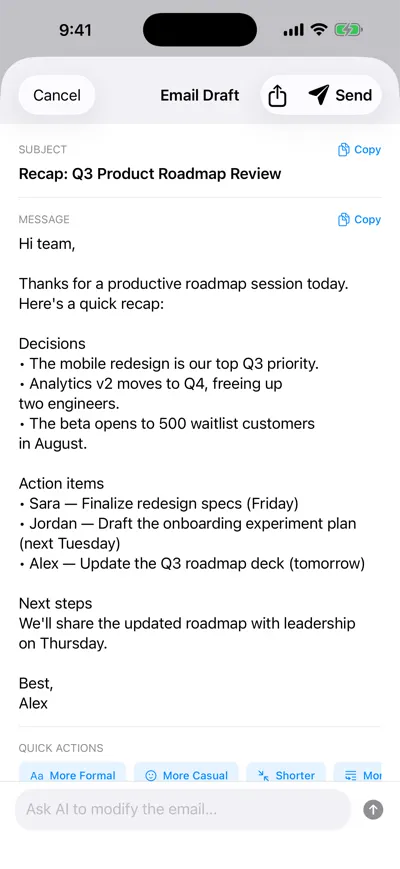
A recap email drafted from the meeting
Frequently asked questions
Let AI take the notes for you
AI Note Taker records and transcribes your meetings, then writes the summary, decisions and action items. Free to start, no install needed.