AI Note Taker for sales teams

AI note taker for sales teams: every call ends with a follow-up ready to send

Reps lose deals in the gap between the call and the follow-up. AI Note Taker records on your phone or in the browser, then drafts the recap, lists next steps with owners, and keeps every buyer quote searchable.

  • No bot in the buyer’s meeting: it records on your own device
  • Recap email drafted from the call, ready to edit and send
  • Works for in-person visits and calls on speaker
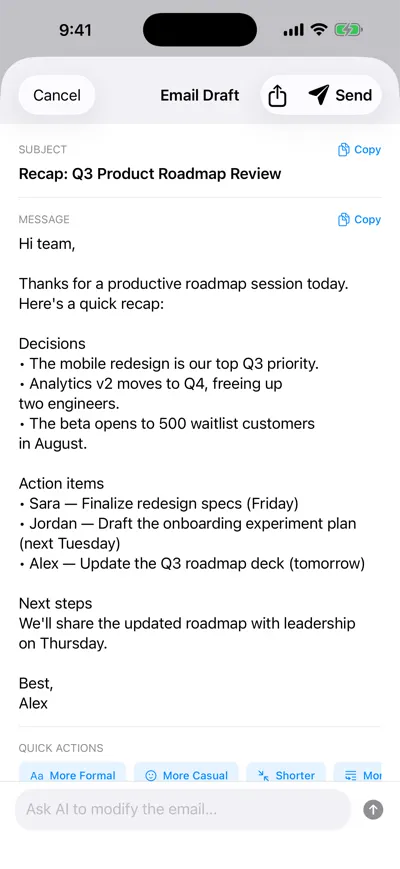
AI-drafted recap email listing decisions, action items with owners and deadlines, and next steps, with options to make it more formal, more casual or shorter

Recap drafted from the call

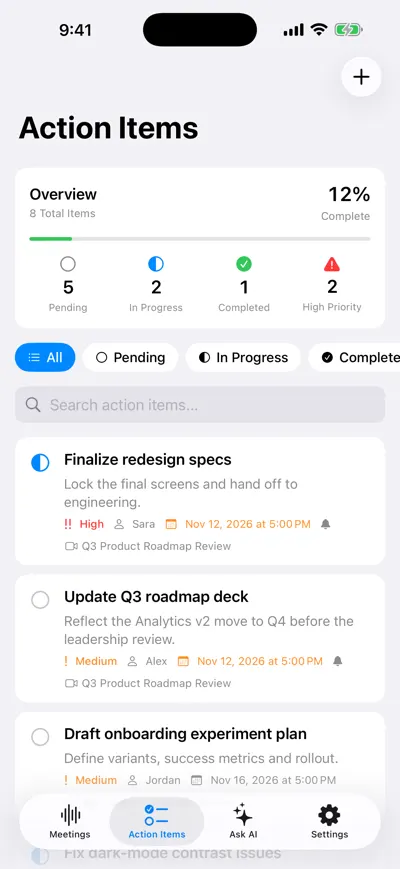
Action Items screen with an overview of tasks by status and items listing priority, owner, due date and reminder

Next steps with owners

A good discovery call produces three things: what the buyer actually said about their problem, who needs to be involved, and what happens next. An AI note taker for sales teams should get all three onto paper without the rep typing while the buyer talks. AI Note Taker does it without sending a bot into the meeting — useful when a buyer’s security team blocks recorders, and essential when the meeting is across a table rather than on Zoom.

A day with AI Note Taker on a sales team

A mid-market account executive with three calls, a site visit and a pipeline review.

  1. 8:45 · Prep

    Ask last week’s call what was promised

    Before the follow-up with Northwind, open last week’s discovery call and ask “What did they say they need before expanding?” The answer points back to the meeting: SSO and audit logs before rolling out to 400 seats.

  2. 10:00 · Discovery call

    Listen, ask, and let the app write

    Open with “Mind if I record so I can focus on you rather than my notes?” and start recording. Note only the moments you want to come back to; the speaker-labeled transcript gets the rest.

  3. 10:40 · Right after

    Send the recap while the buyer still remembers you

    Open the drafted recap email, make it shorter, fix one number, and send. Copy the pain points and next steps into your CRM fields.

  4. 14:00 · Site visit

    Record the walk-through

    In a warehouse or office tour there is no Zoom to plug a bot into. The iPhone app records in the room, offline if the signal is poor.

  5. 16:30 · Pipeline review

    Bring evidence, not adjectives

    Instead of “they seemed keen”, quote the champion’s words with a timestamp. Your manager can read the meeting itself through a share link.

Sales jobs it handles

Different calls need different outputs. Here is what to pull from each one, with an example of what lands in your notes.

Discovery and qualification calls

Record the call, then ask for the fields your sales process uses: budget, authority, need and timeline, or the MEDDICC set. Asking for the quote behind each answer keeps you honest about what the buyer really said.

Example

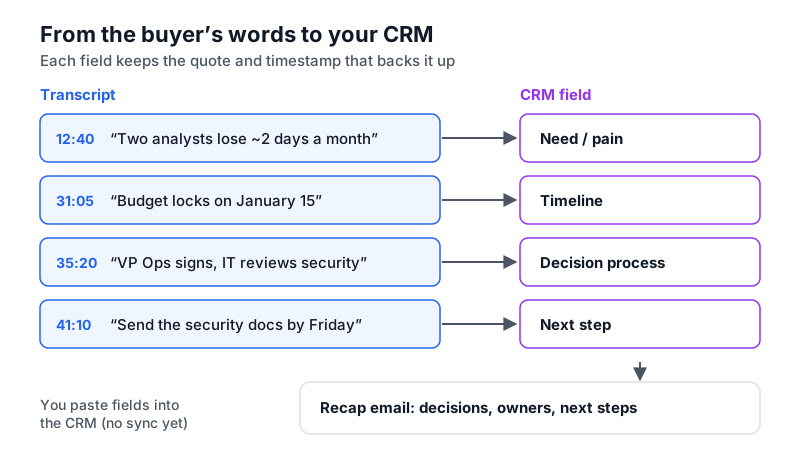
“Need: manual reporting takes their two analysts ~2 days a month (12:40). Timeline: decision before Q1 budget lock, Jan 15 (31:05). Authority: VP Ops signs; IT security reviews (35:20).”

There is no CRM integration today. You copy the fields into Salesforce, HubSpot or your CRM yourself, or export the notes as Markdown.
Follow-up and recap emails

Every analysis drafts a recap email with decisions, action items and next steps. Use the quick options to make it more formal, more casual or shorter before you copy or send it.

Example

Subject “Recap: Northwind expansion call” — two decisions, three next steps (“We send SOC report request form by Fri”, “Northwind confirms seat count”, “Security review call week of the 18th”).

Always read the draft before sending: an AI recap can state a commitment more firmly than the buyer did.

In-person visits and field sales

Lunch meetings, factory tours and trade-show conversations are where bot-based recorders cannot follow. Record on your iPhone and get the same summary and action items as a video call.

Example

A 25-minute booth conversation becomes three follow-ups and a note that the prospect’s current contract renews in March.

Background noise on a show floor lowers accuracy. Hold the phone between you and the buyer, not in your pocket.

Deal reviews and coaching

Managers coach better from transcripts than from summaries of summaries. Share a meeting link with your manager, and review your own past calls to see which answers to an objection actually moved the deal.

Example

On Pro, ask across all your calls: “How did buyers react when I quoted annual pricing?” — the answer lists the calls it came from, so you can replay the three that went well.

Anyone with a share link can view what you shared until you turn the link off. Do not forward links outside your company.

Time saved per rep per week

Estimated for one account executive running 12 customer calls a week. These are reasoned estimates, not a study.

TaskWithout an AI note takerWith AI Note TakerSaved per week
Writing up call notes10 min × 12 calls = 2 hReview AI summary, 3 min × 12 = 36 min~1.4 h
Drafting follow-up emails12 min × 12 = 2.4 hEdit the drafted recap, 4 min × 12 = 48 min~1.6 h
Updating CRM fields6 min × 12 = 1.2 hCopy from the summary, 4 min × 12 = 48 min~25 min
Prepping for follow-up callsRereading notes, 10 min × 6 = 1 hAsk the last call, 4 min × 6 = 24 min~35 min

How we estimated this

  • 12 calls of 30–45 minutes per week; six of them are follow-ups to an earlier recorded call.
  • Baseline times assume the rep writes notes after the call rather than during it, which is common when talking and typing at once hurts the conversation.
  • CRM time is saved only partly because there is no direct CRM sync — you still paste fields in.
  • Analyses for 12 calls a week need Pro; the free plan includes one.
Diagram mapping quotes from a discovery-call transcript to CRM fields for need, timeline, decision maker and next step, then into a recap email
From the buyer’s words to your CRM: each field should come with the quote and timestamp that backs it up.

Consent, buyer trust and current limits

Recording a buyer is a trust decision as much as a legal one. Handle both.

  • Ask at the start of every call. US federal law allows recording with one party’s consent (18 U.S.C. § 2511(2)(d)), but states such as California, Florida, Illinois and Washington require all parties to agree. With buyers in many states and countries, the simplest rule is to ask every time.
  • Phone calls need a workaround. The iPhone app records through the microphone, so it does not capture a regular phone call directly. Put the call on speaker near a second device running the app, or record with the iPhone Phone app and import the audio.
  • Headphones on video calls. If you wear headphones on Zoom or Teams, the microphone hears only you. Use speakers, or record the meeting in the platform and import the file.
  • English only for now, so calls in other languages will not transcribe.
  • Data handling. Meetings are private to your account unless you share a link; audio and transcripts are processed by Google’s Gemini models through Firebase and Vertex AI, and you can delete a meeting at any time. Check this against your company’s and your buyer’s data policies.

Frequently asked questions

Try AI Note Taker on your next meeting

Recording and transcription are unlimited on the free plan, and your first AI analysis is included. No bot joins anything: it records on your iPhone or in your browser.