AI Note Taker for journalists

AI note taker for journalists: transcribe interviews, verify every quote

Transcription is the least glamorous hour of reporting. Record the interview on your iPhone, search the transcript for the line you need, and replay the exact second before it goes into copy.

  • Timestamped, speaker-labeled transcripts you can check against audio
  • Records offline — in a courthouse corridor or on a train
  • Import audio from your recorder or a press-conference video
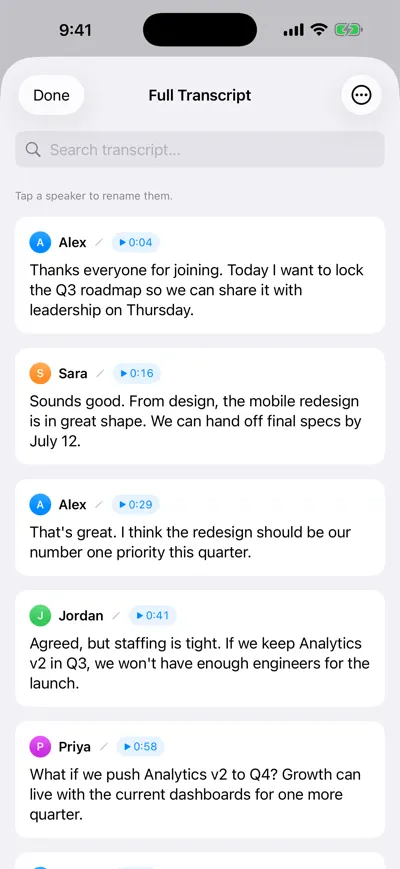
Transcript split by speaker with names on each line, playable timestamps and a search bar at the top

Find the quote, play the second

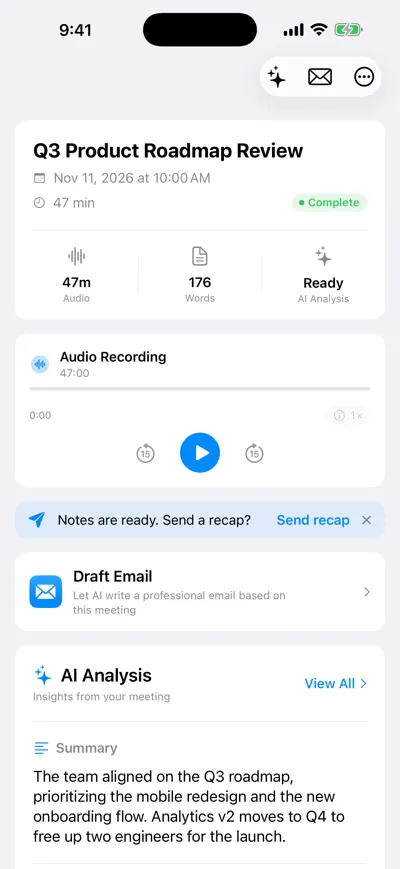
Recording page with an audio player showing the recording length, a Draft Email option and the AI analysis summary below

Audio and summary together

Reporters do not need an AI to write their story; they need the tape turned into text fast and accurately enough to quote from. An AI note taker for journalists should give you a transcript with timestamps, let you find a line in seconds, and make checking it against the audio effortless. AI Note Taker records on your iPhone or in a browser, imports files from a dedicated recorder, and keeps every interview searchable — while you keep editorial judgment.

A day with AI Note Taker on the beat

A local-news reporter covering a zoning dispute, with two interviews, a council meeting and a deadline at 18:00.

  1. 9:30 · Source interview

    Record in person, on the record

    Confirm the ground rules out loud at the start (“This is on the record and I’m recording, OK?”) so the agreement itself is in the transcript. Phone flat on the table between you.

  2. 11:00 · Phone interview

    Speaker on, second device recording

    For the developer’s spokesperson, put the call on speaker and record on a second device, or use the iPhone Phone app’s own recording and import the file afterwards.

  3. 13:00 · Council meeting

    Two hours, no typing

    Record the session in parts (iPhone recordings run up to 2 hours each). Mark the agenda item number on paper when the zoning vote starts so you can jump there later.

  4. 15:30 · Writing

    Search, quote, verify

    Search “variance” across the council transcript, copy the councillor’s line, then tap the timestamp and listen to confirm every word before it goes in.

  5. 17:30 · Fact-check

    Hand the editor timestamps

    List each direct quote with its recording and timestamp so the desk can check it in a minute. Ask the summary for every number mentioned to cross-check figures.

Reporting work it speeds up

The tool is for capture and retrieval. Here is where that saves the most time, and where you still need to slow down.

Source interviews

Record, then search the speaker-labeled transcript for the line you remember. Play from the timestamp to confirm wording, tone and context.

Example

A 48-minute interview with a tenant organiser: search “eviction” finds five passages; the strongest quote is at 31:12, confirmed against audio before filing.

AI transcripts mishear names, numbers and jargon. Never publish a direct quote you have not checked against the recording.
Press conferences and public meetings

Long, multi-speaker events are where manual transcription hurts most. Record in the room or import the official video (MP4, MOV and M4V up to 500 MB) and search it.

Example

Ask the council-meeting recording: “What did each member say before the zoning vote, and how did they vote?” and use the answer as a map to the passages you then verify.

In a large room with many speakers, speaker labels can blur. Note who is speaking on paper at key moments.

Background research calls

Not every conversation is for quotation. Recording background calls (with permission) means you can return to a detail weeks later when the story develops.

Example

Three months on, ask across all recordings on Pro: “Who mentioned the 2019 variance request?” — the answer lists the two calls where it came up.

Keep a clear record of each source’s attribution terms. The transcript captures what was said, not which parts were on background.

Podcasts and audio pieces

A searchable transcript is a quick way to build a paper edit: find the best moments by searching, note timestamps, then cut in your audio editor.

Example

From a 60-minute interview, a paper edit of seven clips with in and out timestamps, built from transcript search in about 20 minutes.

Time saved per interview

Reasoned estimates for a 45-minute interview, compared with transcribing by hand. Your speed will vary.

TaskBy handWith AI Note TakerSaved
Full transcription~3 h (about 4× real time for a fast typist)0 min of typing; transcript ready after recording~3 h
Finding the quotes you needScrubbing audio, ~30 minTranscript search, ~5 min~25 min
Verifying quotes against audio~10 min~10 min — do not skip this0
Pulling all numbers and claims for fact-check~20 minAsk for every figure mentioned, then verify, ~10 min~10 min

How we estimated this

  • Manual transcription at roughly four times the recording length is a common rule of thumb for clear one-on-one audio; noisy or multi-speaker audio takes longer.
  • Most reporters do not transcribe in full; if you only transcribe quotes, the saving is closer to 30–45 minutes per interview.
  • Verification time is deliberately unchanged: AI transcripts make it faster to find a quote, not safer to skip checking it.
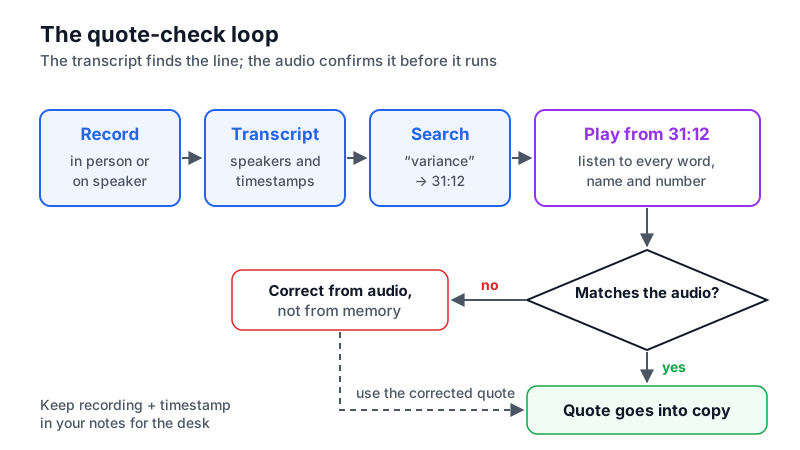
Flow diagram from recording to transcript search to playing the timestamp, and a check step where any mismatch is corrected from the audio before the quote goes into copy
The quote-check loop: the transcript finds the line, the audio confirms it.

Consent, source protection and limits

Recording is a reporting decision with legal and ethical sides. These are the ones to think through.

  • Know the consent rule where both of you are. Federal law allows one-party consent (18 U.S.C. § 2511(2)(d)), but about a dozen states — including California, Florida, Pennsylvania and Washington — require everyone’s consent. For calls across state lines, follow the stricter rule.
  • Protecting confidential sources. Recordings and transcripts in AI Note Taker are stored and processed in the cloud (Google Cloud, with Gemini models via Firebase and Vertex AI). For a source whose identity must be protected, consider whether a recording should exist at all, follow your newsroom’s security guidance, and delete it when you no longer need it.
  • AI summaries are not reporting. Use summaries to navigate a long recording, never as a source of quotes or facts.
  • English only, for now. Interviews in other languages will not transcribe correctly.
  • Phone calls need a workaround: speaker plus a second device, or the iPhone Phone app’s recording imported as a file.

Frequently asked questions

Try AI Note Taker on your next meeting

Recording and transcription are unlimited on the free plan, and your first AI analysis is included. No bot joins anything: it records on your iPhone or in your browser.