Glossary
What Is Speaker Diarization? A Plain-English Explanation
Updated · 6 min read
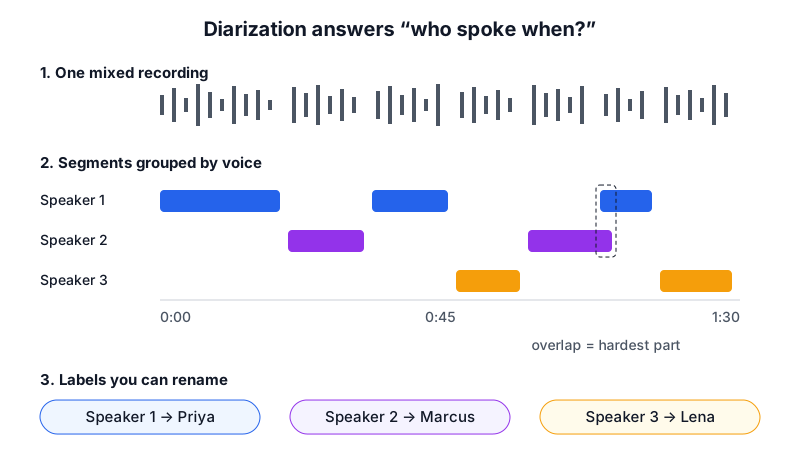
Speaker diarization is the process of splitting an audio recording into segments by speaker, answering the question “who spoke when?”. A diarization system does not know anyone’s name: it groups stretches of speech that sound like the same voice and labels them Speaker 1, Speaker 2, Speaker 3. Combined with speech-to-text, it turns one block of text into a transcript where every line is attributed to a speaker, which you can then rename to real people.
Speaker diarization meaning, in one example
Without diarization, a transcript of a three-person meeting is a single wall of text. With it, the same text is split into turns: “Speaker 1: Can we ship on the 15th? Speaker 2: QA still has 42 open tickets. Speaker 1: Then let’s push a week.” The word comes from “diary”: the system writes a log of who held the floor at each moment.
How speaker diarization works
Systems differ in detail, and many modern ones run several of these stages inside one neural network, but almost all do the same four jobs:
Find the speech
Voice activity detection separates speech from silence, music, typing and room noise, so only spoken audio is analyzed.
Cut it into short pieces
The speech is split at points where the voice seems to change, or simply into windows of a second or two.
Describe each voice
Each piece is turned into a “voiceprint”: a list of numbers (an embedding) that captures pitch, timbre and speaking style, not the words.
Group similar voices
Pieces with similar voiceprints are clustered together, and each cluster gets a label. The system also has to guess how many speakers there are, which is where many errors start.
The labels are then lined up with the timestamps from speech-to-text, so each sentence inherits the speaker who was talking at that moment. Some newer systems, including large AI models that take audio directly, transcribe and attribute speakers in one pass, and can also pick up names from context, such as “Thanks, Priya”.
Diarization vs speaker identification vs transcription
| Term | Question it answers | Output | Needs known voices? |
|---|---|---|---|
| Transcription (speech-to-text) | What was said? | Text | No |
| Speaker diarization | Who spoke when? | Speaker 1, Speaker 2 … with time ranges | No |
| Speaker identification | Which known person is this? | A name from an enrolled list | Yes, voice samples in advance |
| Speaker verification | Is this the person they claim to be? | Yes or no | Yes, one enrolled voice |
Meeting tools that join a call as a bot can often skip much of the guesswork by reading names from the video platform’s participant list. Tools that record from a device microphone, including botless note takers, rely on diarization from the audio alone. See AI note takers without a bot for that trade-off.
What affects diarization accuracy
| Factor | What goes wrong | Fix |
|---|---|---|
| Overlapping speech | Two people talk at once; the line goes to one of them or is split oddly | A facilitator who lets people finish; check overlaps by hand |
| Similar voices | Two speakers merged into one label | Use names when addressing people; rename and check both |
| Short turns | “Yes”, “right”, “mm-hm” are too short to fingerprint | Usually harmless; ignore unless it is a vote or agreement |
| Distance and echo | Far speakers sound alike and get merged | Put the device in the middle of the table, away from walls |
| Background noise | Noise treated as speech or masks voice differences | Close windows and doors, mute notifications, avoid cafés |
| One voice changing | Someone who moves, laughs or shouts is split into two speakers | Merge by giving both labels the same name |
| Many speakers | Quiet participants folded into louder ones | Above six to eight people, expect to review labels |
| Speakerphone or call audio | Remote voices are compressed and sound similar | Use computer speakers at moderate volume, not a tiny phone speaker |
Researchers measure this with the diarization error rate (DER): the share of time that is missed speech, false-alarm speech, or speech given to the wrong speaker. In practice, what matters is simpler: are decisions and action items attributed to the right person? A wrong label on “mm-hm” is noise; a wrong label on “I’ll send the contract Friday” creates a wrong action item.
Tips for better speaker labels
- Place one recording device centrally, about an arm’s length from the nearest speaker.
- Start with a quick round of introductions: “Hi, I’m Lena from finance.” It helps you, and AI that reads names from context.
- Address people by name when handing over (“Marcus, what do you think?”).
- Ask people not to talk over each other on decisions and votes.
- On calls, play remote audio through speakers, not headphones, so the device hears everyone.
- Rename speakers right after the meeting while you still remember the voices.
- Spot-check every decision and action item against the audio before sharing.
Speaker labels in AI Note Taker
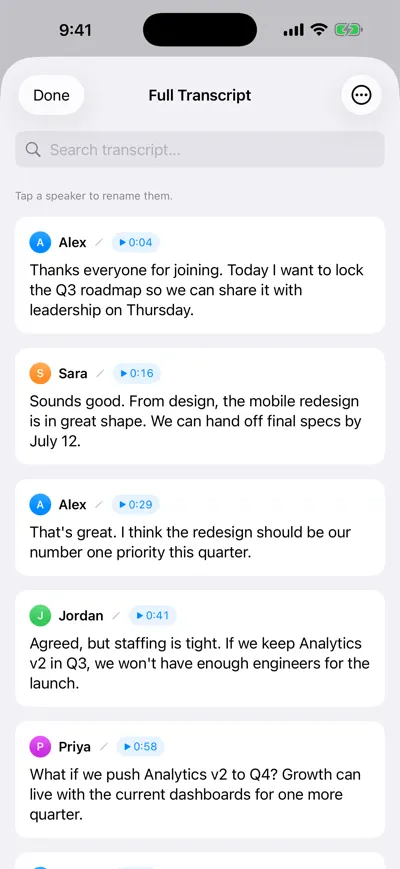
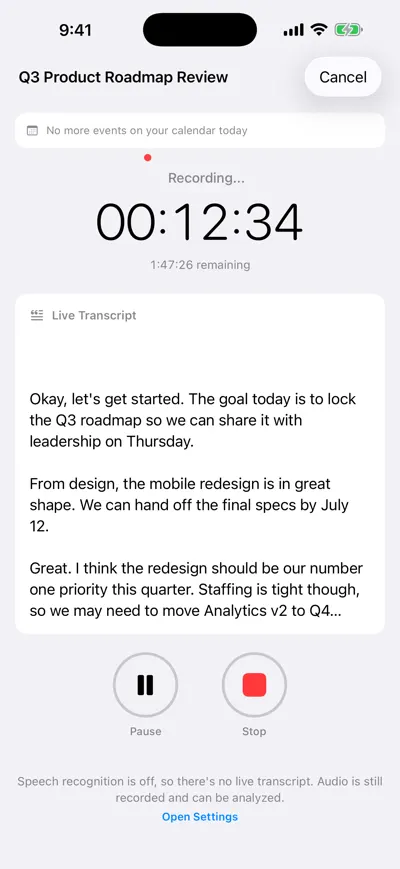
While you record, AI Note Taker shows a live transcript without speaker labels. When you run the AI analysis, the recording is processed again and the transcript is replaced by a speaker-labeled version, split into turns with a timestamp on each. Where people’s names come up in the conversation, the app suggests them for the matching speakers; otherwise you see Speaker 1, Speaker 2 and so on, each in its own color.
- Rename a speaker: on iPhone, open the full transcript and tap a speaker’s name; on the web, use the Speakers list above the transcript on the meeting page. The new name applies to every line by that speaker and syncs between devices.
- Your names win: if you rename a speaker, a later re-analysis keeps your name instead of the suggestion.
- Where names show up: in the transcript, in transcript search, in Markdown and PDF exports, and in the transcript Ask AI reads when you ask about a single meeting (a Pro feature).
- Plan note: speaker labels come with the AI analysis. The free plan includes unlimited recordings and transcriptions plus one AI analysis; Pro includes unlimited analyses.
Tap a speaker to rename them
Live transcript while recording
Related reading: meeting minutes vs notes, how to transcribe an in-person meeting and asking questions about a meeting transcript.
Frequently asked questions
Let AI take the notes for you
AI Note Taker records and transcribes your meetings, then writes the summary, decisions and action items. Free to start, no install needed.