Templates
Nonprofit Meeting Minutes Template for Members, PTAs, HOAs and Churches
Updated · 11 min read
A nonprofit meeting minutes template is the volunteer secretary’s checklist for recording what a membership meeting decided: whether a quorum was present, each motion as adopted and who made it, how the vote went, the results of any election, and when the meeting ended. This page covers the meetings of the wider membership, such as a PTA or PTO general meeting, an HOA annual meeting, a church congregational meeting or a club’s monthly meeting, where the rules on quorum, voting and elections differ from those for a small board. You’ll find Robert’s Rules basics in plain language, two copyable templates, a filled-in PTA example and a guide to the votes that need more than a simple majority.
Board minutes vs. membership meeting minutes
Many nonprofits hold two kinds of meetings. The board meets often and makes most decisions; our board meeting minutes guide covers that, including conflicts of interest and executive sessions. The membership (all PTA members, all homeowners, all voting church members, all club members) meets less often but holds the powers the bylaws reserve for it: electing the board or officers, adopting the budget, amending the bylaws, and sometimes approving large expenses. Membership meetings are bigger, less formal in tone, and more likely to have contested votes and elections, which changes what the secretary needs to capture.
| Organization | Typical membership meeting | Usual business | Watch out for |
|---|---|---|---|
| PTA | General membership meetings during the school year | Budget adoption, officer elections, approving fundraisers and expenses | PTAs are typically bound by state and national PTA bylaws as well as their own; only members who paid dues vote |
| PTO / booster club | Monthly or quarterly general meetings | Event plans, spending approvals, officer elections | Usually independent, so its own bylaws (if any) are the only rules; adopt Robert’s Rules as the default in them |
| HOA / condo association | Annual meeting of owners | Board elections, budget presentation, owner votes on matters reserved to owners | State statutes and governing documents often set notice, quorum, proxy and ballot rules |
| Church / congregation | Annual or special congregational meeting | Electing elders, deacons or council, adopting the budget, calling a pastor, property decisions | Denominational rules (a book of order or church constitution) may override general rules on who votes and how |
| Club / association | Monthly or annual general meeting | Dues, events, officer elections, bylaw changes | Whether non-members and guests may speak; record that they did not vote |
| Volunteer committee | Working meetings | Assignments and recommendations to the board | Committees usually recommend rather than decide; minutes can be short notes |
Robert’s Rules basics for the secretary
Most nonprofits name Robert’s Rules of Order Newly Revised (RONR, currently the 12th edition, 2020) as their parliamentary authority in the bylaws. RONR applies wherever your bylaws and any applicable law are silent. You do not need to know the whole book to take minutes. You need four things.
1. Quorum
Quorum is the minimum number of voting members who must be present for the meeting to do business. Your bylaws should set it, often as a number or a percentage (for example, “10 members” or “10% of members in good standing”). If they are silent, RONR’s default is a majority of the members, which is unreachable for most membership organizations, so check your bylaws before the meeting. Record in the minutes that a quorum was present, and if it is lost mid-meeting, record when and that no further business was transacted.
2. How a motion moves
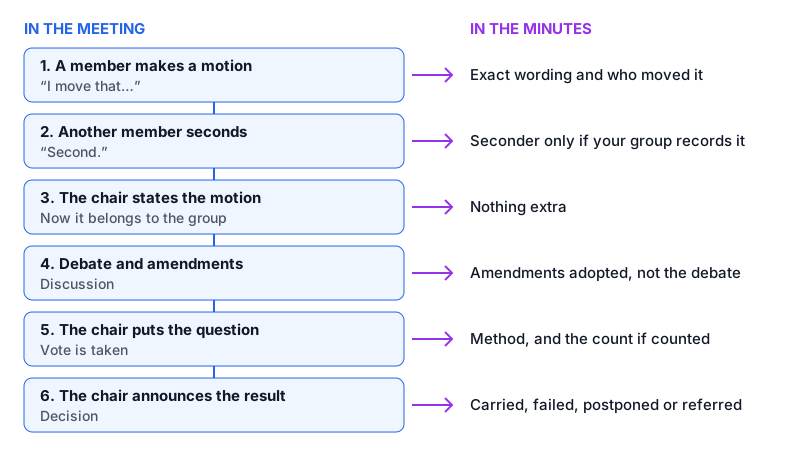
3. General consent
Many routine decisions are made without a formal vote: the chair says “If there is no objection, the minutes are approved as distributed,” pauses, and declares them approved. This is called general or unanimous consent. Record it as “approved by general consent” or “approved without objection”. If anyone objects, the chair takes a normal vote.
4. Vote thresholds
| Motion | What it does | Vote needed |
|---|---|---|
| Main motion | Brings new business, e.g. approve a budget or an event | Majority |
| Amend | Changes the wording of a pending motion | Majority |
| Refer to committee | Sends the question to a committee to study | Majority |
| Postpone to a later time | Delays the decision to a set meeting | Majority |
| Previous question (close debate) | Ends debate and moves to an immediate vote | Two-thirds |
| Limit or extend debate | Changes how long people may speak | Two-thirds |
| Suspend the rules | Temporarily sets aside a rule of procedure | Two-thirds |
| Rescind or amend something previously adopted | Cancels or changes an earlier decision | Two-thirds, or majority with previous notice |
| Amend the bylaws | Changes the governing rules | Usually two-thirds with previous notice (check your bylaws) |
| Adjourn | Ends the meeting | Majority |
Majority means more than half of the votes cast by members entitled to vote, not counting abstentions or blank ballots. With 41 votes for, 38 against and 6 abstentions, the motion carries (41 is more than half of 79). Your bylaws or state law can set a different rule (for example a majority of those present), so check before you announce results.
Nonprofit meeting minutes template (general membership)
This template works for a PTA, PTO, club or congregational meeting. Delete the sections you do not use. Under RONR, the seconder’s name is not required; include it only if your organization traditionally records it.
[ORGANIZATION NAME]
Minutes of the [Regular / Annual / Special] Membership Meeting

Date: [Date]   Time: [Start]   Place: [Location / video link]
Presiding: [Name], [President / Chair]   Secretary: [Name]
Members present: [#] (sign-in sheet attached)   Quorum required: [#] — Quorum present
Guests: [#] (non-voting)
Notice: [Sent / posted] on [date] as required by the bylaws.

1. CALL TO ORDER at [time] by [Name].
2. MINUTES of [previous meeting date]: approved [by general consent / as corrected: ...].
3. TREASURER'S REPORT: Balance on [date] $[ ]; income $[ ]; expenses $[ ].
   Placed on file for audit. (Treasurer's reports are not "approved".)
4. OFFICER AND COMMITTEE REPORTS
   - [Committee]: [one-line summary]. [Recommendation, if any, handled under 6.]
5. UNFINISHED BUSINESS
   - [Item postponed from last meeting]: [action taken]
6. NEW BUSINESS
   Motion by [Name]: "[wording as adopted]"
   [Amended to: "..." — amendment by [Name], adopted.]
   Vote: [voice / show of hands / counted: [#] for, [#] against] — [Carried / Failed]
   Motion by [Name]: "[wording]" — [Referred to [committee], report due [date]]
7. ELECTIONS (if held): see tellers' report below.
8. ANNOUNCEMENTS: [dates, events]
9. ADJOURNMENT at [time].

[Name], Secretary            Approved on: [date of approval]

TELLERS' REPORT (ballot elections, entered in full)
Office: [ ]   Number of votes cast: [#]   Necessary for election: [#]
   [Candidate A]: [#]   [Candidate B]: [#]   Illegal/blank: [#]
Declared elected: [Name]
HOA annual meeting minutes template
An HOA’s annual meeting of owners usually exists to elect directors and present the budget. Quorum is often counted by lots or units (or by voting interest) rather than by people, and proxies or absentee ballots may count toward it, depending on your governing documents and state law.
[ASSOCIATION NAME]
Minutes of the Annual Meeting of the Members

Date: [Date]   Time: [Time]   Place: [Clubhouse / video link]
Presiding: [Name], President   Recording: [Name], Secretary / [Manager]
Notice mailed/emailed to all owners on [date] per [section of bylaws / statute].

QUORUM: [#] of [#] lots represented ([#] in person, [#] by proxy / absentee ballot).
Required: [#]% — Quorum [present / not present].
[If not present: meeting adjourned to [date] per bylaws; no business conducted.]

1. CALL TO ORDER at [time]; introduction of board and management.
2. MINUTES of the [year] annual meeting: approved [by general consent / vote].
3. PRESIDENT'S REPORT: [one-line summary]. (Attached.)
4. FINANCIAL REPORT: Operating fund $[ ]; reserve fund $[ ];
   [year] budget presented: assessment $[ ] per [month/quarter]. (Attached.)
5. ELECTION OF DIRECTORS — [#] seats, [#] candidates
   Inspectors of election: [Names]
   Ballots cast: [#] (incl. [#] absentee / proxy). Results:
   [Candidate]: [#]   [Candidate]: [#]   [Candidate]: [#]
   Elected for [term]: [Names]
6. OWNER VOTES on matters reserved to owners (if any)
   "[Wording]" — For [#] Against [#] — [Carried / Failed] ([threshold required])
7. OWNER FORUM: [#] owners spoke on [topics]. No action taken.
8. ADJOURNMENT at [time].

Secretary: ______________________   Approved: [date]
Filled-in example: PTA general meeting minutes
LINCOLN ELEMENTARY PTA
Minutes of the Regular Membership Meeting

Date: November 5, 2026   Time: 6:30 pm   Place: School library and Zoom
Presiding: Rosa Delgado, President   Secretary: Kevin Tran
Members present: 47 (sign-in sheet and Zoom list attached)
Quorum required: 15 — Quorum present
Guests: 6 (non-voting), incl. Principal A. Novak
Notice: Emailed to members and posted on the PTA website on October 22.

1. CALL TO ORDER at 6:32 pm by R. Delgado.
2. MINUTES of October 1: approved by general consent.
3. TREASURER'S REPORT: Balance on October 31 $18,420; income $6,210
   (fall fundraiser); expenses $2,115. Placed on file for audit.
4. PRINCIPAL'S REPORT: New reading room opens January 12.
5. COMMITTEE REPORTS
   - Fall Festival: 410 attendees, net $4,880.
   - Budget Committee: recommends funding classroom grants (see 6a).
6. NEW BUSINESS
   a. Motion by M. Okafor (Budget Committee): "To spend up to $3,000 on
      classroom grants of $150 per teacher for the 2026–27 school year."
      Amended to "$200 per teacher, up to $4,000" — amendment by J. Reyes, adopted.
      Vote on the motion as amended, show of hands: 39 for, 5 against.
      Carried.
   b. Motion by L. Chen: "To hold a spring fun run on April 18, 2027."
      Referred to the Events Committee, report due at the January meeting.
   c. Motion by D. Patel to close debate on 6b (previous question): 28 for,
      19 against. Failed (two-thirds required: 32).
      (Debate continued; motion 6b then referred as above.)
7. ELECTIONS: Ballot election to fill the vacant Vice President office.
   TELLERS' REPORT — Ballots returned: 46   Blank: 1 (not counted)
   Votes cast: 45   Necessary for election: 23
   S. Ahmed: 29   P. Wallace: 16
   S. Ahmed declared elected Vice President.
8. ANNOUNCEMENTS: Book fair December 7–11; next meeting January 14, 2027.
9. ADJOURNMENT at 7:58 pm.

Kevin Tran, Secretary            Approved on: January 14, 2027
Note three details. The amendment is recorded but the debate around it is not. The failed motion to close debate shows the two-thirds threshold (28 of 47 votes cast was not enough). And because RONR does not count blank ballots as votes cast, the tellers’ report lists the blank ballot but bases the majority (23) on 45 votes cast. The secretary does not record who said what during the 20-minute discussion of the grants.
From meeting to approved minutes
Before the meeting
Get the agenda, the bylaws’ quorum rule and the member list or sign-in sheet. Pre-fill the template with agenda items. If you also prepare the agenda, use the meeting agenda template.
During the meeting
Write down motions word for word as adopted, the mover, vote counts when votes are counted, and times. If a motion is unclear, ask the chair to restate it before the vote; that is a normal request.
Draft within a few days
Type up the minutes while your memory and notes are fresh. Attach the treasurer’s report, committee reports and the tellers’ report rather than retyping them.
Share the draft
Send it to the president to check accuracy, then to members marked “Draft” according to your custom. Some groups publish drafts; others only share them at the next meeting.
Approve at the next meeting
The membership approves the minutes, with corrections if needed, usually by general consent. Write the approval date on the final version and sign it.
Keep them permanently
Approved minutes are the organization’s official history. Store them in a shared folder or minute book that survives volunteer turnover, so next year’s secretary can find them.
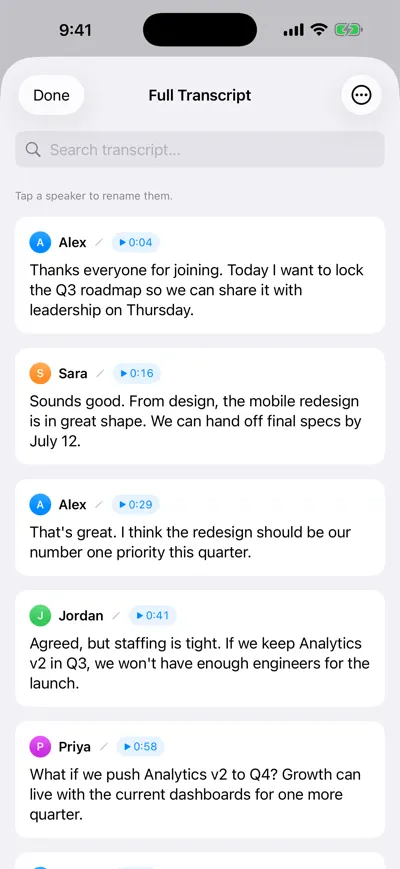
Check exact motion wording
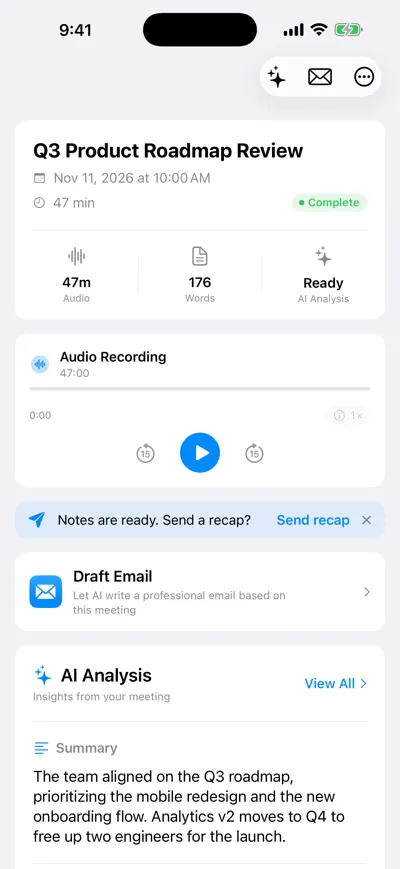
Summary as a first draft
For less formal working meetings, the general meeting minutes template is enough; for the difference between formal minutes and ordinary notes, see meeting minutes vs. notes.
Frequently asked questions
Let AI take the notes for you
AI Note Taker records and transcribes your meetings, then writes the summary, decisions and action items. Free to start, no install needed.