Templates
Retrospective Meeting Template: 4 Retro Formats With Timings
Updated · 11 min read
A retrospective meeting template gives the team a fixed shape for looking back: set the stage, gather data, find the causes, decide what to change, close. The format (Start/Stop/Continue, 4Ls, Sailboat or Mad/Sad/Glad) only changes the questions in the “gather data” step. Below are all four as copyable templates, a minute-by-minute plan for 45 and 60 minute retros, a filled-in example from a real-looking sprint, and a notes template that turns the retro into two or three changes someone actually owns.
The five phases every retrospective meeting template shares
Most agile teams run retros on the five-phase structure popularized by Esther Derby and Diana Larsen’s book Agile Retrospectives. It works for scrum sprints, marketing campaigns, a product launch or a quarter of client work. Use it as the skeleton, then drop in whichever format you choose for phase 2.
| Phase | What happens | 45 min retro | 60 min retro |
|---|---|---|---|
| 1. Set the stage | Restate the goal, the prime directive, a one-word check-in | 3 min | 5 min |
| 0. Review last actions | Did last retro’s actions happen? Keep, finish or drop each | 4 min | 5 min |
| 2. Gather data | Silent writing in the chosen format, then each person posts and reads briefly | 12 min | 15 min |
| 3. Generate insights | Group notes into themes, dot vote, discuss the top 2–3 themes: why did this happen? | 14 min | 20 min |
| 4. Decide what to do | Turn the top themes into 1–3 actions with an owner and date | 8 min | 10 min |
| 5. Close | Read back actions, one-line feedback on the retro itself | 4 min | 5 min |
Notice where the time goes: phase 3 gets the largest share. A common failure is spending 25 minutes reading every sticky note aloud and then rushing the actions in the last three. If time is short, cut the read-out (people can read the board silently) rather than the discussion.
Which retro format to use when
| Format | Best for | Prompts | Watch out for |
|---|---|---|---|
| Start / Stop / Continue | Routine sprint retros, new teams, quick 30-minute slots | What should we start, stop, keep doing? | Gets stale after 4–5 uses in a row |
| 4Ls | End of a project or quarter, learning-heavy work | Liked, Learned, Lacked, Longed for | “Learned” items rarely become actions; ask “so what?” |
| Sailboat | Before a big milestone, teams that need to talk about risk | Wind, Anchor, Rocks, Island | Takes 10 minutes longer; needs a drawn board |
| Mad / Sad / Glad | After a stressful sprint, incident or reorg | What made you mad, sad, glad? | Can become venting; steer to causes in phase 3 |
Rotate formats every few sprints. The point isn’t novelty for its own sake: a different question shakes loose different answers. A team that only ever asks “what should we stop?” will keep listing the same three annoyances.
Four retrospective templates you can copy
Each template below is a full retro plan, not just the column headings. Paste it into your board, doc or the calendar invite, and replace the bracketed parts.
1. Start, Stop, Continue retro (45 min)
RETRO — [Team], Sprint [#] ([dates]) — 45 min
Facilitator: [Name]   Note-taker: [Name]
Goal: pick up to 3 changes for next sprint.

0:00  Set the stage (3 min)
      Prime directive. Check-in: one word for this sprint.
0:03  Last retro's actions (4 min)
      [Action] — [Owner] — done / partly / not done → keep, finish, drop
0:07  Gather data, silent writing (7 min), then post (5 min)
      START     — what should we begin doing?
      STOP      — what is wasting time or causing problems?
      CONTINUE  — what is working and must not get lost?
0:19  Group and dot vote, 3 votes each (4 min)
0:23  Discuss top themes: why is this happening? (10 min)
0:33  Actions (8 min)
      [Action] — [Owner] — [Check date]
0:41  Close (4 min)
      Read back actions. Rate this retro 1–5 and one thing to change.
2. 4Ls retro: Liked, Learned, Lacked, Longed for (60 min)
RETRO — [Project / quarter] — 60 min
Facilitator: [Name]   Note-taker: [Name]
Goal: capture lessons and decide what we do differently next time.

0:00  Set the stage (5 min) — timeline of the project on screen
0:05  Last retro's actions (5 min)
0:10  Silent writing, 8 min, one idea per note:
      LIKED       — what did you enjoy or think went well?
      LEARNED     — what do you know now that you didn't before?
      LACKED      — what was missing (people, info, tools, time)?
      LONGED FOR  — what do you wish had existed?
0:18  Post and read briefly (7 min)
0:25  Group, dot vote (5 min)
0:30  Discuss top 3 themes (15 min)
      For each LEARNED item ask: so what will we do with it?
0:45  Actions, max 3 (10 min)
      [Action] — [Owner] — [Check date]
0:55  Close (5 min)
3. Sailboat retro (60 min)
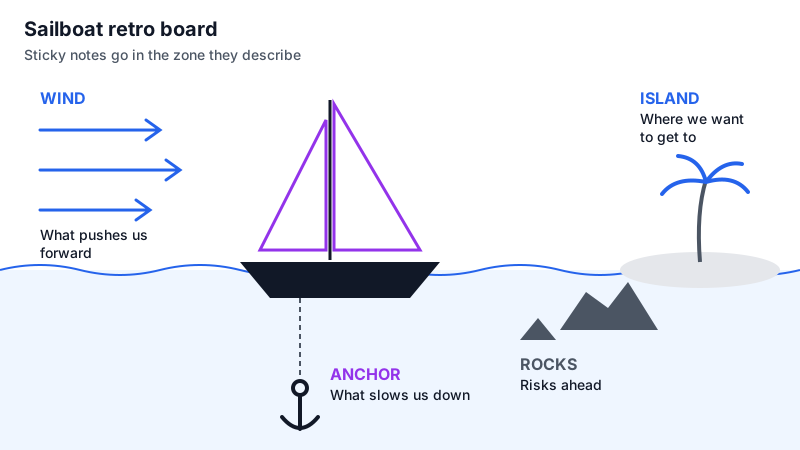
RETRO — [Team], before [milestone] — 60 min
Facilitator: [Name]   Note-taker: [Name]

0:00  Set the stage (5 min)
      Write the ISLAND first, together: where are we trying to get to?
      Island: [e.g. "v2 live for all customers by March 1"]
0:05  Last retro's actions (5 min)
0:10  Silent writing (8 min), then place notes (7 min)
      WIND    — what is pushing us toward the island?
      ANCHOR  — what is holding us back right now?
      ROCKS   — what risks could sink us before we arrive?
0:25  Group and dot vote: anchors and rocks only (5 min)
0:30  Discuss the top 2 anchors and top rock (15 min)
      Anchor: why is it there? Can we cut it, or only lighten it?
      Rock: how likely, how bad, what's our early warning sign?
0:45  Actions (10 min)
      [Action] — [Owner] — [Check date]
      Risk to watch: [Rock] — [Owner] — [Signal]
0:55  Close: one way to strengthen the wind (5 min)
4. Mad, Sad, Glad retro (45 min)
RETRO — [Team], after [sprint / incident / change] — 45 min
Facilitator: [Name, ideally from outside the team]   Note-taker: [Name]

0:00  Set the stage (4 min)
      Prime directive. Ground rule: talk about events, not people.
0:04  Silent writing (6 min), then post (5 min)
      MAD   — what frustrated you or felt unfair?
      SAD   — what disappointed you or could have gone better?
      GLAD  — what made you happy or proud?
0:15  Read GLAD first, aloud (3 min)
0:18  Group MAD + SAD into themes, dot vote (4 min)
0:22  Top 2 themes: what caused this? what's in our control? (13 min)
0:35  Actions (6 min)
      [Action] — [Owner] — [Check date]
      Escalate (outside our control): [Item] — [Who raises it, with whom]
0:41  Close: one appreciation each (4 min)
Filled-in example: a Start, Stop, Continue retro
Here is what the notes look like after a real-sized retro: a six-person product team at the end of a two-week sprint where a release slipped by three days. Note that the raw sticky notes are summarized into themes; nobody needs a transcript of all 31 notes.
RETRO — Checkout team, Sprint 42 (Oct 27 – Nov 7, 2026) — 45 min
Facilitator: Jonas   Note-taker: Mei   Present: 6 of 6
Check-in words: "rushed", "proud", "tired", "ok", "messy", "relieved"

LAST RETRO'S ACTIONS
- Add staging smoke test to CI — Arjun — DONE (caught 2 bugs this sprint)
- Cap WIP at 3 tickets per person — Sofia — PARTLY (ignored in week 2) → keep

THEMES (votes)
1. Late design changes after dev started (9 votes)
   START: design sign-off before a ticket enters the sprint
   Cause: 2 tickets were pulled in mid-sprint at the PM's request;
   the specs were still drafts.
2. Release day is manual and stressful (7 votes)
   STOP: releasing on Friday afternoons
   Cause: release checklist lives in one person's head (Arjun).
3. Pairing on the payment bug worked well (5 votes)
   CONTINUE: pair on anything touching payments

ACTIONS
1. Add "design approved" to Definition of Ready — Lena (PM) — Nov 14
2. Write the release checklist into the repo; no releases after
   Thu 3pm — Arjun — Nov 18
3. Keep WIP cap; Sofia posts WIP count in standup daily — Sofia — next retro

RETRO RATING: avg 4.1/5. Feedback: "voting took too long, use 2 votes"
Three things make these notes useful later. Each theme names a cause, not just a symptom. Each action is small enough to finish before the next retro. And last retro’s actions are tracked with an honest status, so the team can see retros lead somewhere.
Retrospective notes template
Whatever the format, the output should fit on one page. This is the version to paste into your team wiki or send as a recap after the retro.
RETRO NOTES — [Team], [Sprint / period] — [Date]
Format: [Start/Stop/Continue | 4Ls | Sailboat | Mad/Sad/Glad]
Facilitator: [Name]   Note-taker: [Name]   Present: [#] of [#]

PREVIOUS ACTIONS
- [Action] — [Owner] — [Done / Partly / Not done] — [Keep / Drop]

TOP THEMES (with vote counts)
1. [Theme] ([votes]) — cause: [one line]
2. [Theme] ([votes]) — cause: [one line]
3. [Theme] ([votes]) — cause: [one line]

ACTIONS (max 3)
1. [Action] — [Owner] — [Due / check date]
2. [Action] — [Owner] — [Due / check date]

ESCALATIONS (outside the team's control)
- [Item] — raised by [Name] with [Who] — by [Date]

KEPT ON PURPOSE (what worked)
- [Item]

RETRO FEEDBACK: [rating, one suggestion]
How to facilitate a retro that changes something
Separate the facilitator from the manager
If the team lead runs the retro, people soften what they say. Rotate facilitation among team members, or swap facilitators with a neighbouring team once a quarter.
Write silently before anyone speaks
Silent writing for 5–8 minutes stops the loudest person from setting the agenda. One idea per note, and ask for at least three notes each.
Ask “why” at least twice per theme
“Release was stressful” is a symptom. “Because the checklist lives in Arjun’s head” is a cause you can act on. Keep asking until you reach something the team controls.
Cap actions at three
Ten actions means none get done. Pick the two or three with the biggest votes and a willing owner, and park the rest in the notes.
Make actions visible between retros
Put retro actions on the sprint board or in the weekly team meeting agenda, not only in the retro doc. Check them first thing in the next retro.
Retro health check
- Everyone wrote notes silently before discussion started.
- More time went to causes than to reading notes aloud.
- Every action has exactly one owner and a date.
- There are three or fewer actions.
- Last retro’s actions were reviewed with an honest status.
- Notes were shared within a day, in the same place as last time.
Recording retros and tracking actions over time
Retros are one of the few meetings where people sometimes prefer not to be recorded, so ask first and respect a no. If the team agrees, a recording frees the note-taker to take part, and the transcript is useful for the facilitator to check that the themes in the notes match what was actually said.
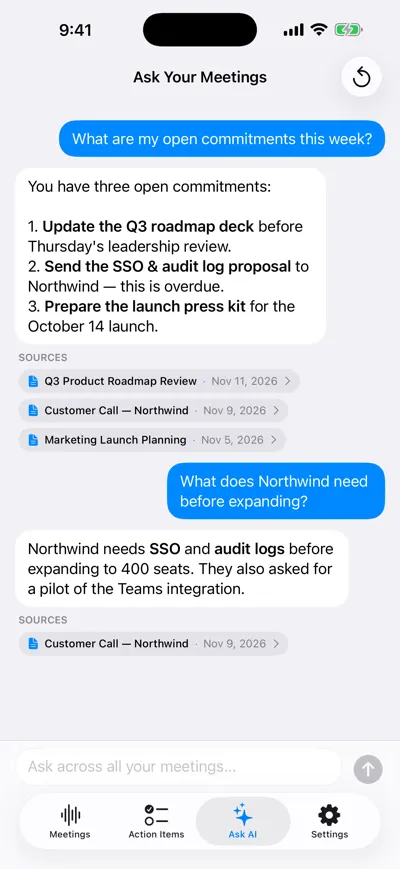
Ask across past retros
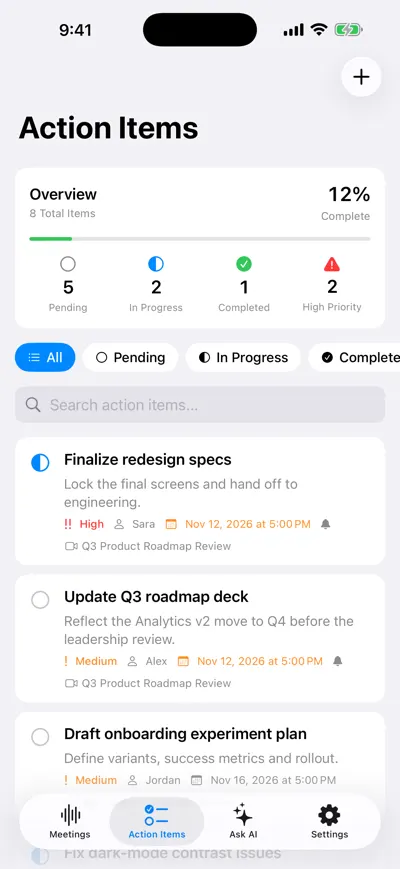
Retro actions with owners
For a retro that sits inside quarterly planning, use the planning agenda in our meeting agenda template guide. For generating ideas rather than reviewing the past, see the brainstorming meeting template.
Frequently asked questions
Let AI take the notes for you
AI Note Taker records and transcribes your meetings, then writes the summary, decisions and action items. Free to start, no install needed.