Templates
Weekly Team Meeting Template: Agenda, Notes and Rotating Roles
Updated · 8 min read
A good weekly team meeting template is a running document: one agenda that teammates add to during the week, a fixed 30-minute running order (wins, metrics, last week’s actions, two or three topics, FYIs, wrap-up), and notes written into the same doc so next week starts where this week ended. Below you’ll find that agenda, the notes doc, a rotating-roles schedule so the manager isn’t always running the show, a filled-in example and a quick diagnosis for weekly meetings that have gone stale.
How a weekly team meeting differs from other recurring meetings
Teams often run three recurring meetings and blur them together. Each has a different job, and the weekly meeting is the only one where the whole team makes decisions together.
| Meeting | Purpose | Typical length | Template |
|---|---|---|---|
| Daily standup | Coordinate today’s work, surface blockers | 10–15 min | Standup notes |
| Weekly status meeting | Report progress to a lead or stakeholder | 30 min | Agenda templates |
| Weekly team meeting | Share context, decide team-wide questions, keep commitments visible | 30–45 min | This page |
| One-on-one | Individual growth, feedback, private concerns | 30 min | 1:1 template |
If your team already has a daily standup, the weekly meeting should not repeat it. Skip the round of individual updates entirely and use the time for the topics that need more than one person to resolve.
Weekly team meeting agenda (30 minutes)
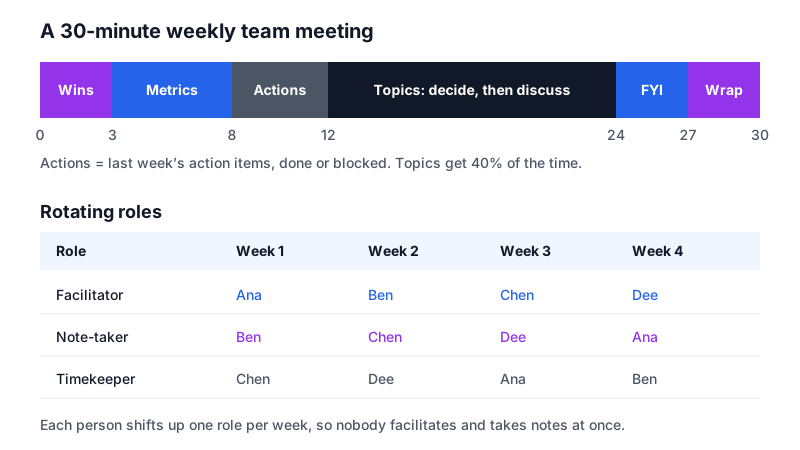
| Minute | Block | Who | Rule |
|---|---|---|---|
| 0–3 | Wins | Anyone | One sentence each, no more than three wins |
| 3–8 | Metrics | Metric owner | Two or three numbers vs. target; explain only what moved |
| 8–12 | Last week’s action items | Facilitator | Done, blocked or dropped. No status stories |
| 12–24 | Topics | Topic owners | Decide items first, then discuss items |
| 24–27 | FYI | Anyone | Only items people must act on; the rest stay written |
| 27–30 | Wrap-up | Note-taker | Read back decisions and new action items |
[TEAM] WEEKLY — [Day], [Date], [Time] (30 min)
Facilitator: [Name]   Note-taker: [Name]   Timekeeper: [Name]
Written updates: posted in #[channel] by [day, time] — read before joining

1. WINS (3 min)
   - [Win] — [Name]

2. METRICS (5 min) — [Metric owner]
   - [Metric]: [this week] vs target [ ] ([up/down] because ___)

3. LAST WEEK'S ACTION ITEMS (4 min)
   - [Action] — [Owner] — done / blocked / dropped

4. TOPICS (12 min) — added by [cut-off day, time]; max 3
   a. DECIDE: [question] — [Owner] — [min]
   b. DISCUSS: [question] — [Owner] — [min]
   c. [ ]

5. FYI (3 min)
   - [Item that needs action from someone]

6. WRAP-UP (3 min) — [Note-taker]
   Decisions, new action items, next week's roles
The cut-off for topics matters. Ask people to add topics by the day before, with a question and an owner. A topic that arrives without a question (“hiring”) gets bumped until it has one (“Do we open the second backend role now or in January?”).
Running notes doc for the weekly meeting
Instead of a new document each week, keep one doc per quarter. Add each meeting at the top, so the latest is always first and older weeks are a scroll away. Pin the open action items and the decision log above the meetings; those are the parts people search for.
[TEAM] WEEKLY MEETING — [Quarter, Year]
Recurring: [Day, time]   Link: [ ]   Rotation: see bottom

OPEN ACTION ITEMS (carry forward until done or dropped)
| Action | Owner | Due | Raised on | Status |
|--------|-------|-----|-----------|--------|
|        |       |     |           |        |

DECISION LOG
| Date | Decision | Decided by | Context link |
|------|----------|------------|--------------|
|      |          |            |              |

────────────────────────────────────────
[DATE] — Facilitator [ ] · Notes [ ] · Time [ ]
Present: [ ]   Away: [ ]

Wins:
Metrics:
Action review: (update the table above)
Topics:
  a. [Question] — [Owner]
     Notes:
     Decision / next step:
FYI:
New action items: (add to the table above)
────────────────────────────────────────
[PREVIOUS DATE] ...

ROTATION
| Week of | Facilitator | Note-taker | Timekeeper |
|---------|-------------|------------|------------|
Filled-in example: one week of notes
A five-person customer support team, week 46. Notice how short each section is. The value comes from the decision and action entries, which also get copied into the tables at the top of the doc.
NOV 12, 2026 — Facilitator Chen · Notes Dee · Time Ana
Present: Ana, Ben, Chen, Dee, Ola (manager)   Away: none

Wins
- Ben's macro for refund requests cut handle time on those by ~40%.
- CSAT comment: "Fastest answer I've had from any vendor" (ticket 88213)

Metrics (Ola)
- First response time: 3h 10m vs target 2h — up, because of the
  Monday outage spike (410 tickets in 6 hours)
- CSAT: 92% vs target 90%
- Backlog > 48h old: 37 (last week 12)

Action review
- Draft outage reply template — Ana — DONE, used Monday
- Ask product for status-page access — Ola — BLOCKED, follow up Thu
- Tag audit of October tickets — Ben — DROPPED (superseded by new tags)

Topics
a. DECIDE: Do we add a Saturday shift until the backlog is < 15?
   (Chen, 7 min)
   Decision: yes, for 3 weekends; volunteers Ben + Dee, paid as overtime.
   Ola to confirm budget by Friday.
b. DISCUSS: Outage communication: what slowed us down Monday? (Ana, 5 min)
   - No single owner for status-page updates
   - Engineers' Slack channel too noisy to follow
   Next step: Ana proposes an outage role card at next week's meeting.

FYI
- Holiday rota sheet closes Nov 20 — everyone add dates.

New action items
- Confirm Saturday overtime budget — Ola — Nov 14
- Outage role card proposal — Ana — Nov 19
- Status-page access follow-up — Ola — Nov 13

Next week: Facilitator Dee · Notes Ana · Time Ben
Rotating roles: tips that make it stick
When the manager facilitates every week, the meeting turns into a report to the manager. Rotating the three roles spreads ownership, lets the manager listen and contribute like everyone else, and gives quieter teammates practice running a room.
| Role | Before the meeting | During | After |
|---|---|---|---|
| Facilitator | Trims the topic list to three; checks each has a question and an owner | Keeps the order, calls time, asks for a decision | Hands the doc to next week’s facilitator |
| Note-taker | Copies the template block into the doc | Writes decisions and actions, not a transcript | Updates the action and decision tables within the hour |
| Timekeeper | Sets timers for each block | Gives a one-minute warning; offers “decide now or park?” | Notes which blocks overran, for the next retro |
- Shift by one each week. List the team in a fixed order; each week every person moves to the next role. Nobody facilitates and takes notes in the same meeting.
- Publish the rotation for the quarter at the bottom of the running doc so swaps are arranged ahead, not five minutes before.
- Include the manager in the rotation as note-taker and timekeeper too. It signals the roles are real work, not chores.
- Give new people the timekeeper role first. It is the easiest way to learn the meeting’s rhythm.
- Let the facilitator say no. A topic without a question or an owner gets bumped to next week. The facilitator needs explicit permission to do this.
Fixing a weekly meeting that has gone stale
| Symptom | Likely cause | Fix |
|---|---|---|
| Everyone reads their status aloud | No written updates | Require written updates by the day before; drop the round |
| Same action items appear for weeks | Nobody reviews them, or they are too big | Review them in the first 10 minutes; split anything older than two weeks |
| Meeting ends early with nothing decided | No topics submitted | Cancel when the topic list is empty; post wins and metrics in writing |
| Meeting always overruns | Too many topics, no timekeeper | Cap at three topics; timekeeper calls “decide now or park?” |
| People join late or on mute | Meeting doesn’t feel useful | Run a short retrospective on the meeting itself |
It is fine to cancel. If the topic list is empty at the cut-off, the facilitator posts wins and metrics in the channel and gives the team 30 minutes back. A weekly meeting that runs every week regardless teaches people its time isn’t valuable.
Recording the weekly meeting
The note-taker role works better when the note-taker can also take part. If the team agrees, record the meeting and let the note-taker fill the doc from the summary afterwards instead of typing during the discussion.
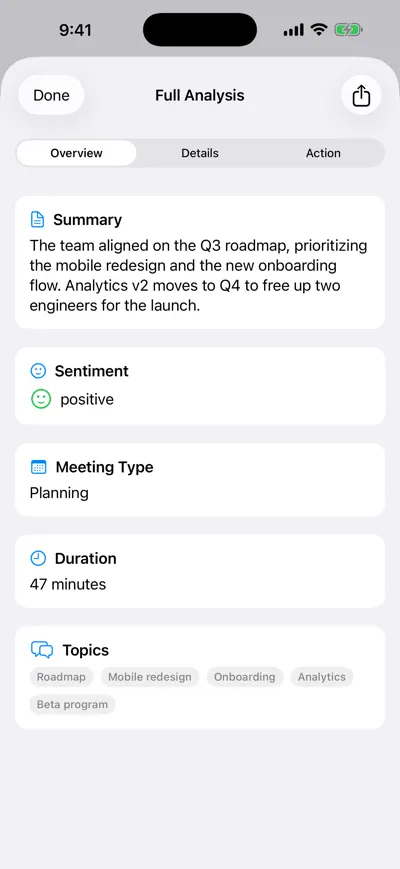
Summary for the notes doc
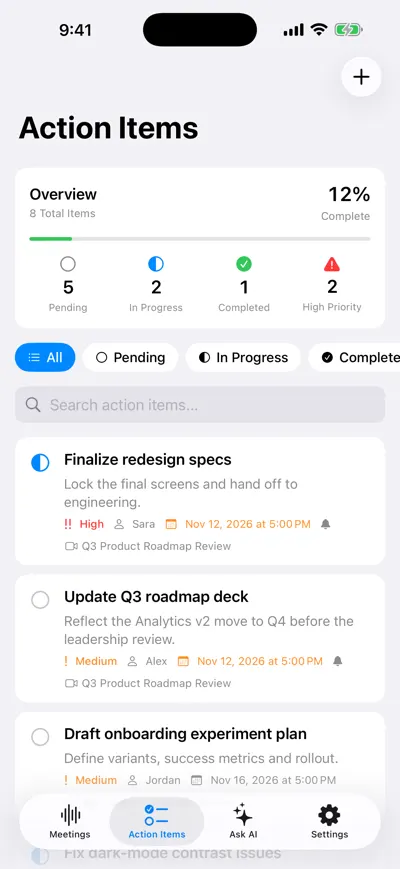
Open items for next week
Frequently asked questions
Let AI take the notes for you
AI Note Taker records and transcribes your meetings, then writes the summary, decisions and action items. Free to start, no install needed.