Templates
All-Hands Meeting Template: Agenda, Run of Show and Recap Post
Updated · 10 min read
An all-hands meeting template has three parts: the agenda everyone sees, the run of show only the organizers see (who is on stage, when, with which slides, and what happens if something breaks), and the recap post that goes out afterwards for people who could not attend. Below you’ll find all three as copyable templates, a timed 60-minute plan in which live Q&A gets the biggest single block, a playbook for handling hard questions, and a filled-in example from a 120-person company.
What an all-hands meeting is for
An all-hands (also called a town hall or company meeting) is the one meeting where everybody hears the same thing at the same time. That makes it good for three things and bad for most others. It is good for context (where the company is against its goals and why), alignment (what matters most next quarter, and what we are not doing) and trust (leaders answering real questions in public). It is bad for detailed status updates, decisions that need debate, and anything that only matters to one team: those belong in a weekly team meeting or a written update.
| Company size | Cadence | Length | Q&A share | What changes |
|---|---|---|---|---|
| Under 30 people | Weekly or every two weeks | 30 min | 30–40% | Informal, one screen share, questions asked out loud |
| 30–200 people | Monthly | 45–60 min | 25–35% | Pre-submitted questions, a host, team spotlights |
| 200–1,000 people | Monthly or quarterly | 60 min | 25–30% | Producer role, moderated Q&A tool, recorded for other time zones |
| 1,000+ people | Quarterly, plus regional meetings | 60–90 min | 20–30% | Rehearsals, live captions, a written FAQ published the same day |
If your company spans time zones, alternate the slot (one month Americas-friendly, the next Europe or APAC-friendly) instead of always asking the same people to join at 7 pm. Whoever cannot attend live should get the recording and the written recap the same day.
All-hands meeting agenda template (60 minutes)
This is the version employees see in the calendar invite. It tells them what will be covered, roughly when, and how to submit questions. The timings add up to 60 minutes.
[Company] All-Hands — [Date], [Time + time zone], 60 min
Where: [Room] + [video link]   Recording and recap posted in [channel] within 24 h
Ask your questions here by [day, time]: [form or Q&A tool link] (anonymous allowed)

This month's one message: [one sentence]

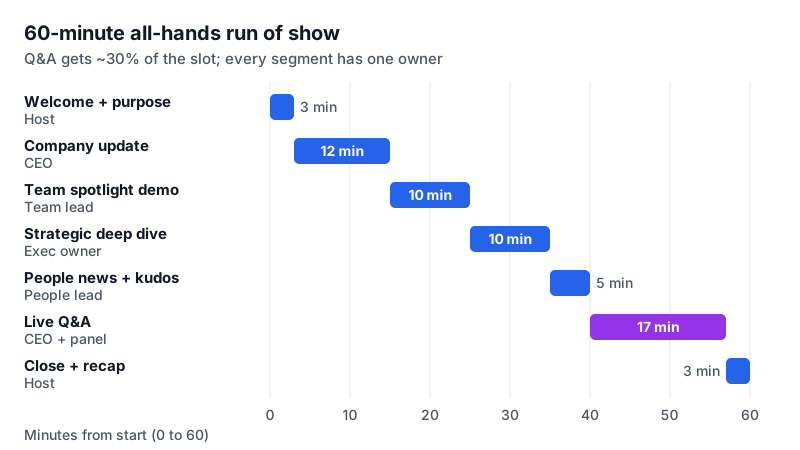
0:00  Welcome and what today is about (3 min) — [Host]
0:03  Company update: goals vs. actuals, what changed (12 min) — [CEO]
0:15  Team spotlight: [team] demos [project] (10 min) — [Team lead]
0:25  Deep dive: [one strategic topic] (10 min) — [Exec owner]
0:35  People news: new joiners, kudos, open roles (5 min) — [People lead]
0:40  Live Q&A: top-voted questions first (17 min) — [CEO + panel]
0:57  Close: three things to remember (3 min) — [Host]
Run of show: the organizer’s version
The run of show is a private, minute-by-minute script for the host and whoever produces the meeting. It answers the questions that otherwise get solved live and badly: who shares their screen, who unmutes, what happens if the CEO’s connection drops, and who watches the clock. For anything over about 50 people, give one person the producer role. They do not present; they run the tech, cue speakers and hold up the time signals.
RUN OF SHOW — [Company] All-Hands, [Date]
Host: [Name]   Producer: [Name]   Q&A moderator: [Name]   Note taker: [Name]
Backup host if [Host] drops: [Name]   Slides owner: [Name]

T-7 days  Agenda in invite; question form opens
T-3 days  Speakers send slides to [Slides owner]; one deck, one screen share
T-1 day   15-min tech check with every speaker (mic, camera, demo works)
T-1 day   Moderator groups submitted questions into themes, picks top 8
T-15 min  Producer opens call, starts recording test, pins host
T-0       Recording on; live captions on

TIME   SEGMENT                 OWNER        SLIDES   CUE / NOTES
0:00   Welcome + one message   [Host]       1–2      Walk-in music off at 0:00
0:03   Company update          [CEO]        3–10     Producer flashes "2 min" at 0:13
0:15   Team spotlight demo     [Team lead]  11–12    Demo recorded as backup video
0:25   Deep dive               [Exec]       13–18    Ends with "what this means for you"
0:35   People news + kudos     [People]     19–21    Names checked for spelling
0:40   Live Q&A                [CEO+panel]  22       Moderator reads questions aloud
0:57   Close + 3 takeaways     [Host]       23       Says where recap will be posted
1:00   Recording off

If running late: cut the deep dive to 5 min, never the Q&A.
If a speaker drops: producer plays backup video or host moves to next segment.
After: note taker sends draft recap to [Host] within 4 h; unanswered questions to owners.
How to run all-hands Q&A (including hard questions)
Q&A is where an all-hands earns or loses trust. A few rules keep it useful and keep the exec team from looking evasive.
Collect questions a week ahead
Use a form or a Q&A tool that allows anonymous submissions and upvotes. Anonymous questions are where the real concerns show up: reorgs, pay, layoffs, a decision nobody understood.
Group, don’t filter
The moderator merges duplicates into one question (“Seven people asked about the hiring freeze”) and orders by votes. Dropping uncomfortable questions is noticed immediately, especially when people can see the vote counts.
Answer the hardest top question first
Taking the most-voted difficult question at the start of Q&A signals that the meeting is honest, and makes the rest of the session calmer.
Use three honest answer shapes
“Here is the answer.” “Here is what we know and what we don’t yet; we will tell you by [date].” “I can’t share that, and here is why” (legal, a person’s privacy, an unannounced deal). All three are acceptable. A vague non-answer is not.
Hand off detail
If a question needs ten minutes or only affects one team, give a one-line answer and name an owner who will follow up in writing. Log it so the follow-up actually happens.
Close the loop in the recap
Every question that was not answered live gets a written answer in the recap post or an FAQ page within a week, with the asker’s name only if they chose to be named.
Q&A TRACKER — All-Hands [Date]

#  | Theme          | Question (merged)                         | Votes | Answered by | Live? | Follow-up owner | Due
1  | [Hiring]       | [Is the hiring freeze still on for Q1?]   | [24]  | [CEO]       | Yes   | —               | —
2  | [Product]      | [Why did we delay the Android app?]       | [17]  | [CPO]       | Yes   | [CPO] FAQ entry | [date]
3  | [Benefits]     | [When does the new parental leave start?] | [9]   | —           | No    | [People lead]   | [date]

Not answered live: [#] questions → answers posted in [channel / FAQ link] by [date]
All-hands recap post template
Many employees will not watch a 60-minute recording, and some cannot attend because of time zones, shifts or leave. The recap post is what most of them will actually read, so it carries the one message, the numbers, and every answer. Post it in your main company channel and link the recording.
All-Hands recap — [Date]  (recording: [link], [##] min)

The one thing to remember:
[One sentence.]

Company update
- [Goal 1]: [actual] vs. [target] — [on track / behind / ahead]
- [Goal 2]: [actual] vs. [target] — [status]
- What changed since last month: [1–2 lines]

Spotlight: [Team] showed [project]. Try it: [link]
Deep dive: [topic] — what it means for you: [1–2 lines]
People: welcome [names]; kudos to [names] for [reason]; open roles: [link]

Your questions
Q: [Question]  A: [Answer, 1–3 lines]
Q: [Question]  A: [Answer]
Not answered live: [#] questions, answered below / in [FAQ link]

Next all-hands: [Date, time + time zone]. Questions open [date]: [link]
Filled-in all-hands example
Here is what the recap looked like for a fictional 120-person software company after its November all-hands. Note how short each section is: the details stay in the recording and the linked docs.
All-Hands recap — Thursday, November 12, 2026  (recording: link, 58 min)

The one thing to remember:
Q4 is about retention, not new logos: every team's top goal ties to renewals.

Company update
- ARR: $14.2M vs. $14.0M target — ahead
- Net revenue retention: 104% vs. 110% target — behind
- What changed: two large customers churned in October over reporting gaps;
  the reporting rebuild moves ahead of the Android app.

Spotlight: the Data team demoed scheduled reports (beta). Try it: link
Deep dive: Retention plan — each team has one renewal-related goal for Q4.
People: welcome Ana, Tomás and Wei; kudos to Support for cutting first
response time to 2 h; 6 open roles: link

Your questions
Q: Is the Android app cancelled?  A: No. It moves to Q1 2027; the team
   stays intact and two engineers help on reporting until January.
Q: Will there be layoffs because of the churn?  A: No layoffs are planned.
   Hiring for non-customer-facing roles pauses until January 15.
Q: When does the new parental leave policy start?  A: January 1. The People
   team posts the full policy by November 20.
Not answered live: 4 questions, answered in the FAQ doc: link

Next all-hands: Thursday, December 10, 5 pm CET / 11 am ET
Recording and notes for an all-hands
Most companies record all-hands meetings so other time zones can watch. Tell people at the start that the meeting is recorded, and switch off recording for any segment you would not want forwarded (a confidential deal, a sensitive personnel announcement). Recording laws differ by country and US state; see is it legal to record a meeting before you set a policy.
The recording is not the recap. Somebody still has to turn 60 minutes into a page, and that is the job AI Note Taker speeds up: record on an iPhone placed near the speakers or in the browser on the host’s laptop (no bot joins your video call), then use the speaker-labeled transcript to check exact numbers and Q&A answers, and the AI-drafted recap email as the first draft of your post. Ask AI can find an answer in the transcript (“What did the CEO say about hiring?”) so you can quote it accurately. The transcript and AI features currently work in English.
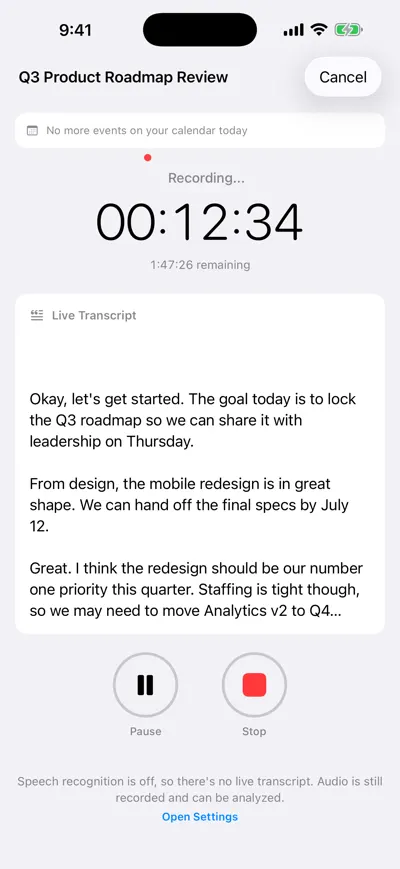
Record the all-hands on a phone
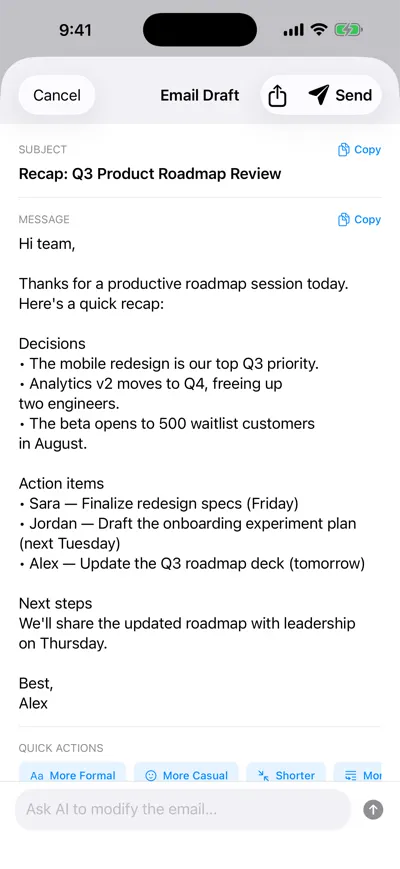
Turn it into a recap draft
All-hands checklist
- One message for the month, written as a sentence.
- Agenda in the calendar invite a week ahead, with the question link.
- Run of show shared with host, producer, moderator and every speaker.
- Tech check with every speaker the day before; backup video for live demos.
- Questions grouped, duplicates merged, top hard question answered first.
- Q&A block protected: cut the deep dive before you cut questions.
- Recording and captions on; attendees told it is recorded.
- Recap posted within 24 hours, with answers to every unanswered question within a week.
For a smaller recurring team meeting, start from the meeting agenda template instead, and for the leadership meeting that prepares the all-hands, a project kickoff template style agenda works well. The meeting recap email guide covers recaps for smaller meetings.
Frequently asked questions
Let AI take the notes for you
AI Note Taker records and transcribes your meetings, then writes the summary, decisions and action items. Free to start, no install needed.